Super Wings Mission Challenge

Super Wings Mission Challenge

Arcade

| TapTapTales

Play on PC with BlueStacks or from our cloud

  • Overview
  • Game Features
  • How to Play

Page Modified On: November 20, 2025

Play Super Wings Mission Challenge on PC or Mac

Super Wings Mission Challenge brings the Arcade genre to life, and throws up exciting challenges for gamers. Developed by TapTapTales, this Android game is best experienced on BlueStacks, the World’s #1 app player for PC and Mac users.

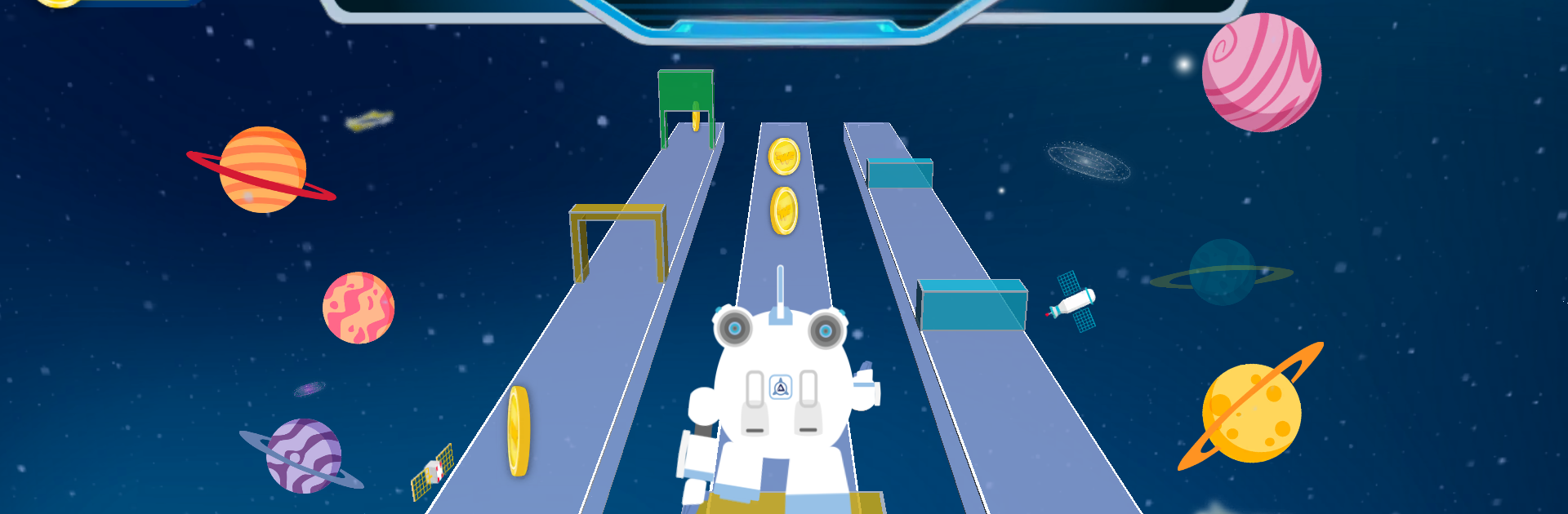
Super Wings Mission Challenge plays like a pack of quick, colorful mini arcades wrapped around simple missions. It puts all the show’s pilots front and center, and each one has a different style of challenge. Jett is a straight shot racer through country roads, scooping power ups and trying to keep a clean line while the pace keeps creeping up. Astra turns it into a space hop, timing jumps between meteors. Paul feels like classic traffic dodging, watching gaps and committing at the right second. Dizzy climbs from rock to rock, very vertical and a bit twitchy. Donnie is a slice-the-blocks game with bombs to avoid. Ellie swings along a vine through narrow cracks, and it is tighter than it first looks. Jerome switches gears with a rhythm routine, hit the beats and keep the combo. Shine runs little path puzzles where cleaning every bit of trash without getting stuck is the trick.

It all feeds into missions, and the curve ramps from easy to busy without being mean. Power balls act like tickets to unlock more levels, power ups, and extra characters, so runs always give something back. Visuals pop with bright 2D backdrops and bold 3D characters, very Saturday morning, and the music stays upbeat. Sessions are short, so it works well for quick breaks or younger players learning the ropes. On PC with BlueStacks, keyboard controls make the racing and traffic stages feel steadier, and the mouse is great for Donnie’s cutting game. There is some repeat across the 100 plus missions, mostly faster speeds and new hazards, but it stays light, friendly, and easy to pick up again.

Start your journey now. Download the game on BlueStacks, invite your friends, and march on a new adventure.


Game Features

Enhancements

  • Macros
  • Multi Instance
  • Multi Instance Sync
  • Script
  • Enhancements
Macros

Macros

Automate the predictable in Super Wings Mission Challenge and transform your gameplay with Macros. Get access to inventive Macros in the BlueStacks Macro Community
Multi Instance

Multi Instance

Play Super Wings Mission Challenge on one window. And chat with your friend on the other. Press CTRL + Shift + 8 to open the Multi-Instance Manager. And start creating fresh instances or clone an existing one.
Multi Instance Sync

Multi Instance Sync

Play Super Wings Mission Challenge with the power of Multi-Instance Sync. Replicate what you are doing on the main instance on all other instances. Level up faster, play more.
Script

Script

Script your way to gaming glory in Super Wings Mission Challenge with BlueStacks Script. Write and run a set of commands to automate repeated tasks. Trigger the command by assigning it to any key.
Read More

How to Download and Play Super Wings Mission Challenge on PC or Mac

  • Download and install BlueStacks on your PC or Mac

  • Complete Google sign-in to access the Play Store, or do it later

  • Look for Super Wings Mission Challenge in the search bar at the top right corner

  • Click to install Super Wings Mission Challenge from the search results

  • Complete Google sign-in (if you skipped step 2) to install Super Wings Mission Challenge

  • Click the Super Wings Mission Challenge icon on the home screen to start playing

video
Watch Video

Minimum System Requirements

With BlueStacks 5, you can get started on a PC that fulfills the following requirements.

  • Operating System

    Microsoft Windows 7 or above, macOS 11 (Big Sur) or above

  • Processor

    Intel, AMD or Apple Silicon Processor

  • RAM

    at least 4GB

  • HDD

    10GB Free Disk Space

Note:

* You must be an Administrator on your PC. Up to date graphics drivers from Microsoft or the chipset vendor.

Super Wings Mission Challenge - FAQs

  • How to play Super Wings Mission Challenge on Windows PC & Mac?

    Play Super Wings Mission Challenge on your PC or Mac by following these simple steps.

    • Click on 'Play Super Wings Mission Challenge on PC’ to download BlueStacks
    • Install it and log-in to Google Play Store
    • Launch and play the game.
  • Why is BlueStacks the fastest and safest platform to play games on PC?

    BlueStacks respects your privacy and is always safe and secure to use. It does not carry any malware, spyware, or any sort of additional software that could harm your PC.

    It is engineered to optimize speed and performance for a seamless gaming experience.

  • What are Super Wings Mission Challenge PC requirements?

    Minimum requirement to run Super Wings Mission Challenge on your PC

    • OS: Microsoft Windows 7 or above MacOS 11 (Big Sur) or above
    • Processor: Intel, AMD or Apple Silicon Processor
    • RAM: Your PC must have at least 4GB of RAM. (Note that having 4GB or more disk space is not a substitute for RAM)
    • HDD: 10GB Free Disk Space.
    • You must be an Administrator on your PC.