Monkey Battle: Swing Shot

Monkey Battle: Swing Shot

Casual

| Com2uS

Play on PC with BlueStacks or from our cloud

  • Overview
  • Game Features
  • How to Play

Page Modified On: May 08, 2026

Play Monkey Battle: Swing Shot on PC or Mac

Bring your A-game to Monkey Battle: Swing Shot, the Casual game sensation from Com2uS. Give your gameplay the much-needed boost with precise game controls, high FPS graphics, and top-tier features on your PC or Mac with BlueStacks.

About the Game

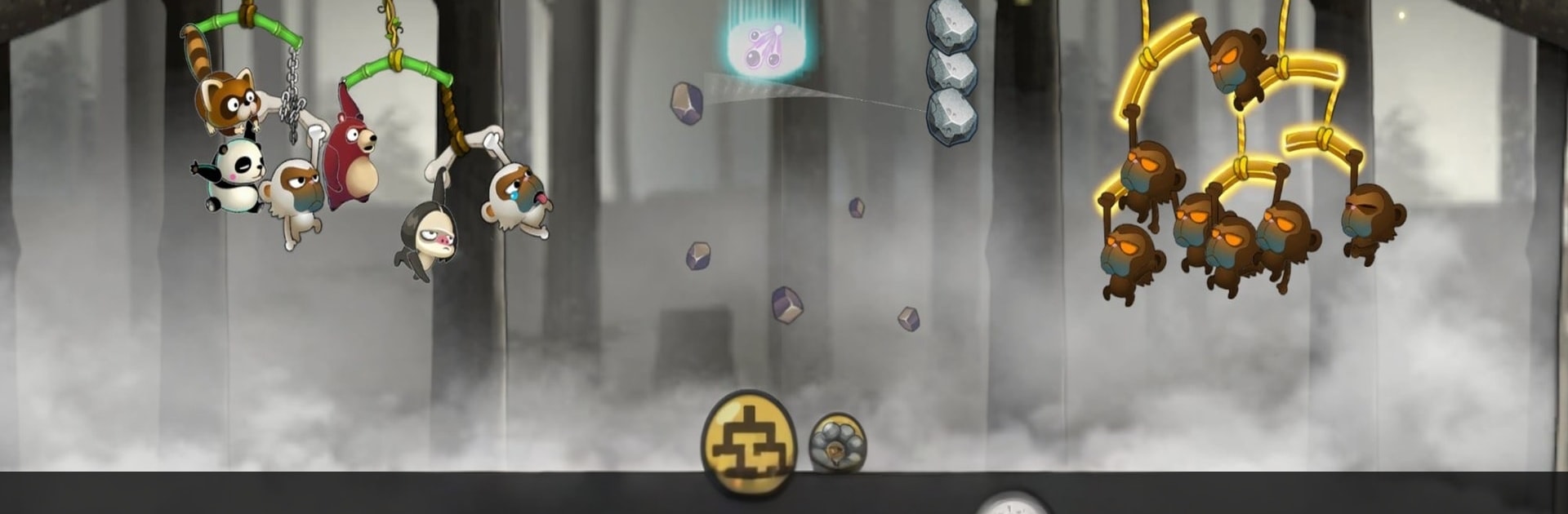
Monkey Battle: Swing Shot is a goofy jungle showdown where physics do the talking. You’ll fling animals from swaying branches, time your release just right, and send rivals tumbling in the funniest ways possible. It’s fast, a little chaotic, and sneakily strategic—the kind of punchy Casual action you can hop into anytime from Com2uS. Prefer a bigger screen and steadier aim? It also plays nicely on BlueStacks.

Game Features

  • Slingshot Physics, No Fuss: Tap, drag, and release to arc perfect shots. Read the swing of both your branch and the enemy’s, then thread the needle for a satisfying hit.
  • Laugh-Out-Loud Impacts: Watch your targets wobble, bounce, and flail with cartoony reactions that make every clean shot feel extra sweet.
  • Build a Wild Squad: Collect a crew with distinct perks—Monkeys, Raccoons, Brown Bears, Sloths, and Pandas included. Mix personalities, discover synergies, and tune your lineup for different matchups.
  • Placement That Matters: Where you perch each animal changes everything. Set up smart angles, protect your heavy hitters, and bait mistakes from the other side.
  • Tougher Branches, Better Defense: Upgrade your perches to stay standing longer. A sturdier setup can turn a risky round into a safe counterattack.
  • Quick to Learn, Deep to Master: Snappy matches and clean controls make it easy to jump in, while clever physics and team-building keep you hooked.

Ready to top the leaderboard? We bet you do. Let precise controls and sharp visuals optimized on BlueStacks lead you to victory.


Game Features

Enhancements

  • Macros
  • Multi Instance
  • Script
  • Repeated Tap
  • Enhancements
Macros

Macros

Automate the predictable in Monkey Battle: Swing Shot and transform your gameplay with Macros. Get access to inventive Macros in the BlueStacks Macro Community
Multi Instance

Multi Instance

Play Monkey Battle: Swing Shot on one window. And chat with your friend on the other. Press CTRL + Shift + 8 to open the Multi-Instance Manager. And start creating fresh instances or clone an existing one.
Script

Script

Script your way to gaming glory in Monkey Battle: Swing Shot with BlueStacks Script. Write and run a set of commands to automate repeated tasks. Trigger the command by assigning it to any key.
Repeated Tap

Repeated Tap

BlueStacks lets you master Monkey Battle: Swing Shot with useful features like the Repeated Tap. Now you do not have to press the same key repeatedly to initiate an action. Just assign it to one key and you are good to go.
Read More

How to Download and Play Monkey Battle: Swing Shot on PC or Mac

  • Download and install BlueStacks on your PC or Mac

  • Complete Google sign-in to access the Play Store, or do it later

  • Look for Monkey Battle: Swing Shot in the search bar at the top right corner

  • Click to install Monkey Battle: Swing Shot from the search results

  • Complete Google sign-in (if you skipped step 2) to install Monkey Battle: Swing Shot

  • Click the Monkey Battle: Swing Shot icon on the home screen to start playing

video
Watch Video

Minimum System Requirements

With BlueStacks 5, you can get started on a PC that fulfills the following requirements.

  • Operating System

    Microsoft Windows 7 or above, macOS 11 (Big Sur) or above

  • Processor

    Intel, AMD or Apple Silicon Processor

  • RAM

    at least 4GB

  • HDD

    10GB Free Disk Space

Note:

* You must be an Administrator on your PC. Up to date graphics drivers from Microsoft or the chipset vendor.

Monkey Battle: Swing Shot - FAQs

  • How to play Monkey Battle: Swing Shot on Windows PC & Mac?

    Play Monkey Battle: Swing Shot on your PC or Mac by following these simple steps.

    • Click on 'Play Monkey Battle: Swing Shot on PC’ to download BlueStacks
    • Install it and log-in to Google Play Store
    • Launch and play the game.
  • Why is BlueStacks the fastest and safest platform to play games on PC?

    BlueStacks respects your privacy and is always safe and secure to use. It does not carry any malware, spyware, or any sort of additional software that could harm your PC.

    It is engineered to optimize speed and performance for a seamless gaming experience.

  • What are Monkey Battle: Swing Shot PC requirements?

    Minimum requirement to run Monkey Battle: Swing Shot on your PC

    • OS: Microsoft Windows 7 or above MacOS 11 (Big Sur) or above
    • Processor: Intel, AMD or Apple Silicon Processor
    • RAM: Your PC must have at least 4GB of RAM. (Note that having 4GB or more disk space is not a substitute for RAM)
    • HDD: 10GB Free Disk Space.
    • You must be an Administrator on your PC.