Hovercraft - Build Fly Retry

Hovercraft - Build Fly Retry

Racing

| High Score Hero LLC

Play on PC with BlueStacks or from our cloud

  • Overview
  • Game Features
  • How to Play

Page Modified On: January 09, 2026

Play Hovercraft - Build Fly Retry on PC or Mac

Step into the World of Hovercraft – Build Fly Retry, a thrilling Racing game from the house of High Score Hero LLC. Play this Android game on BlueStacks App Player and experience immersive gaming on PC or Mac.

About the Game

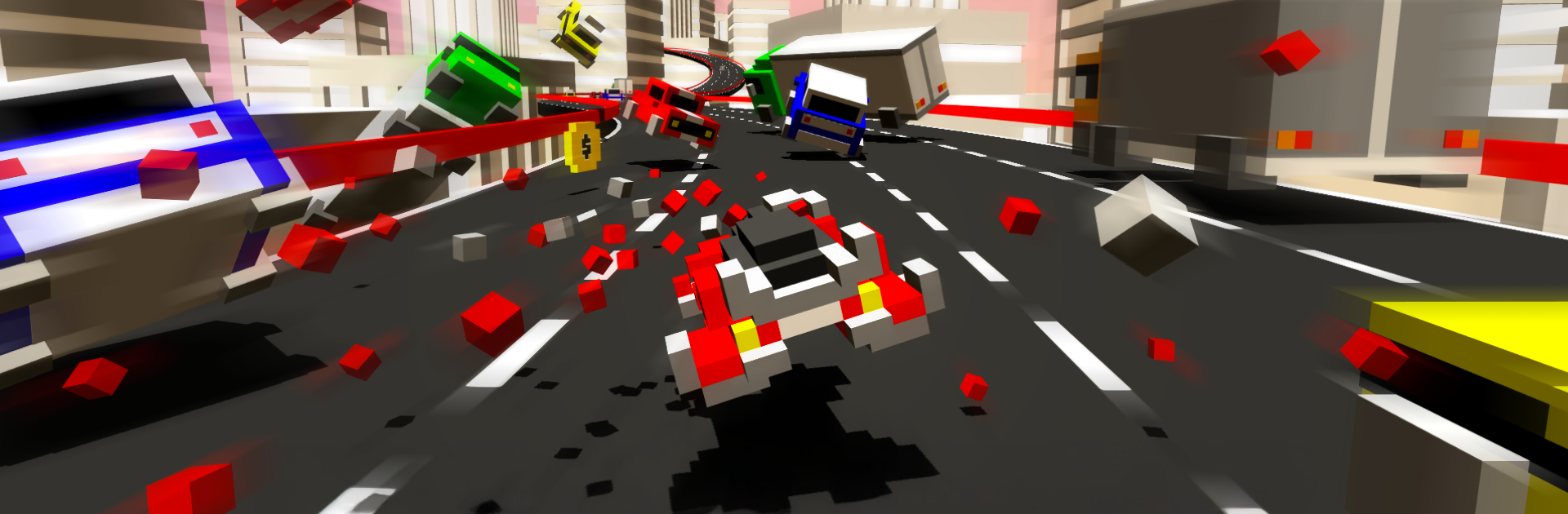
Hovercraft – Build Fly Retry mixes creative building with high-speed chaos in a way that just clicks. Craft your own blocky hover ride, then throw it into traffic high above the city and see how long you can keep it together. It’s a clever blend of sandbox tinkering and pulse-pounding Racing from High Score Hero LLC.

Game Features

  • Build Anything: Snap together a custom hovercraft in a simple 3D editor. Shape it, color it, balance it—if you can imagine it, you can try to fly it. Think it’ll work? Only one way to find out.

  • Physics-Driven Mayhem: Every bump matters. Pieces crack off, debris scatters, and one bad move can trigger ridiculous chain reactions that are equal parts “oops” and “that was awesome.”

  • Fast, Risky Racing: Weave through skyway traffic at absurd speeds. Squeeze through impossible gaps, thread needles, and take smart risks—bold piloting pays out big.

  • Earn and Unlock: Rack up rewards for skillful runs and daring maneuvers. Collect a wide range of ready-made hovercrafts or keep expanding your own fleet from scratch.

  • Simple to Start, Hard to Master: Easy controls get you moving fast, but smart design tweaks and tighter lines separate clean runs from spectacular wipeouts.

  • Special Targets and Sprints: Spot high-value vehicles, nail quick dashes, and chase bonus objectives when they pop up. They’re tempting… and a little dangerous.

  • Looks Great Anywhere: Play on your phone, or fire it up on BlueStacks if you want a bigger view and handy keymapping for tighter control.

Ready to top the leaderboard? We bet you do. Let precise controls and sharp visuals optimized on BlueStacks lead you to victory.


Game Features

Enhancements

  • Macros
  • Multi Instance
  • Multi Instance Sync
  • Script
  • Enhancements
Macros

Macros

Automate the predictable in Hovercraft - Build Fly Retry and transform your gameplay with Macros. Get access to inventive Macros in the BlueStacks Macro Community
Multi Instance

Multi Instance

Play Hovercraft - Build Fly Retry on one window. And chat with your friend on the other. Press CTRL + Shift + 8 to open the Multi-Instance Manager. And start creating fresh instances or clone an existing one.
Multi Instance Sync

Multi Instance Sync

Play Hovercraft - Build Fly Retry with the power of Multi-Instance Sync. Replicate what you are doing on the main instance on all other instances. Level up faster, play more.
Script

Script

Script your way to gaming glory in Hovercraft - Build Fly Retry with BlueStacks Script. Write and run a set of commands to automate repeated tasks. Trigger the command by assigning it to any key.
Read More

How to Download and Play Hovercraft - Build Fly Retry on PC or Mac

  • Download and install BlueStacks on your PC or Mac

  • Complete Google sign-in to access the Play Store, or do it later

  • Look for Hovercraft - Build Fly Retry in the search bar at the top right corner

  • Click to install Hovercraft - Build Fly Retry from the search results

  • Complete Google sign-in (if you skipped step 2) to install Hovercraft - Build Fly Retry

  • Click the Hovercraft - Build Fly Retry icon on the home screen to start playing

video
Watch Video

Minimum System Requirements

With BlueStacks 5, you can get started on a PC that fulfills the following requirements.

  • Operating System

    Microsoft Windows 7 or above, macOS 11 (Big Sur) or above

  • Processor

    Intel, AMD or Apple Silicon Processor

  • RAM

    at least 4GB

  • HDD

    10GB Free Disk Space

Note:

* You must be an Administrator on your PC. Up to date graphics drivers from Microsoft or the chipset vendor.

Hovercraft - Build Fly Retry - FAQs

  • How to play Hovercraft - Build Fly Retry on Windows PC & Mac?

    Play Hovercraft - Build Fly Retry on your PC or Mac by following these simple steps.

    • Click on 'Play Hovercraft - Build Fly Retry on PC’ to download BlueStacks
    • Install it and log-in to Google Play Store
    • Launch and play the game.
  • Why is BlueStacks the fastest and safest platform to play games on PC?

    BlueStacks respects your privacy and is always safe and secure to use. It does not carry any malware, spyware, or any sort of additional software that could harm your PC.

    It is engineered to optimize speed and performance for a seamless gaming experience.

  • What are Hovercraft - Build Fly Retry PC requirements?

    Minimum requirement to run Hovercraft - Build Fly Retry on your PC

    • OS: Microsoft Windows 7 or above MacOS 11 (Big Sur) or above
    • Processor: Intel, AMD or Apple Silicon Processor
    • RAM: Your PC must have at least 4GB of RAM. (Note that having 4GB or more disk space is not a substitute for RAM)
    • HDD: 10GB Free Disk Space.
    • You must be an Administrator on your PC.