Stunt Car Ramp Driving Game 3D

Stunt Car Ramp Driving Game 3D

Racing

| Play Shift Games

Play on PC with BlueStacks or from our cloud

  • Overview
  • Game Features
  • How to Play

Page Modified On: April 07, 2026

Play Stunt Car Ramp Driving Game 3D on PC or Mac

Explore a whole new adventure with Stunt Car Ramp Driving Game 3D, a Racing game created by Play Shift Games. Experience great gameplay with BlueStacks, the most popular gaming platform to play Android games on your PC or Mac.

About the Game

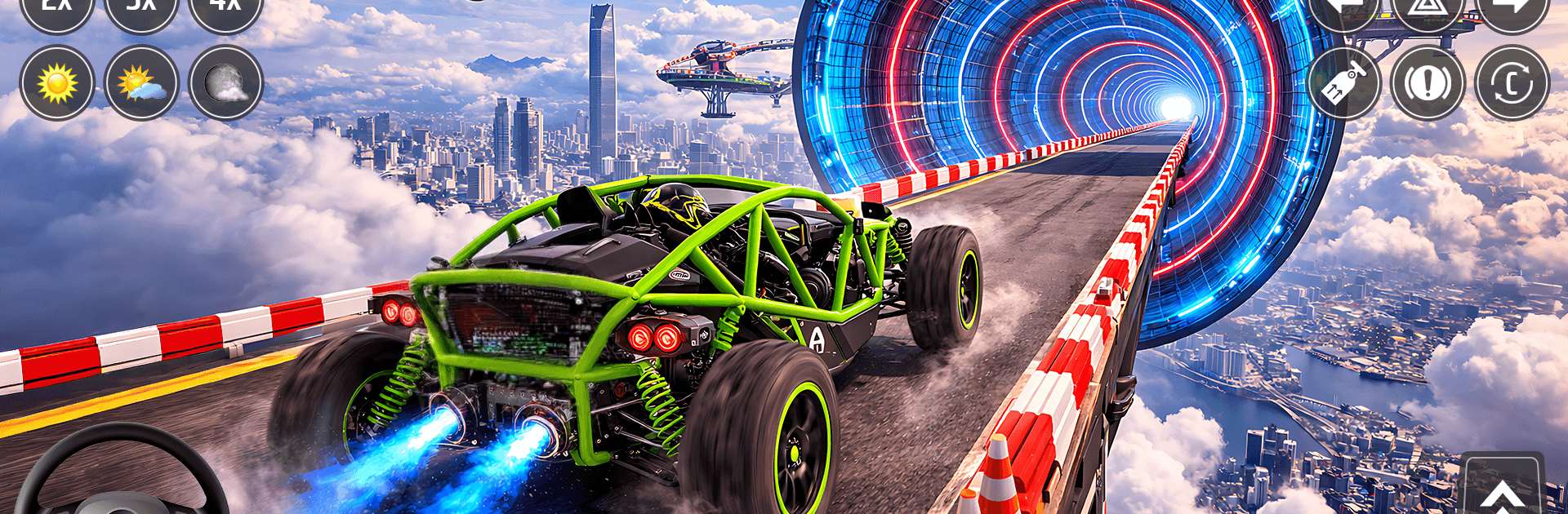
Stunt Car Ramp Driving Game 3D throws you straight into high-flying, nerve-testing runs where precision matters as much as speed. Built by Play Shift Games, it blends massive ramps, tricky layouts, and tight car handling to make every jump feel earned. It’s a bold, skill-first take on Racing—quick to pick up, tough to master, and super satisfying when you stick the landing.

Game Features

  • Big Ramps, Bigger Air: Launch off towering ramps, clear gaps, and thread the needle through wild track setups designed to test your nerve.
  • Realistic Driving Physics: Feel the weight shift as you brake, steer, and land. Momentum, grip, and timing all matter if you want clean runs.
  • Stunt Missions with Bite: Tackle focused objectives—hit checkpoints, stick specific tricks, and finish within time limits to prove you’ve got control.
  • Clean, Snappy Controls: Choose the input style that fits you and fine-tune sensitivity so drifts, corrections, and last-second saves feel natural.
  • Multiple Camera Angles: Switch views on the fly to plan a line, read a landing, or soak in the height before you drop.
  • Cars to Master: Each vehicle handles differently. Learn their quirks, pick your favorite, and push it harder on every attempt.
  • Learn, Retry, Improve: Instant restarts keep the pace quick, making it easy to practice a section until it clicks.
  • Crisp Feedback: Visual cues and punchy effects help you read speed, angle, and impact so you can adjust mid-run.
  • Scalable Challenge: Early tracks build confidence; later ramps demand perfect throttle control and precise aerial adjustments.
  • Play on PC with BlueStacks: Prefer a bigger screen and keyboard controls? BlueStacks makes it easy to take those stunts to your desktop.

Get ready for a buttery smooth, high-performance gaming action only on BlueStacks.

Game Features

Enhancements

  • Macros
  • Multi Instance
  • Multi Instance Sync
  • Script
  • Enhancements
Macros

Macros

Automate the predictable in Stunt Car Ramp Driving Game 3D and transform your gameplay with Macros. Get access to inventive Macros in the BlueStacks Macro Community
Multi Instance

Multi Instance

Play Stunt Car Ramp Driving Game 3D on one window. And chat with your friend on the other. Press CTRL + Shift + 8 to open the Multi-Instance Manager. And start creating fresh instances or clone an existing one.
Multi Instance Sync

Multi Instance Sync

Play Stunt Car Ramp Driving Game 3D with the power of Multi-Instance Sync. Replicate what you are doing on the main instance on all other instances. Level up faster, play more.
Script

Script

Script your way to gaming glory in Stunt Car Ramp Driving Game 3D with BlueStacks Script. Write and run a set of commands to automate repeated tasks. Trigger the command by assigning it to any key.
Read More

How to Download and Play Stunt Car Ramp Driving Game 3D on PC or Mac

  • Download and install BlueStacks on your PC or Mac

  • Complete Google sign-in to access the Play Store, or do it later

  • Look for Stunt Car Ramp Driving Game 3D in the search bar at the top right corner

  • Click to install Stunt Car Ramp Driving Game 3D from the search results

  • Complete Google sign-in (if you skipped step 2) to install Stunt Car Ramp Driving Game 3D

  • Click the Stunt Car Ramp Driving Game 3D icon on the home screen to start playing

video
Watch Video

Minimum System Requirements

With BlueStacks 5, you can get started on a PC that fulfills the following requirements.

  • Operating System

    Microsoft Windows 7 or above, macOS 11 (Big Sur) or above

  • Processor

    Intel, AMD or Apple Silicon Processor

  • RAM

    at least 4GB

  • HDD

    10GB Free Disk Space

Note:

* You must be an Administrator on your PC. Up to date graphics drivers from Microsoft or the chipset vendor.

Stunt Car Ramp Driving Game 3D - FAQs

  • How to play Stunt Car Ramp Driving Game 3D on Windows PC & Mac?

    Play Stunt Car Ramp Driving Game 3D on your PC or Mac by following these simple steps.

    • Click on 'Play Stunt Car Ramp Driving Game 3D on PC’ to download BlueStacks
    • Install it and log-in to Google Play Store
    • Launch and play the game.
  • Why is BlueStacks the fastest and safest platform to play games on PC?

    BlueStacks respects your privacy and is always safe and secure to use. It does not carry any malware, spyware, or any sort of additional software that could harm your PC.

    It is engineered to optimize speed and performance for a seamless gaming experience.

  • What are Stunt Car Ramp Driving Game 3D PC requirements?

    Minimum requirement to run Stunt Car Ramp Driving Game 3D on your PC

    • OS: Microsoft Windows 7 or above MacOS 11 (Big Sur) or above
    • Processor: Intel, AMD or Apple Silicon Processor
    • RAM: Your PC must have at least 4GB of RAM. (Note that having 4GB or more disk space is not a substitute for RAM)
    • HDD: 10GB Free Disk Space.
    • You must be an Administrator on your PC.