Fashion Makeover Wedding Games

Fashion Makeover Wedding Games

Role Playing

| Play Wizard

Play on PC with BlueStacks or from our cloud

  • Overview
  • Game Features
  • How to Play

Page Modified On: May 11, 2026

Play Fashion Makeover Wedding Games on PC or Mac

Join millions to experience Fashion Makeover Wedding Games, an exciting Role Playing game from Play Wizard. With BlueStacks App Player, you are always a step ahead of your opponent, ready to outplay them with faster gameplay and better control with the mouse and keyboard on your PC or Mac.

About the Game

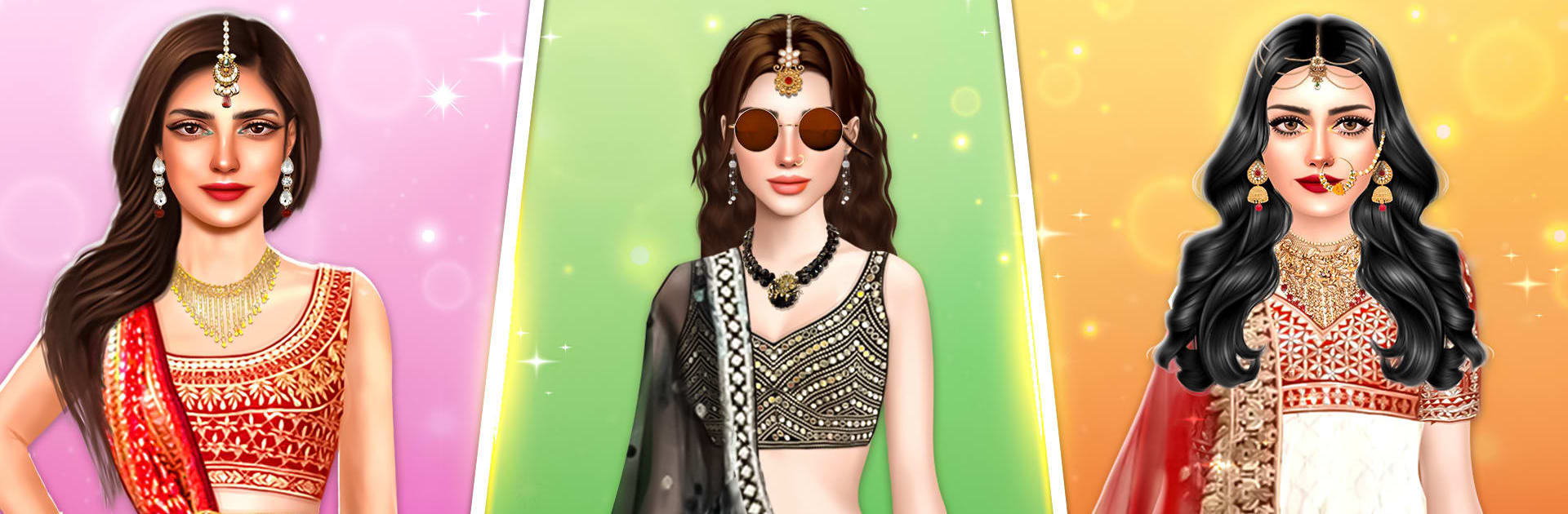
Fashion Makeover Wedding Games is a Role Playing beauty sandbox from Play Wizard where you design dream wedding looks for brides from around the world. One day you’re sketching mehndi and layering jewels; the next you’re pairing a sleek white gown with a cathedral veil or building a vibrant, festival-ready palette. Prefer a bigger screen for all that detail? It also plays nicely on PC with BlueStacks.

Game Features

  • Global Bridal Styling: Create looks inspired by Indian ceremonies, classic Western weddings, and lively South American celebrations, matching traditions with your personal flair.
  • Over 100 Gowns: Browse more than 100 bridal dresses—ball gowns, mermaid cuts, minimalist sheaths—and finish the look with veils, clutches, and the perfect heels.
  • Full Glam Toolkit: Go beyond dresses with rich makeup kits, hairstyles, jewelry, and mehndi options. Eyes, lips, cheeks, nails—tune every detail.
  • Rewards That Unlock More: Win style-offs and earn goodies to open new accessories, makeup choices, and outfits as your portfolio grows.
  • Bridal Challenges Mode: Test your taste in themed challenges that nudge you to think about setting, culture, and season while keeping everything picture-perfect.
  • Bride and Squad: Style the bride and her bridesmaids so the whole party looks coordinated without feeling matchy-matchy.
  • Helpful Styling Cues: Not sure what works for a sunset ceremony or a traditional ritual? Subtle in-game hints help you pick the right pieces at the right moment.
  • Relaxing, Creative Play: No pressure—just a satisfying loop of trying ideas, swapping pieces, and watching a look come together.
  • Seasonal Events: Keep an eye out for limited-time moments like a Black Friday sale to snag standout items for your collection.
  • Bold, Colorful Visuals: Crisp, eye-catching graphics make fabrics, textures, and makeup shades pop while you fine-tune your final look.

Slay your opponents with your epic moves. Play it your way on BlueStacks and dominate the battlefield.


Game Features

Enhancements

  • Macros
  • Rerolling
  • Eco Mode
  • Multi Instance Sync
  • Enhancements
Macros

Macros

Focus more on the fun part of the game, skip the tedious aspects. Master Fashion Makeover Wedding Games with Macros. Record yourself completing the monotonous tasks you wish to automate and replay them later with just one keypress.
Rerolling

Rerolling

Speed up the rerolling process in Fashion Makeover Wedding Games. Perform multiple summons and keep looking for the best Heroes. Use Multi-Instance sync to replicate the rerolling mechanism in all instances.
Eco Mode

Eco Mode

Farm in-game resources with ease in Fashion Makeover Wedding Games. Enable the Eco Mode when running the game in multiple instances. And lower your PC's resource consumption.
Multi Instance Sync

Multi Instance Sync

With the Multi-instance Sync, you can do even more in Fashion Makeover Wedding Games. Sync the action of the main instance and repeat them in real time for all other instances. Sync and sit back, let the game progress unfold.
Read More

How to Download and Play Fashion Makeover Wedding Games on PC or Mac

  • Download and install BlueStacks on your PC or Mac

  • Complete Google sign-in to access the Play Store, or do it later

  • Look for Fashion Makeover Wedding Games in the search bar at the top right corner

  • Click to install Fashion Makeover Wedding Games from the search results

  • Complete Google sign-in (if you skipped step 2) to install Fashion Makeover Wedding Games

  • Click the Fashion Makeover Wedding Games icon on the home screen to start playing

video
Watch Video

Minimum System Requirements

With BlueStacks 5, you can get started on a PC that fulfills the following requirements.

  • Operating System

    Microsoft Windows 7 or above, macOS 11 (Big Sur) or above

  • Processor

    Intel, AMD or Apple Silicon Processor

  • RAM

    at least 4GB

  • HDD

    10GB Free Disk Space

Note:

* You must be an Administrator on your PC. Up to date graphics drivers from Microsoft or the chipset vendor.

Fashion Makeover Wedding Games - FAQs

  • How to play Fashion Makeover Wedding Games on Windows PC & Mac?

    Play Fashion Makeover Wedding Games on your PC or Mac by following these simple steps.

    • Click on 'Play Fashion Makeover Wedding Games on PC’ to download BlueStacks
    • Install it and log-in to Google Play Store
    • Launch and play the game.
  • Why is BlueStacks the fastest and safest platform to play games on PC?

    BlueStacks respects your privacy and is always safe and secure to use. It does not carry any malware, spyware, or any sort of additional software that could harm your PC.

    It is engineered to optimize speed and performance for a seamless gaming experience.

  • What are Fashion Makeover Wedding Games PC requirements?

    Minimum requirement to run Fashion Makeover Wedding Games on your PC

    • OS: Microsoft Windows 7 or above MacOS 11 (Big Sur) or above
    • Processor: Intel, AMD or Apple Silicon Processor
    • RAM: Your PC must have at least 4GB of RAM. (Note that having 4GB or more disk space is not a substitute for RAM)
    • HDD: 10GB Free Disk Space.
    • You must be an Administrator on your PC.