Offroad Jeep Driving : 4X4 Sim

Offroad Jeep Driving : 4X4 Sim

Role Playing

| Forbidden Games

Play on PC with BlueStacks or from our cloud

  • Overview
  • Game Features
  • How to Play

Page Modified On: November 20, 2025

Play Offroad Jeep Driving : 4X4 Sim on PC or Mac

Offroad Jeep Driving : 4X4 Sim brings the Role Playing genre to life, and throws up exciting challenges for gamers. Developed by Forbidden Games, this Android game is best experienced on BlueStacks, the World’s #1 app player for PC and Mac users.

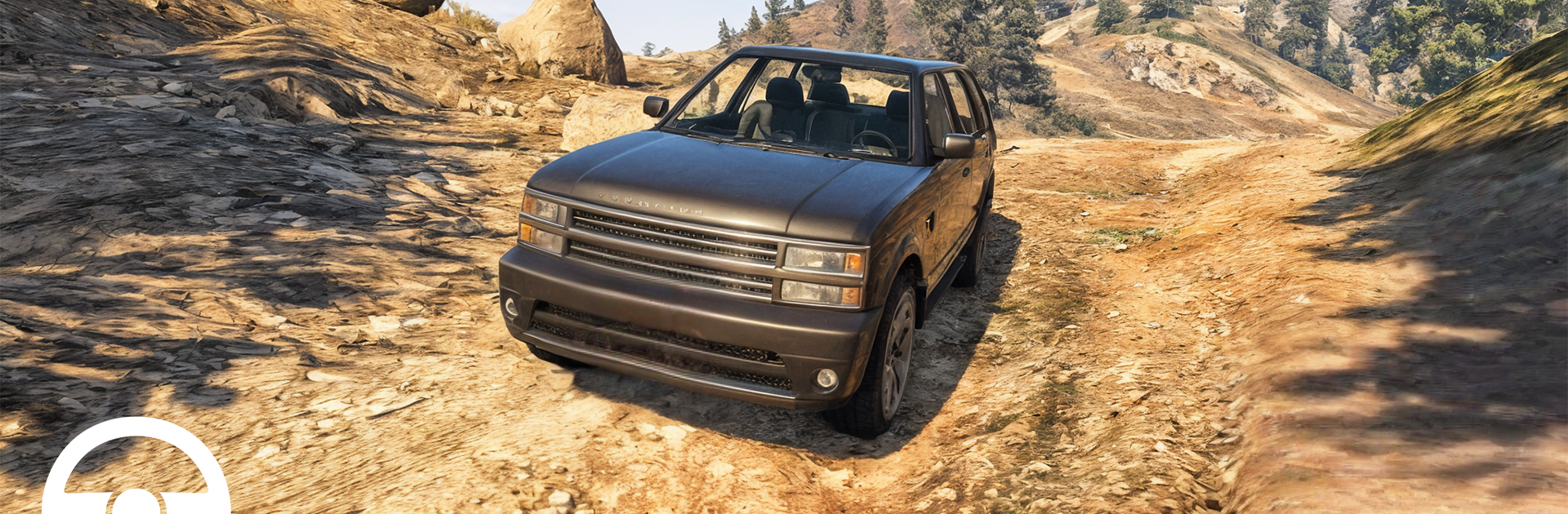
Offroad Jeep Driving: 4X4 Sim is all about wrestling big SUVs through rough terrain and seeing what survives. It leans hard into the Mahindra Thar fantasy, with plenty of Indian favorites like Scorpio, Bolero, and some Prado and Wrangler style options too. The game splits into lots of bite-sized modes, so one run might be a slow crawl up a rocky hill, the next is a parking test with tight cones, then a sandy desert route where the jeep floats and digs at the same time. There is racing, relay stages, city drifting, truck cargo hauls, and those classic time trials that ask for clean lines and zero rollovers. On PC with BlueStacks, the steering feels steadier on keys, camera control is easier, and the frame pacing is smoother than on a phone, which helps when a slope is nasty and every bump matters.

Physics sit in that fun arcade-real zone. Weight shifts, tires slip, and a bad throttle jab will slide the nose off a boulder. Slow and careful wins the hill-climb stuff, momentum and good timing win the dunes, and parking trials punish sloppy angles. Vehicles can be customized with paint and upgrades, so the favorite ride can slowly turn into a capable beast instead of just a shiny one. Visuals are clean and bright, not flashy, with chunky tracks and clear checkpoints that make routes easy to read. Anyone who likes offroad challenges, precision parking, and a little stunt play on the side will find a lot to mess with here, especially if patience and throttle control are part of the fun.

Slay your opponents with your epic moves. Play it your way on BlueStacks and dominate the battlefield.


Game Features

Enhancements

  • Macros
  • Rerolling
  • Eco Mode
  • Multi Instance Sync
  • Enhancements
Macros

Macros

Focus more on the fun part of the game, skip the tedious aspects. Master Offroad Jeep Driving : 4X4 Sim with Macros. Record yourself completing the monotonous tasks you wish to automate and replay them later with just one keypress.
Rerolling

Rerolling

Speed up the rerolling process in Offroad Jeep Driving : 4X4 Sim. Perform multiple summons and keep looking for the best Heroes. Use Multi-Instance sync to replicate the rerolling mechanism in all instances.
Eco Mode

Eco Mode

Farm in-game resources with ease in Offroad Jeep Driving : 4X4 Sim. Enable the Eco Mode when running the game in multiple instances. And lower your PC's resource consumption.
Multi Instance Sync

Multi Instance Sync

With the Multi-instance Sync, you can do even more in Offroad Jeep Driving : 4X4 Sim. Sync the action of the main instance and repeat them in real time for all other instances. Sync and sit back, let the game progress unfold.
Read More

How to Download and Play Offroad Jeep Driving : 4X4 Sim on PC or Mac

  • Download and install BlueStacks on your PC or Mac

  • Complete Google sign-in to access the Play Store, or do it later

  • Look for Offroad Jeep Driving : 4X4 Sim in the search bar at the top right corner

  • Click to install Offroad Jeep Driving : 4X4 Sim from the search results

  • Complete Google sign-in (if you skipped step 2) to install Offroad Jeep Driving : 4X4 Sim

  • Click the Offroad Jeep Driving : 4X4 Sim icon on the home screen to start playing

video
Watch Video

Minimum System Requirements

With BlueStacks 5, you can get started on a PC that fulfills the following requirements.

  • Operating System

    Microsoft Windows 7 or above, macOS 11 (Big Sur) or above

  • Processor

    Intel, AMD or Apple Silicon Processor

  • RAM

    at least 4GB

  • HDD

    10GB Free Disk Space

Note:

* You must be an Administrator on your PC. Up to date graphics drivers from Microsoft or the chipset vendor.

Offroad Jeep Driving : 4X4 Sim - FAQs

  • How to play Offroad Jeep Driving : 4X4 Sim on Windows PC & Mac?

    Play Offroad Jeep Driving : 4X4 Sim on your PC or Mac by following these simple steps.

    • Click on 'Play Offroad Jeep Driving : 4X4 Sim on PC’ to download BlueStacks
    • Install it and log-in to Google Play Store
    • Launch and play the game.
  • Why is BlueStacks the fastest and safest platform to play games on PC?

    BlueStacks respects your privacy and is always safe and secure to use. It does not carry any malware, spyware, or any sort of additional software that could harm your PC.

    It is engineered to optimize speed and performance for a seamless gaming experience.

  • What are Offroad Jeep Driving : 4X4 Sim PC requirements?

    Minimum requirement to run Offroad Jeep Driving : 4X4 Sim on your PC

    • OS: Microsoft Windows 7 or above MacOS 11 (Big Sur) or above
    • Processor: Intel, AMD or Apple Silicon Processor
    • RAM: Your PC must have at least 4GB of RAM. (Note that having 4GB or more disk space is not a substitute for RAM)
    • HDD: 10GB Free Disk Space.
    • You must be an Administrator on your PC.