WWE Generations: Eras Collide

WWE Generations: Eras Collide

Role Playing

| Scopely

Play on PC with BlueStacks or from our cloud

  • Overview
  • Game Features
  • How to Play

Page Modified On: July 06, 2026

Play WWE Generations: Eras Collide on PC or Mac

Step into the World of WWE Generations: Eras Collide, a thrilling Role Playing game from the house of Scopely. Play this Android game on BlueStacks App Player and experience immersive gaming on PC or Mac.

About the Game

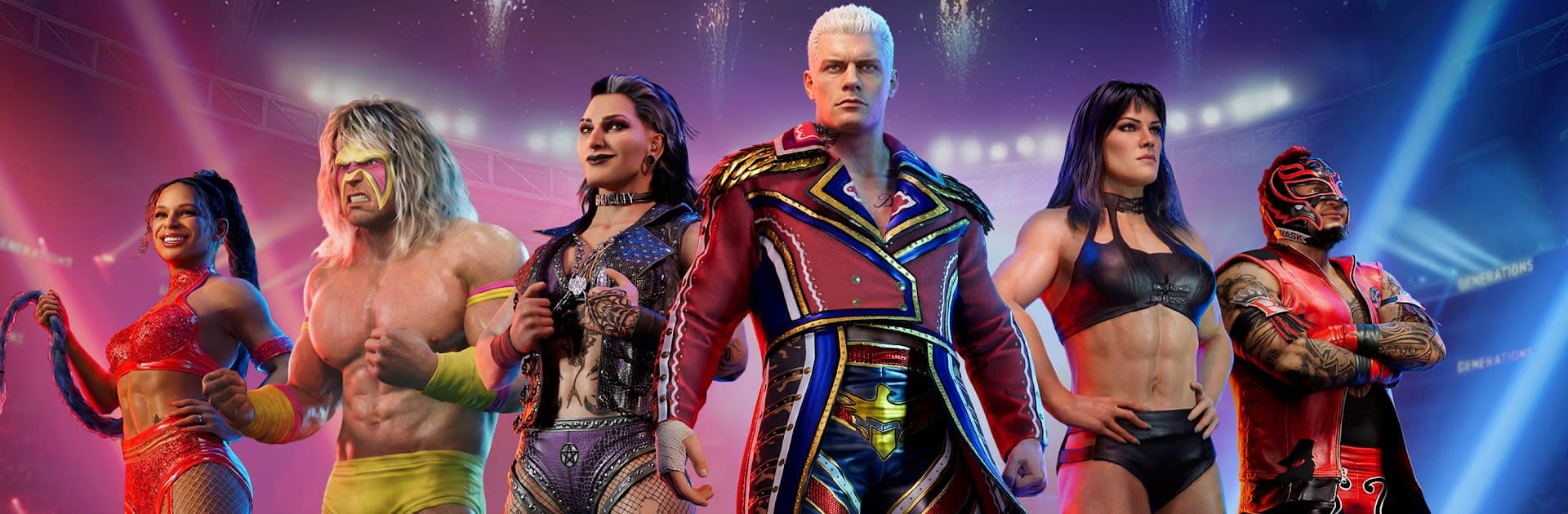
WWE Generations: Eras Collide is a Role Playing take on sports entertainment where past, present, and future share the same ring. You’ll draft a squad of Superstars from different eras and run 3v3, turn-based battles that reward smart picks, clever timing, and ruthless synergy. It’s part collection game, part strategy board—wrapped in that big-match WWE presentation fans know by heart.

Game Features

  • 3v3 Turn-Based Brawls: Pick your moves, plan around cooldowns, and line up tag-ins and finishers. Every choice can swing the match.
  • Legends Across Eras: Build a roster spanning the Golden, Attitude, and modern eras—icons and rising stars side by side, all ready to scrap.
  • Dream-Team Chemistry: Mix factions, styles, and timelines to unlock unique bonuses. Create wild pairings you’ve never seen on TV and make them work.
  • Deep RPG Strategy: Hundreds of abilities, traits, and team tags let you craft roles—tanks that soak damage, glass-cannon strikers, slick support characters that flip the script.
  • Authentic WWE Presentation: Throw down on RAW, SmackDown, and WrestleMania stages with entrances, finishers, crowd reactions, and ringside commentary that sells every near fall.
  • Progression With Purpose: Level, rank, and specialize your Superstars. Equip signature-style gear to tweak stats and unlock new tricks that fit your lineup.
  • Competitive PvP: Test your best trio against real players, study counters, and climb through the ranks with smarter comps, not just bigger numbers.
  • Smart Controls Anywhere: Built for quick sessions on mobile and smooth on PC with BlueStacks if you’d rather manage your roster and battles on a bigger screen.

Ready to top the leaderboard? We bet you do. Let precise controls and sharp visuals optimized on BlueStacks lead you to victory.


Game Features

Enhancements

  • Macros
  • Rerolling
  • Eco Mode
  • Multi Instance Sync
  • Enhancements
Macros

Macros

Focus more on the fun part of the game, skip the tedious aspects. Master WWE Generations: Eras Collide with Macros. Record yourself completing the monotonous tasks you wish to automate and replay them later with just one keypress.
Rerolling

Rerolling

Speed up the rerolling process in WWE Generations: Eras Collide. Perform multiple summons and keep looking for the best Heroes. Use Multi-Instance sync to replicate the rerolling mechanism in all instances.
Eco Mode

Eco Mode

Farm in-game resources with ease in WWE Generations: Eras Collide. Enable the Eco Mode when running the game in multiple instances. And lower your PC's resource consumption.
Multi Instance Sync

Multi Instance Sync

With the Multi-instance Sync, you can do even more in WWE Generations: Eras Collide. Sync the action of the main instance and repeat them in real time for all other instances. Sync and sit back, let the game progress unfold.
Read More

How to Download and Play WWE Generations: Eras Collide on PC or Mac

  • Download and install BlueStacks on your PC or Mac

  • Complete Google sign-in to access the Play Store, or do it later

  • Look for WWE Generations: Eras Collide in the search bar at the top right corner

  • Click to install WWE Generations: Eras Collide from the search results

  • Complete Google sign-in (if you skipped step 2) to install WWE Generations: Eras Collide

  • Click the WWE Generations: Eras Collide icon on the home screen to start playing

video
Watch Video

Minimum System Requirements

With BlueStacks 5, you can get started on a PC that fulfills the following requirements.

  • Operating System

    Microsoft Windows 7 or above, macOS 11 (Big Sur) or above

  • Processor

    Intel, AMD or Apple Silicon Processor

  • RAM

    at least 4GB

  • HDD

    10GB Free Disk Space

Note:

* You must be an Administrator on your PC. Up to date graphics drivers from Microsoft or the chipset vendor.

WWE Generations: Eras Collide - FAQs

  • How to play WWE Generations: Eras Collide on Windows PC & Mac?

    Play WWE Generations: Eras Collide on your PC or Mac by following these simple steps.

    • Click on 'Play WWE Generations: Eras Collide on PC’ to download BlueStacks
    • Install it and log-in to Google Play Store
    • Launch and play the game.
  • Why is BlueStacks the fastest and safest platform to play games on PC?

    BlueStacks respects your privacy and is always safe and secure to use. It does not carry any malware, spyware, or any sort of additional software that could harm your PC.

    It is engineered to optimize speed and performance for a seamless gaming experience.

  • What are WWE Generations: Eras Collide PC requirements?

    Minimum requirement to run WWE Generations: Eras Collide on your PC

    • OS: Microsoft Windows 7 or above MacOS 11 (Big Sur) or above
    • Processor: Intel, AMD or Apple Silicon Processor
    • RAM: Your PC must have at least 4GB of RAM. (Note that having 4GB or more disk space is not a substitute for RAM)
    • HDD: 10GB Free Disk Space.
    • You must be an Administrator on your PC.