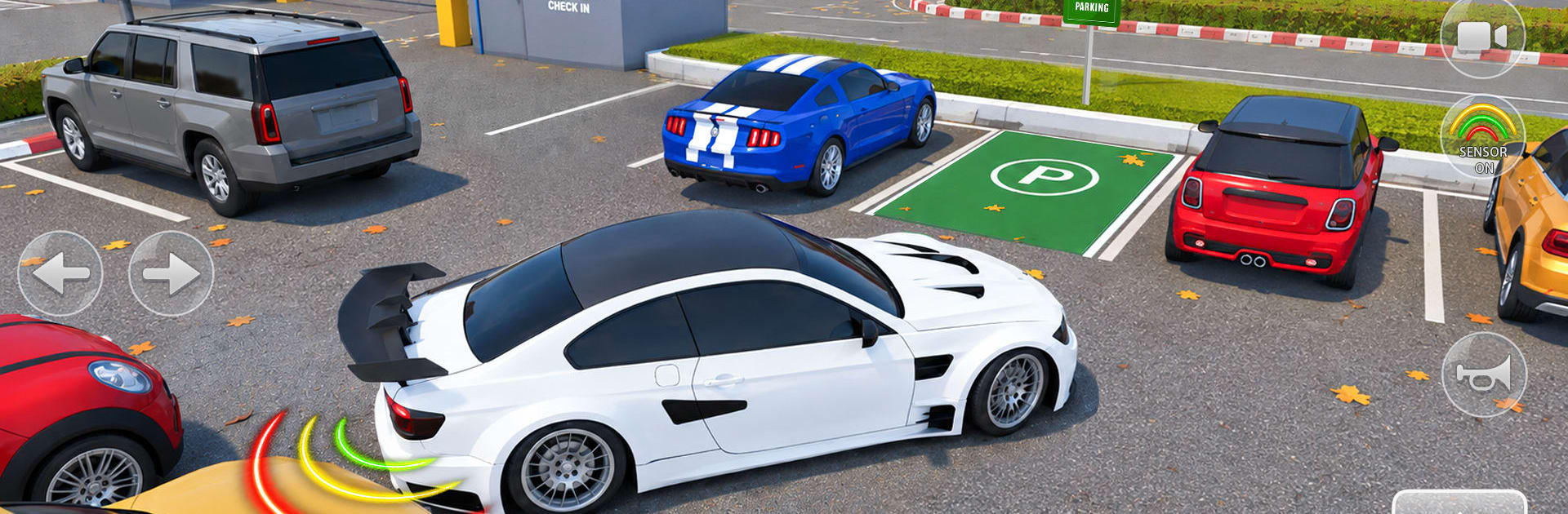
Driving Pro: Car Parking Game

Driving Pro: Car Parking Game

Simulation

| Funverse IEG

Play on PC with BlueStacks or from our cloud

  • Overview
  • Game Features
  • How to Play

Page Modified On: October 30, 2026

Play Driving Pro: Car Parking Game on PC or Mac

Explore a whole new adventure with Driving Pro: Car Parking Game, a Simulation game created by Funverse IEG. Experience great gameplay with BlueStacks, the most popular gaming platform to play Android games on your PC or Mac.

About the Game

Driving Pro: Car Parking Game is a Simulation that’s all about clean driving, tight parking, and staying cool when the weather turns messy. You’ll start with simple objectives, then move into tougher situations where rain, fog, and nighttime make every decision matter. With tons of levels, an Open World to relax in, and more than 40 cars to try, it’s a solid space to build real road awareness—without the repair bills.

Game Features

  • 360 challenges plus free roam: Work through six themed sets of 60 levels each, then unwind in Open World with no timers or objectives.
  • Step-by-step license prep: Tackle guided, license-style tests that build confidence with steering, braking, and gear changes.
  • Parking that tests patience: Slide into tight spots with sensor assistance and responsive control over speed and angle.
  • Car control under pressure: Practice quick stops, smooth turns, and precise gear handling when the course turns demanding.
  • Streets with real rules: Read signs, follow signals, and make smart calls at intersections while staying aware of traffic flow.
  • Weather that changes your plan: Rain blurs the view (use those wipers), fog shrinks sightlines, and slick conditions reward slower, steadier inputs.
  • Night driving done right: Rely on headlights and careful pacing when visibility drops after dark.
  • 40+ cars, your control style: Swap between different vehicles and choose the control layout that feels most natural for you.
  • Progress that rewards skill: Earn XP, unlock new modes, and revisit earlier runs to sharpen your technique.
  • Sounds and details that sell the drive: Clean engine audio, tidy interiors, and a satisfying victory camera after each success.
  • Play offline, anywhere: No connection needed—and it also feels great on BlueStacks if you prefer a bigger view.

Ready to top the leaderboard? We bet you do. Let precise controls and sharp visuals optimized on BlueStacks lead you to victory.


Game Features

Enhancements

  • Macros
  • Multi Instance
  • Multi Instance Sync
  • Script
  • Enhancements
Macros

Macros

Automate the predictable in Driving Pro: Car Parking Game and transform your gameplay with Macros. Get access to inventive Macros in the BlueStacks Macro Community
Multi Instance

Multi Instance

Play Driving Pro: Car Parking Game on one window. And chat with your friend on the other. Press CTRL + Shift + 8 to open the Multi-Instance Manager. And start creating fresh instances or clone an existing one.
Multi Instance Sync

Multi Instance Sync

Play Driving Pro: Car Parking Game with the power of Multi-Instance Sync. Replicate what you are doing on the main instance on all other instances. Level up faster, play more.
Script

Script

Script your way to gaming glory in Driving Pro: Car Parking Game with BlueStacks Script. Write and run a set of commands to automate repeated tasks. Trigger the command by assigning it to any key.
Read More

How to Download and Play Driving Pro: Car Parking Game on PC or Mac

  • Download and install BlueStacks on your PC or Mac

  • Complete Google sign-in to access the Play Store, or do it later

  • Look for Driving Pro: Car Parking Game in the search bar at the top right corner

  • Click to install Driving Pro: Car Parking Game from the search results

  • Complete Google sign-in (if you skipped step 2) to install Driving Pro: Car Parking Game

  • Click the Driving Pro: Car Parking Game icon on the home screen to start playing

video
Watch Video

Minimum System Requirements

With BlueStacks 5, you can get started on a PC that fulfills the following requirements.

  • Operating System

    Microsoft Windows 7 or above, macOS 11 (Big Sur) or above

  • Processor

    Intel, AMD or Apple Silicon Processor

  • RAM

    at least 4GB

  • HDD

    10GB Free Disk Space

Note:

* You must be an Administrator on your PC. Up to date graphics drivers from Microsoft or the chipset vendor.

Driving Pro: Car Parking Game - FAQs

  • How to play Driving Pro: Car Parking Game on Windows PC & Mac?

    Play Driving Pro: Car Parking Game on your PC or Mac by following these simple steps.

    • Click on 'Play Driving Pro: Car Parking Game on PC’ to download BlueStacks
    • Install it and log-in to Google Play Store
    • Launch and play the game.
  • Why is BlueStacks the fastest and safest platform to play games on PC?

    BlueStacks respects your privacy and is always safe and secure to use. It does not carry any malware, spyware, or any sort of additional software that could harm your PC.

    It is engineered to optimize speed and performance for a seamless gaming experience.

  • What are Driving Pro: Car Parking Game PC requirements?

    Minimum requirement to run Driving Pro: Car Parking Game on your PC

    • OS: Microsoft Windows 7 or above MacOS 11 (Big Sur) or above
    • Processor: Intel, AMD or Apple Silicon Processor
    • RAM: Your PC must have at least 4GB of RAM. (Note that having 4GB or more disk space is not a substitute for RAM)
    • HDD: 10GB Free Disk Space.
    • You must be an Administrator on your PC.