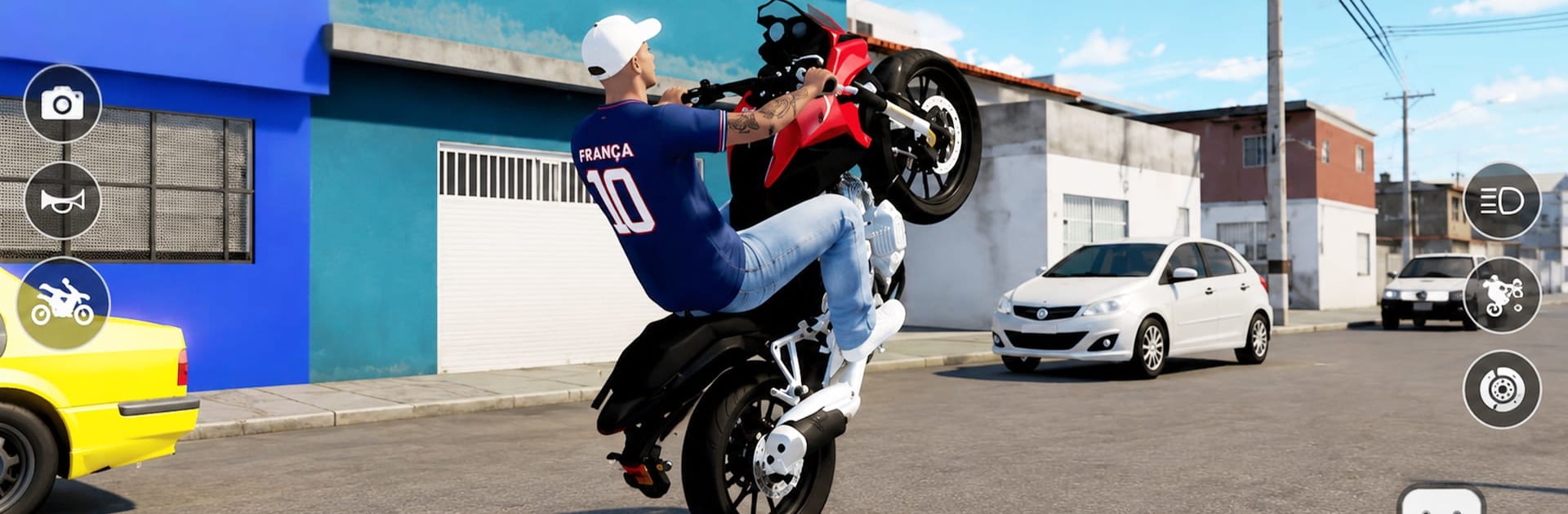
Moto Bike Sim Wheelie Game

Moto Bike Sim Wheelie Game

Simulation

| Apex Bound Studio Private Limited

Play on PC with BlueStacks or from our cloud

  • Overview
  • Game Features
  • How to Play

Page Modified On: October 30, 2026

Play Moto Bike Sim Wheelie Game on PC or Mac

Explore a whole new adventure with Moto Bike Sim Wheelie Game, a Simulation game created by Apex Bound Studio Private Limited. Experience great gameplay with BlueStacks, the most popular gaming platform to play Android games on your PC or Mac.

About the Game

Moto Bike Sim Wheelie Game hands you a big city and a powerful bike, then dares you to keep that front wheel in the air. As a Simulation, it leans into believable physics, clean handling, and the satisfying grind of learning real riding technique. Hop between quick missions, freestyle stunt sessions, and relaxed cruises at your own pace. If you like playing on a bigger screen, it also feels great on BlueStacks.

Game Features

  • Authentic bike physics: Feel the balance point, manage throttle and rear brake, and learn the tiny inputs that turn sketchy lifts into long, clean wheelies.
  • Open-city playground: Roam a spacious urban map with streets, highways, and back alleys that invite both exploration and practice runs.
  • Wheelies and freestyle: Hold steady one-wheelers, string together smooth tricks, and push for longer distances without looping out.
  • Mission variety: Tackle time-based runs, stunt objectives, and skill checks that keep you switching between precision and speed.
  • Bikes to unlock: Build a garage of different motorcycles, each with its own character and performance feel.
  • Quick customization: Swap colors and styles to make every ride feel a bit more yours.
  • Smooth, simple controls: Easy-to-grasp inputs with responsive feedback let you focus on timing and technique, not fumbling buttons.
  • Dynamic look and feel: Lively lighting and a detailed city backdrop make every ride feel fresh, whether you’re cruising or chasing records.
  • Offline play: Ride, practice, and complete challenges even when you’re not connected.
  • Steady progression: Start with short hops, refine your balance, and work up to confident, record-setting wheelies.

Get ready for a buttery smooth, high-performance gaming action only on BlueStacks.

Game Features

Enhancements

  • Macros
  • Multi Instance
  • Multi Instance Sync
  • Script
  • Enhancements
Macros

Macros

Automate the predictable in Moto Bike Sim Wheelie Game and transform your gameplay with Macros. Get access to inventive Macros in the BlueStacks Macro Community
Multi Instance

Multi Instance

Play Moto Bike Sim Wheelie Game on one window. And chat with your friend on the other. Press CTRL + Shift + 8 to open the Multi-Instance Manager. And start creating fresh instances or clone an existing one.
Multi Instance Sync

Multi Instance Sync

Play Moto Bike Sim Wheelie Game with the power of Multi-Instance Sync. Replicate what you are doing on the main instance on all other instances. Level up faster, play more.
Script

Script

Script your way to gaming glory in Moto Bike Sim Wheelie Game with BlueStacks Script. Write and run a set of commands to automate repeated tasks. Trigger the command by assigning it to any key.
Read More

How to Download and Play Moto Bike Sim Wheelie Game on PC or Mac

  • Download and install BlueStacks on your PC or Mac

  • Complete Google sign-in to access the Play Store, or do it later

  • Look for Moto Bike Sim Wheelie Game in the search bar at the top right corner

  • Click to install Moto Bike Sim Wheelie Game from the search results

  • Complete Google sign-in (if you skipped step 2) to install Moto Bike Sim Wheelie Game

  • Click the Moto Bike Sim Wheelie Game icon on the home screen to start playing

video
Watch Video

Minimum System Requirements

With BlueStacks 5, you can get started on a PC that fulfills the following requirements.

  • Operating System

    Microsoft Windows 7 or above, macOS 11 (Big Sur) or above

  • Processor

    Intel, AMD or Apple Silicon Processor

  • RAM

    at least 4GB

  • HDD

    10GB Free Disk Space

Note:

* You must be an Administrator on your PC. Up to date graphics drivers from Microsoft or the chipset vendor.

Moto Bike Sim Wheelie Game - FAQs

  • How to play Moto Bike Sim Wheelie Game on Windows PC & Mac?

    Play Moto Bike Sim Wheelie Game on your PC or Mac by following these simple steps.

    • Click on 'Play Moto Bike Sim Wheelie Game on PC’ to download BlueStacks
    • Install it and log-in to Google Play Store
    • Launch and play the game.
  • Why is BlueStacks the fastest and safest platform to play games on PC?

    BlueStacks respects your privacy and is always safe and secure to use. It does not carry any malware, spyware, or any sort of additional software that could harm your PC.

    It is engineered to optimize speed and performance for a seamless gaming experience.

  • What are Moto Bike Sim Wheelie Game PC requirements?

    Minimum requirement to run Moto Bike Sim Wheelie Game on your PC

    • OS: Microsoft Windows 7 or above MacOS 11 (Big Sur) or above
    • Processor: Intel, AMD or Apple Silicon Processor
    • RAM: Your PC must have at least 4GB of RAM. (Note that having 4GB or more disk space is not a substitute for RAM)
    • HDD: 10GB Free Disk Space.
    • You must be an Administrator on your PC.