Neo-Dismount : Cyberfall

Neo-Dismount : Cyberfall

Simulation

| Skygo

Play on PC with BlueStacks or from our cloud

  • Overview
  • Game Features
  • How to Play

Page Modified On: June 29, 2026

Play Neo-Dismount : Cyberfall on PC or Mac

Play Neo-Dismount : Cyberfall by Skygo on PC or Mac with BlueStacks. Use a bigger screen, mouse and keyboard controls, and smoother performance while you play.

About the Game

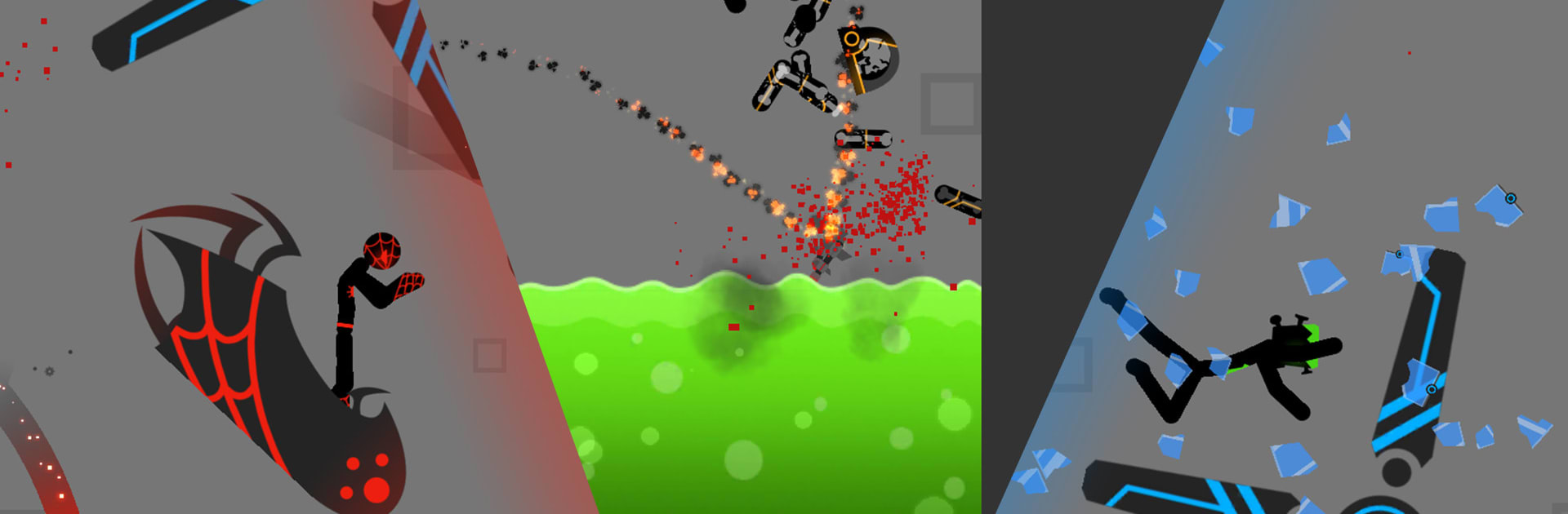
Neo-Dismount : Cyberfall is a wild, physics-first Simulation where flinging a crash-test stick figure through a futuristic obstacle course is the whole point. It keeps the spirit of classic dismount games, but cranks everything up—collisions feel snappier, props react smarter, and score chases get seriously addictive. You set up the run, unleash chaos, then sit back and watch the glorious chain reactions roll.

Game Features

  • Next-gen physics: A refined system makes every tumble, bounce, and crunch feel weighty and believable, so even tiny changes to speed or angle can flip the outcome.
  • Futuristic crash zones: Explore sleek, sci-fi arenas built for impact—tight corridors, sprawling ramps, hazard-filled paths, and more spots to send your ragdoll flying.
  • More stuff to smash: New vehicles, fresh characters, and a bigger collection of props give you tons of ways to build ridiculous runs and surprising collisions.
  • Smarter interactions: Props react to each other and to your character in richer ways, opening up creative routes and long, satisfying chain reactions.
  • Modes with range: From score-focused challenges to more experimental setups inspired by the classic formula, there’s a mode for quick bursts or deep tinkering.
  • Sharper scoring: Track meaningful stats—impact quality, distance, combo chains—so your best runs actually feel earned.
  • Fast retries: Reset instantly and tweak your setup without breaking the flow, making “one more try” turn into twenty.
  • PC-friendly option: Prefer a bigger screen and crisp controls? It plays great on BlueStacks without changing the core feel.
  • All virtual, all safe: It’s a pure sandbox for simulated stunts—push limits here, not in real life.

Start playing Neo-Dismount : Cyberfall on BlueStacks and get a smoother, more comfortable PC or Mac setup.


Game Features

Enhancements

  • Macros
  • Multi Instance
  • Multi Instance Sync
  • Script
  • Enhancements
Macros

Macros

Automate the predictable in Neo-Dismount : Cyberfall and transform your gameplay with Macros. Get access to inventive Macros in the BlueStacks Macro Community
Multi Instance

Multi Instance

Play Neo-Dismount : Cyberfall on one window. And chat with your friend on the other. Press CTRL + Shift + 8 to open the Multi-Instance Manager. And start creating fresh instances or clone an existing one.
Multi Instance Sync

Multi Instance Sync

Play Neo-Dismount : Cyberfall with the power of Multi-Instance Sync. Replicate what you are doing on the main instance on all other instances. Level up faster, play more.
Script

Script

Script your way to gaming glory in Neo-Dismount : Cyberfall with BlueStacks Script. Write and run a set of commands to automate repeated tasks. Trigger the command by assigning it to any key.
Read More

How to Download and Play Neo-Dismount : Cyberfall on PC or Mac

  • Download and install BlueStacks on your PC or Mac

  • Complete Google sign-in to access the Play Store, or do it later

  • Look for Neo-Dismount : Cyberfall in the search bar at the top right corner

  • Click to install Neo-Dismount : Cyberfall from the search results

  • Complete Google sign-in (if you skipped step 2) to install Neo-Dismount : Cyberfall

  • Click the Neo-Dismount : Cyberfall icon on the home screen to start playing

video
Watch Video

Minimum System Requirements

With BlueStacks 5, you can get started on a PC that fulfills the following requirements.

  • Operating System

    Microsoft Windows 7 or above, macOS 11 (Big Sur) or above

  • Processor

    Intel, AMD or Apple Silicon Processor

  • RAM

    at least 4GB

  • HDD

    10GB Free Disk Space

Note:

* You must be an Administrator on your PC. Up to date graphics drivers from Microsoft or the chipset vendor.

Neo-Dismount : Cyberfall - FAQs

  • How to play Neo-Dismount : Cyberfall on Windows PC & Mac?

    Play Neo-Dismount : Cyberfall on your PC or Mac by following these simple steps.

    • Click on 'Play Neo-Dismount : Cyberfall on PC’ to download BlueStacks
    • Install it and log-in to Google Play Store
    • Launch and play the game.
  • Why is BlueStacks the fastest and safest platform to play games on PC?

    BlueStacks respects your privacy and is always safe and secure to use. It does not carry any malware, spyware, or any sort of additional software that could harm your PC.

    It is engineered to optimize speed and performance for a seamless gaming experience.

  • What are Neo-Dismount : Cyberfall PC requirements?

    Minimum requirement to run Neo-Dismount : Cyberfall on your PC

    • OS: Microsoft Windows 7 or above MacOS 11 (Big Sur) or above
    • Processor: Intel, AMD or Apple Silicon Processor
    • RAM: Your PC must have at least 4GB of RAM. (Note that having 4GB or more disk space is not a substitute for RAM)
    • HDD: 10GB Free Disk Space.
    • You must be an Administrator on your PC.