Solar Smash
Solar Smash

Solar Smash

Simulation

| Paradyme Games

Play on PC with BlueStacks or from our cloud

  • Overview
  • Tips & Tricks
  • Game Features
  • How to Play

Page Modified On: November 25, 2025

Play Solar Smash on PC or Mac

Explore a whole new adventure with Solar Smash, a Simulation game created by Paradyme Games. Experience great gameplay with BlueStacks, the most popular gaming platform to play Android games on your PC or Mac.

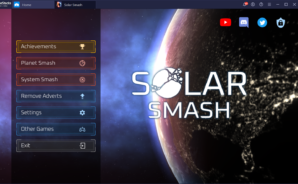
Solar Smash is basically a big toy box for blowing up planets and making space do strange things. A player picks a world, then goes wild with lasers, meteors, nukes, antimatter rockets, even goofy stuff like a space shiba or a giant monster. Watching the surface crack, oceans boil off, and the core get punched out is oddly relaxing. It looks nice without being too serious, and the camera lets someone zoom in close or pull way back to watch debris drift. There are shields and defense satellites too, so it is not only destruction. Sometimes it turns into a puzzle about how to break a planet that is trying to protect itself, which is fun.

There are two main ways to play. Planet Smash is straight up target practice for planets and moons, with a big list of tools to test. Solar System Smash is where it gets nerdy in a good way. A player can build simple star systems, place planets, tweak orbits, then see gravity tug everything around. Collisions feel weighty, rings get shredded, and a tiny black hole can wreck the whole layout in a minute. The physics sell the chaos without turning it into a homework sim. Controls are simple on mobile, but on PC with BlueStacks the mouse feels precise and the bigger screen makes the cracks, shockwaves, and orbit lines easier to read. There is no story, no grind, just quick sessions of creative destruction, some experimenting, then a reset to try a different combo or a weird ring world with a shielded moon.

Start your journey now. Download the game on BlueStacks, invite your friends, and march on a new adventure.

Game Features

Enhancements

  • Macros
  • Multi Instance
  • Multi Instance Sync
  • Script
  • Enhancements
Macros

Macros

Automate the predictable in Solar Smash and transform your gameplay with Macros. Get access to inventive Macros in the BlueStacks Macro Community
Multi Instance

Multi Instance

Play Solar Smash on one window. And chat with your friend on the other. Press CTRL + Shift + 8 to open the Multi-Instance Manager. And start creating fresh instances or clone an existing one.
Multi Instance Sync

Multi Instance Sync

Play Solar Smash with the power of Multi-Instance Sync. Replicate what you are doing on the main instance on all other instances. Level up faster, play more.
Script

Script

Script your way to gaming glory in Solar Smash with BlueStacks Script. Write and run a set of commands to automate repeated tasks. Trigger the command by assigning it to any key.
Read More

How to Download and Play Solar Smash on PC or Mac

  • Download and install BlueStacks on your PC or Mac

  • Complete Google sign-in to access the Play Store, or do it later

  • Look for Solar Smash in the search bar at the top right corner

  • Click to install Solar Smash from the search results

  • Complete Google sign-in (if you skipped step 2) to install Solar Smash

  • Click the Solar Smash icon on the home screen to start playing

video
Watch Video

Minimum System Requirements

With BlueStacks 5, you can get started on a PC that fulfills the following requirements.

  • Operating System

    Microsoft Windows 7 or above, macOS 11 (Big Sur) or above

  • Processor

    Intel, AMD or Apple Silicon Processor

  • RAM

    at least 4GB

  • HDD

    10GB Free Disk Space

Note:

* You must be an Administrator on your PC. Up to date graphics drivers from Microsoft or the chipset vendor.

Solar Smash - FAQs

  • How to play Solar Smash on Windows PC & Mac?

    Play Solar Smash on your PC or Mac by following these simple steps.

    • Click on 'Play Solar Smash on PC’ to download BlueStacks
    • Install it and log-in to Google Play Store
    • Launch and play the game.
  • Why is BlueStacks the fastest and safest platform to play games on PC?

    BlueStacks respects your privacy and is always safe and secure to use. It does not carry any malware, spyware, or any sort of additional software that could harm your PC.

    It is engineered to optimize speed and performance for a seamless gaming experience.

  • What are Solar Smash PC requirements?

    Minimum requirement to run Solar Smash on your PC

    • OS: Microsoft Windows 7 or above MacOS 11 (Big Sur) or above
    • Processor: Intel, AMD or Apple Silicon Processor
    • RAM: Your PC must have at least 4GB of RAM. (Note that having 4GB or more disk space is not a substitute for RAM)
    • HDD: 10GB Free Disk Space.
    • You must be an Administrator on your PC.