TDZ Pro
TDZ Pro

TDZ Pro

Simulation

| Leke Games

Play on PC with BlueStacks or from our cloud

  • Overview
  • Game Features
  • How to Play

Page Modified On: May 18, 2026

Play TDZ Pro on PC or Mac

Step into the World of TDZ Pro, a thrilling Simulation game from the house of Leke Games. Play this Android game on BlueStacks App Player and experience immersive gaming on PC or Mac.

About the Game

TDZ Pro is a Simulation game from Leke Games that blends long-haul trucking and intercity bus driving in one shared world. You’re building a transportation business while actually getting behind the wheel—hauling freight one moment and shuttling passengers the next. It’s hands-on, numbers-smart, and full of long routes, busy terminals, tolls, and rough weather that keep every drive interesting.

Game Features

  • Two jobs, one world — Swap between trucking and coach driving whenever you like, keeping both sides of the transport life under your control.
  • Tycoon management — Start a company, hire drivers, assign routes, and watch the profits roll in as your fleet and offices grow.
  • Massive fleet — Drive 50+ machines, from American and European rigs to luxury coaches, each with its own feel and personality.
  • Deep customization — Deck out vehicles with lamps, bumpers, horns, and custom skins to make your rides unmistakably yours.
  • Real roads, real rules — Tackle traffic, toll booths, tight schedules, and passenger satisfaction across a huge map with dozens of cities.
  • Smart economy — Bid in freight auctions, plan fuel stops, and hunt for cheaper gas to keep margins healthy.
  • Lifelike handling — Feel cargo weight, suspension movement, and road grip thanks to polished physics that reward smooth driving.
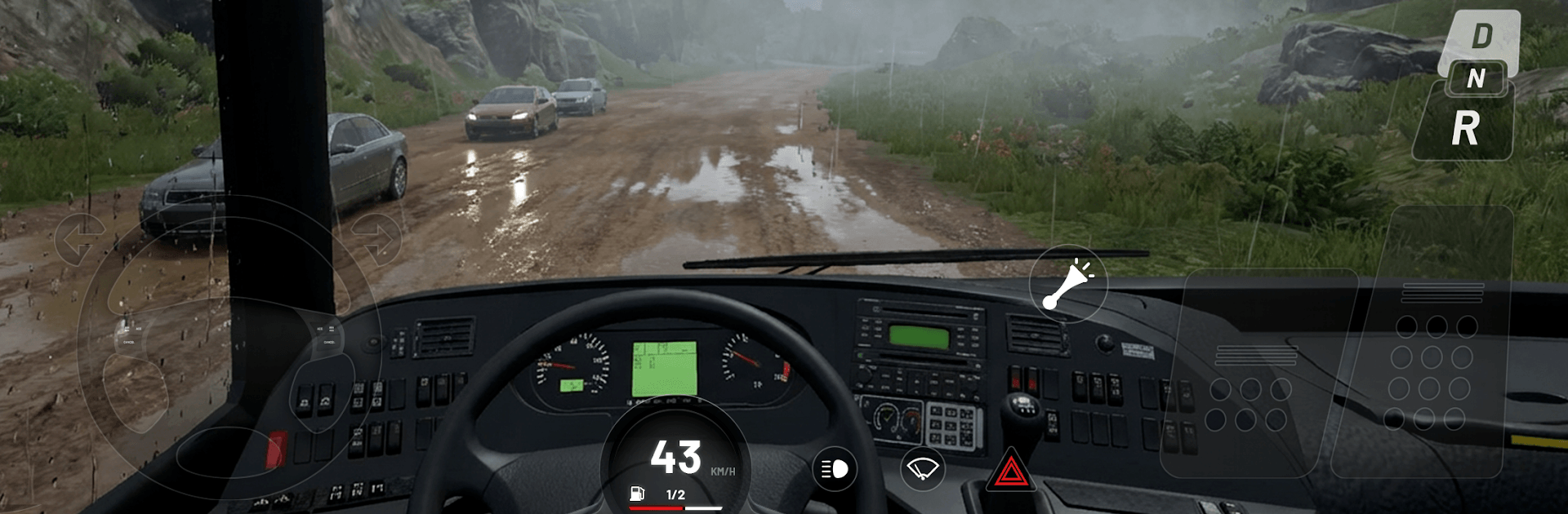
  • Rich visuals — Dynamic weather (rain, snow, fog), a full day–night cycle, and detailed interiors add to the road-trip vibe.
  • Multiplayer seasons — Team up to haul shared cargo or jump into friendly races and see who finishes first.
  • Cockpit immersion — Functional dashboards, mirrors, and camera views help you drive how you prefer.
  • Flexible controls — Tweak assist options and graphics to match your device or enjoy precise steering on PC with BlueStacks.

Slay your opponents with your epic moves. Play it your way on BlueStacks and dominate the battlefield.


Game Features

Enhancements

  • Macros
  • Multi Instance
  • Multi Instance Sync
  • Script
  • Enhancements
Macros

Macros

Automate the predictable in TDZ Pro and transform your gameplay with Macros. Get access to inventive Macros in the BlueStacks Macro Community
Multi Instance

Multi Instance

Play TDZ Pro on one window. And chat with your friend on the other. Press CTRL + Shift + 8 to open the Multi-Instance Manager. And start creating fresh instances or clone an existing one.
Multi Instance Sync

Multi Instance Sync

Play TDZ Pro with the power of Multi-Instance Sync. Replicate what you are doing on the main instance on all other instances. Level up faster, play more.
Script

Script

Script your way to gaming glory in TDZ Pro with BlueStacks Script. Write and run a set of commands to automate repeated tasks. Trigger the command by assigning it to any key.
Read More

How to Download and Play TDZ Pro on PC or Mac

  • Download and install BlueStacks on your PC or Mac

  • Complete Google sign-in to access the Play Store, or do it later

  • Look for TDZ Pro in the search bar at the top right corner

  • Click to install TDZ Pro from the search results

  • Complete Google sign-in (if you skipped step 2) to install TDZ Pro

  • Click the TDZ Pro icon on the home screen to start playing

video
Watch Video

Minimum System Requirements

With BlueStacks 5, you can get started on a PC that fulfills the following requirements.

  • Operating System

    Microsoft Windows 7 or above, macOS 11 (Big Sur) or above

  • Processor

    Intel, AMD or Apple Silicon Processor

  • RAM

    at least 4GB

  • HDD

    10GB Free Disk Space

Note:

* You must be an Administrator on your PC. Up to date graphics drivers from Microsoft or the chipset vendor.

TDZ Pro - FAQs

  • How to play TDZ Pro on Windows PC & Mac?

    Play TDZ Pro on your PC or Mac by following these simple steps.

    • Click on 'Play TDZ Pro on PC’ to download BlueStacks
    • Install it and log-in to Google Play Store
    • Launch and play the game.
  • Why is BlueStacks the fastest and safest platform to play games on PC?

    BlueStacks respects your privacy and is always safe and secure to use. It does not carry any malware, spyware, or any sort of additional software that could harm your PC.

    It is engineered to optimize speed and performance for a seamless gaming experience.

  • What are TDZ Pro PC requirements?

    Minimum requirement to run TDZ Pro on your PC

    • OS: Microsoft Windows 7 or above MacOS 11 (Big Sur) or above
    • Processor: Intel, AMD or Apple Silicon Processor
    • RAM: Your PC must have at least 4GB of RAM. (Note that having 4GB or more disk space is not a substitute for RAM)
    • HDD: 10GB Free Disk Space.
    • You must be an Administrator on your PC.