Ski Tracker
Ski Tracker

Ski Tracker

Sports

| Sport & Travel

Play on PC with BlueStacks or from our cloud

  • Overview
  • Game Features
  • How to Play

Page Modified On: October 24, 2025

Play Ski Tracker on PC or Mac

Ski Tracker brings the Sports genre to life, and throws up exciting challenges for gamers. Developed by Sport & Travel, this Android game is best experienced on BlueStacks, the World’s #1 app player for PC and Mac users.

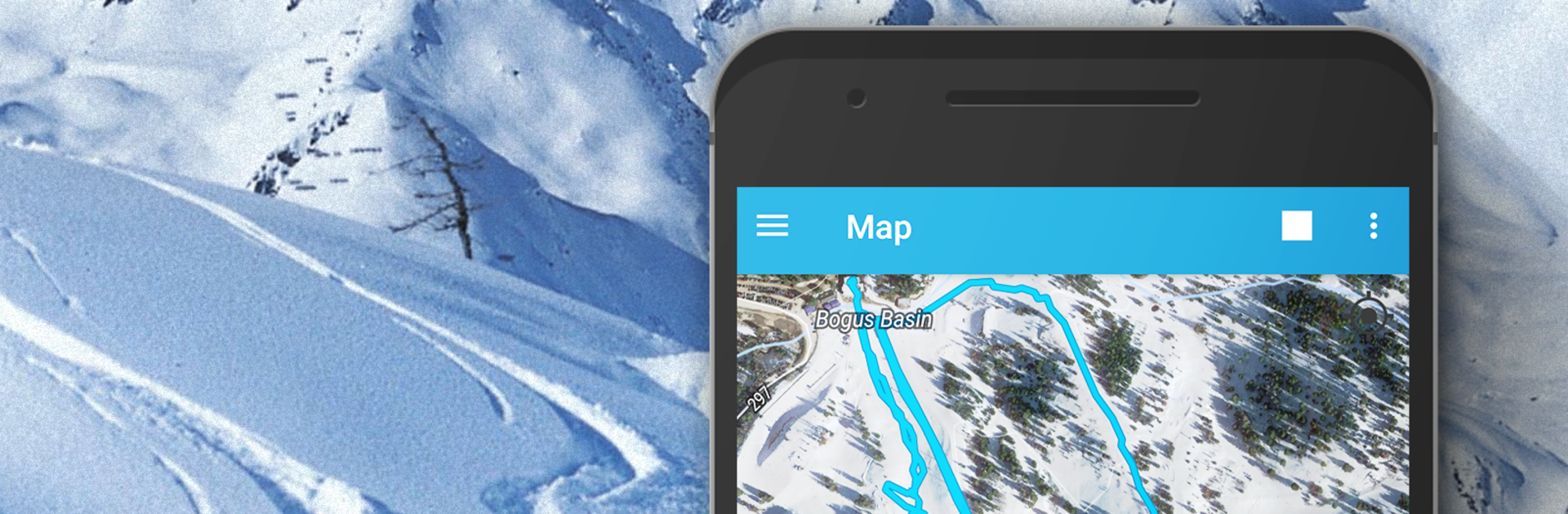
Ski Tracker feels less like a flashy game and more like a winter sports buddy that turns every run into a mini challenge. It logs maximum speed, tracks distance, and splits everything into downhill time, lift time, and those standing-around moments. The map view is the neat part, it draws lines where the skis actually went and tags elevation so there is a clear picture of climbs versus drops, with min and max altitude saved. There is a Fast Ride mode that lets someone pick a section and see only that segment’s top speed, time, and distance, which is great for that one steep pitch that begs a redo. Photos can be snapped with stats printed right on them, easy to share later. It saves the whole day so there is a history to browse, graphs and numbers included.

It is useful for more than alpine stuff. Cross-country, skitouring, snowboarding, even skating gets tracked just fine, since it mostly leans on GPS. No data plan needed, although GPS inside buildings or during foul weather can act weird and take a while to lock, so that is worth knowing. It can help with basic slope navigation, finding routes, or staying in touch with friends on the hill, and there are friendly compare-with-friends stats if a group wants to turn the day into a casual competition. There is an optional premium tier with extra tools that can be tried for a bit. Running it through BlueStacks on a PC makes maps and charts easier to read between runs, and planning the next route on a big screen just feels cleaner, then the phone can go back in the pocket for the actual skiing.

Slay your opponents with your epic moves. Play it your way on BlueStacks and dominate the battlefield.


Game Features

Enhancements

  • Macros
  • Multi Instance
  • Multi Instance Sync
  • Script
  • Enhancements
Macros

Macros

Automate the predictable in Ski Tracker and transform your gameplay with Macros. Get access to inventive Macros in the BlueStacks Macro Community
Multi Instance

Multi Instance

Play Ski Tracker on one window. And chat with your friend on the other. Press CTRL + Shift + 8 to open the Multi-Instance Manager. And start creating fresh instances or clone an existing one.
Multi Instance Sync

Multi Instance Sync

Play Ski Tracker with the power of Multi-Instance Sync. Replicate what you are doing on the main instance on all other instances. Level up faster, play more.
Script

Script

Script your way to gaming glory in Ski Tracker with BlueStacks Script. Write and run a set of commands to automate repeated tasks. Trigger the command by assigning it to any key.
Read More

How to Download and Play Ski Tracker on PC or Mac

  • Download and install BlueStacks on your PC or Mac

  • Complete Google sign-in to access the Play Store, or do it later

  • Look for Ski Tracker in the search bar at the top right corner

  • Click to install Ski Tracker from the search results

  • Complete Google sign-in (if you skipped step 2) to install Ski Tracker

  • Click the Ski Tracker icon on the home screen to start playing

video
Watch Video

Minimum System Requirements

With BlueStacks 5, you can get started on a PC that fulfills the following requirements.

  • Operating System

    Microsoft Windows 7 or above, macOS 11 (Big Sur) or above

  • Processor

    Intel, AMD or Apple Silicon Processor

  • RAM

    at least 4GB

  • HDD

    10GB Free Disk Space

Note:

* You must be an Administrator on your PC. Up to date graphics drivers from Microsoft or the chipset vendor.

Ski Tracker - FAQs

  • How to play Ski Tracker on Windows PC & Mac?

    Play Ski Tracker on your PC or Mac by following these simple steps.

    • Click on 'Play Ski Tracker on PC’ to download BlueStacks
    • Install it and log-in to Google Play Store
    • Launch and play the game.
  • Why is BlueStacks the fastest and safest platform to play games on PC?

    BlueStacks respects your privacy and is always safe and secure to use. It does not carry any malware, spyware, or any sort of additional software that could harm your PC.

    It is engineered to optimize speed and performance for a seamless gaming experience.

  • What are Ski Tracker PC requirements?

    Minimum requirement to run Ski Tracker on your PC

    • OS: Microsoft Windows 7 or above MacOS 11 (Big Sur) or above
    • Processor: Intel, AMD or Apple Silicon Processor
    • RAM: Your PC must have at least 4GB of RAM. (Note that having 4GB or more disk space is not a substitute for RAM)
    • HDD: 10GB Free Disk Space.
    • You must be an Administrator on your PC.