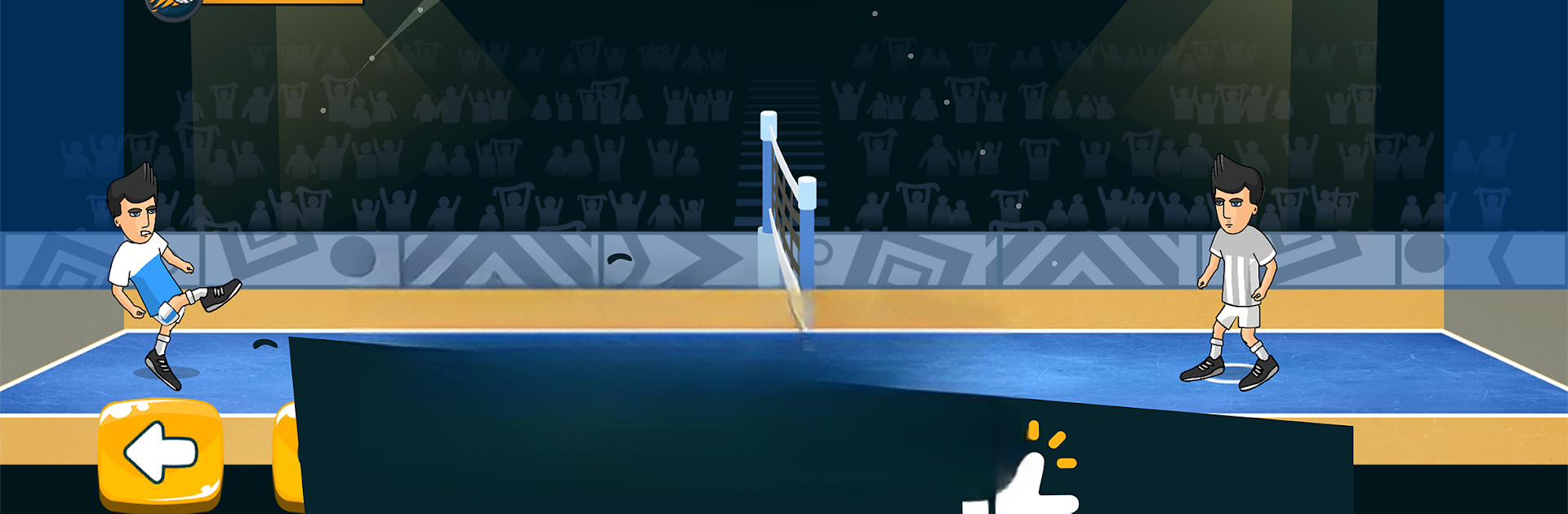
Soccer Spike - Kick Volleyball

Soccer Spike - Kick Volleyball

Sports

| Rabona Football Games

Play on PC with BlueStacks or from our cloud

  • Overview
  • Game Features
  • How to Play

Page Modified On: January 02, 2026

Play Soccer Spike - Kick Volleyball on PC or Mac

Soccer Spike – Kick Volleyball brings the Sports genre to life, and throws up exciting challenges for gamers. Developed by Rabona Football Games, this Android game is best experienced on BlueStacks, the World’s #1 app player for PC and Mac users.

About the Game

Soccer Spike – Kick Volleyball blends the footwork of soccer with the snap and flair of volleyball to create quick, high-tension matches that feel great from the first kick. It’s a fast, skill-forward Sports title from Rabona Football Games where timing, positioning, and a bit of swagger decide every rally. Expect crisp controls, punchy physics, and that “one more match” itch.

Game Features

  • Fast, skill-based rallies — Read the bounce, set up the ball, and smash home acrobatic spikes or crafty taps. Every touch matters, so good timing beats button mashing.
  • Career from rookie to standout — Start small and work your way through a full journey. Unlock new arenas, tougher challenges, and fresh tools as your game improves.
  • Real-time multiplayer — Challenge friends or take on players around the world in ranked and casual matches. Climb the ladder, learn opponents’ habits, and celebrate those clutch wins.
  • Player growth that fits your style — Upgrade key attributes and unlock special moves to suit how you like to play: power hits, precision placement, or relentless defense.
  • Build and customize — Shape your athlete’s look and assemble your ideal setup. Mix gear and abilities to create a signature playstyle.
  • Lively arenas and sharp physics — Snappy ball behavior, bold visuals, and distinctive courts keep each match feeling fresh and readable.
  • Events, leagues, and tournaments — Jump into rotating modes and competitive seasons that reward consistency and smart play.
  • Free-to-play friendly — Get straight into matches, earn rewards by playing, and keep refining your skills without hitting walls.
  • Optional PC play with BlueStacks — Prefer a bigger screen and keyboard controls? It runs smoothly there, too, while keeping your progress synced.

Make your gaming sessions memorable with precise controls that give you an edge in close combats and visuals that pop up, bringing every character to life.


Game Features

Enhancements

  • Macros
  • Multi Instance
  • Multi Instance Sync
  • Script
  • Enhancements
Macros

Macros

Automate the predictable in Soccer Spike - Kick Volleyball and transform your gameplay with Macros. Get access to inventive Macros in the BlueStacks Macro Community
Multi Instance

Multi Instance

Play Soccer Spike - Kick Volleyball on one window. And chat with your friend on the other. Press CTRL + Shift + 8 to open the Multi-Instance Manager. And start creating fresh instances or clone an existing one.
Multi Instance Sync

Multi Instance Sync

Play Soccer Spike - Kick Volleyball with the power of Multi-Instance Sync. Replicate what you are doing on the main instance on all other instances. Level up faster, play more.
Script

Script

Script your way to gaming glory in Soccer Spike - Kick Volleyball with BlueStacks Script. Write and run a set of commands to automate repeated tasks. Trigger the command by assigning it to any key.
Read More

How to Download and Play Soccer Spike - Kick Volleyball on PC or Mac

  • Download and install BlueStacks on your PC or Mac

  • Complete Google sign-in to access the Play Store, or do it later

  • Look for Soccer Spike - Kick Volleyball in the search bar at the top right corner

  • Click to install Soccer Spike - Kick Volleyball from the search results

  • Complete Google sign-in (if you skipped step 2) to install Soccer Spike - Kick Volleyball

  • Click the Soccer Spike - Kick Volleyball icon on the home screen to start playing

video
Watch Video

Minimum System Requirements

With BlueStacks 5, you can get started on a PC that fulfills the following requirements.

  • Operating System

    Microsoft Windows 7 or above, macOS 11 (Big Sur) or above

  • Processor

    Intel, AMD or Apple Silicon Processor

  • RAM

    at least 4GB

  • HDD

    10GB Free Disk Space

Note:

* You must be an Administrator on your PC. Up to date graphics drivers from Microsoft or the chipset vendor.

Soccer Spike - Kick Volleyball - FAQs

  • How to play Soccer Spike - Kick Volleyball on Windows PC & Mac?

    Play Soccer Spike - Kick Volleyball on your PC or Mac by following these simple steps.

    • Click on 'Play Soccer Spike - Kick Volleyball on PC’ to download BlueStacks
    • Install it and log-in to Google Play Store
    • Launch and play the game.
  • Why is BlueStacks the fastest and safest platform to play games on PC?

    BlueStacks respects your privacy and is always safe and secure to use. It does not carry any malware, spyware, or any sort of additional software that could harm your PC.

    It is engineered to optimize speed and performance for a seamless gaming experience.

  • What are Soccer Spike - Kick Volleyball PC requirements?

    Minimum requirement to run Soccer Spike - Kick Volleyball on your PC

    • OS: Microsoft Windows 7 or above MacOS 11 (Big Sur) or above
    • Processor: Intel, AMD or Apple Silicon Processor
    • RAM: Your PC must have at least 4GB of RAM. (Note that having 4GB or more disk space is not a substitute for RAM)
    • HDD: 10GB Free Disk Space.
    • You must be an Administrator on your PC.