
XC Guide
XC Guide

XC Guide

Sports

| Indy Flyer

Play on PC with BlueStacks or from our cloud

  • Overview
  • Game Features
  • How to Play

Page Modified On: September 19, 2025

Play XC Guide on PC or Mac

Step into the World of XC Guide, a thrilling Sports game from the house of Indy Flyer. Play this Android game on BlueStacks App Player and experience immersive gaming on PC or Mac.

About the Game

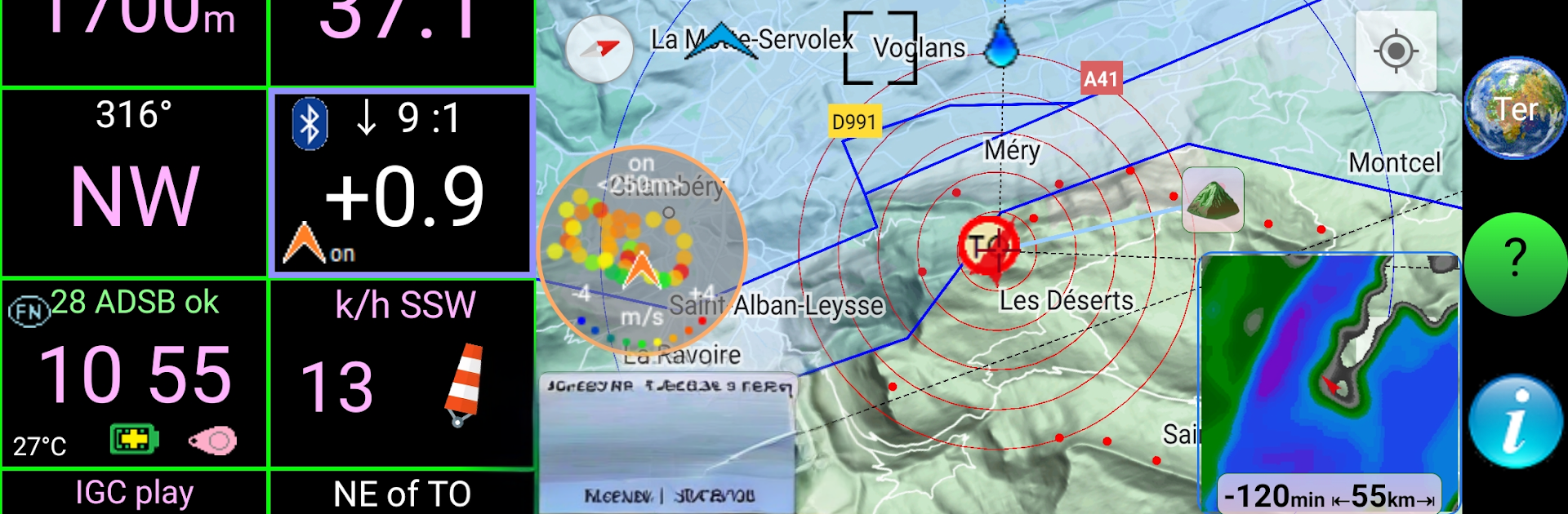
XC Guide by Indy Flyer turns cross-country flying into a clean, data-rich Sports experience you can actually enjoy looking at. It packs a full flight computer, live tracking, and task tools into one cockpit-style app, whether you’re practicing race tactics or keeping tabs on friends in the air. Want a bigger map while you plan? It also runs nicely on BlueStacks.

Game Features

  • Live tracking, everywhere: Follow pilots and drivers across multiple networks in one place—OGN, FANET, FLARM, SafeSky, SkyLines, SportsTrackLive, Flymaster, Livetrack24, Loctome, Garmin inReach, SPOT, ADS-B sources like OpenSky/SkyEcho2/RadarBox, plus AirWhere, XC Globe, Telegram-based feeds, Volandoo, and PureTrack.
  • Full flight computer: See altitude AMSL/AGL, ground speed, heading, climb/sink, glide, G‑force, wind, flight time, and distance from takeoff. Use your phone’s baro or pair a Bluetooth vario.
  • Smart pilot radar: A clean list shows who’s around you—aircraft type or photo, relative direction, tracker type, and status updates—great for gaggles and retrieve coordination.
  • Rich, useful map: Google map overlays other pilots, retrieve buses, airspace, waypoints, thermal hot spots, flight trails, plus safety and retrieve messages.
  • Navigation and tasks: Build waypoints, set up race tasks, and manage routes. Compatible with the PG‑Race task format, and you can share tasks quickly by scanning a QR code.
  • Thermal assistant: A handy widget on the map helps you find, center, and stick with lift.
  • Weather layers: Quick-look rain radar and cloud cover so you’re not guessing what’s upwind.
  • Audible safety cues: Get sounds for SOS and Retrieve messages, airspace proximity, and FANET alerts—so you don’t miss the important stuff.
  • Flight logs and replay: Save IGC and KML automatically, then replay flights. IGC logs from XC Guide are accepted for top-tier events and popular online contests.
  • Takeoff/landing check-ins: Optional automatic emails when you launch or land to keep your crew in the loop.
  • Built-in help: Detailed guides in multiple languages make features easy to learn.

Start your journey now. Download the game on BlueStacks, invite your friends, and march on a new adventure.


Game Features

Enhancements

  • Macros
  • Multi Instance
  • Multi Instance Sync
  • Script
  • Enhancements
Macros

Macros

Automate the predictable in XC Guide and transform your gameplay with Macros. Get access to inventive Macros in the BlueStacks Macro Community
Multi Instance

Multi Instance

Play XC Guide on one window. And chat with your friend on the other. Press CTRL + Shift + 8 to open the Multi-Instance Manager. And start creating fresh instances or clone an existing one.
Multi Instance Sync

Multi Instance Sync

Play XC Guide with the power of Multi-Instance Sync. Replicate what you are doing on the main instance on all other instances. Level up faster, play more.
Script

Script

Script your way to gaming glory in XC Guide with BlueStacks Script. Write and run a set of commands to automate repeated tasks. Trigger the command by assigning it to any key.
Read More

How to Download and Play XC Guide on PC or Mac

  • Download and install BlueStacks on your PC or Mac

  • Complete Google sign-in to access the Play Store, or do it later

  • Look for XC Guide in the search bar at the top right corner

  • Click to install XC Guide from the search results

  • Complete Google sign-in (if you skipped step 2) to install XC Guide

  • Click the XC Guide icon on the home screen to start playing

video
Watch Video

Minimum System Requirements

With BlueStacks 5, you can get started on a PC that fulfills the following requirements.

  • Operating System

    Microsoft Windows 7 or above, macOS 11 (Big Sur) or above

  • Processor

    Intel, AMD or Apple Silicon Processor

  • RAM

    at least 4GB

  • HDD

    10GB Free Disk Space

Note:

* You must be an Administrator on your PC. Up to date graphics drivers from Microsoft or the chipset vendor.

XC Guide - FAQs

  • How to play XC Guide on Windows PC & Mac?

    Play XC Guide on your PC or Mac by following these simple steps.

    • Click on 'Play XC Guide on PC’ to download BlueStacks
    • Install it and log-in to Google Play Store
    • Launch and play the game.
  • Why is BlueStacks the fastest and safest platform to play games on PC?

    BlueStacks respects your privacy and is always safe and secure to use. It does not carry any malware, spyware, or any sort of additional software that could harm your PC.

    It is engineered to optimize speed and performance for a seamless gaming experience.

  • What are XC Guide PC requirements?

    Minimum requirement to run XC Guide on your PC

    • OS: Microsoft Windows 7 or above MacOS 11 (Big Sur) or above
    • Processor: Intel, AMD or Apple Silicon Processor
    • RAM: Your PC must have at least 4GB of RAM. (Note that having 4GB or more disk space is not a substitute for RAM)
    • HDD: 10GB Free Disk Space.
    • You must be an Administrator on your PC.







