Europe at War: WW2 Strategy

Europe at War: WW2 Strategy

Strategy

| FuGames

Play on PC with BlueStacks or from our cloud

  • Overview
  • Game Features
  • How to Play

Page Modified On: October 23, 2026

Play Europe at War: WW2 Strategy on PC or Mac

Step into the World of Europe at War: WW2 Strategy, a thrilling Strategy game from the house of FuGames. Play this Android game on BlueStacks App Player and experience immersive gaming on PC or Mac.

About the Game

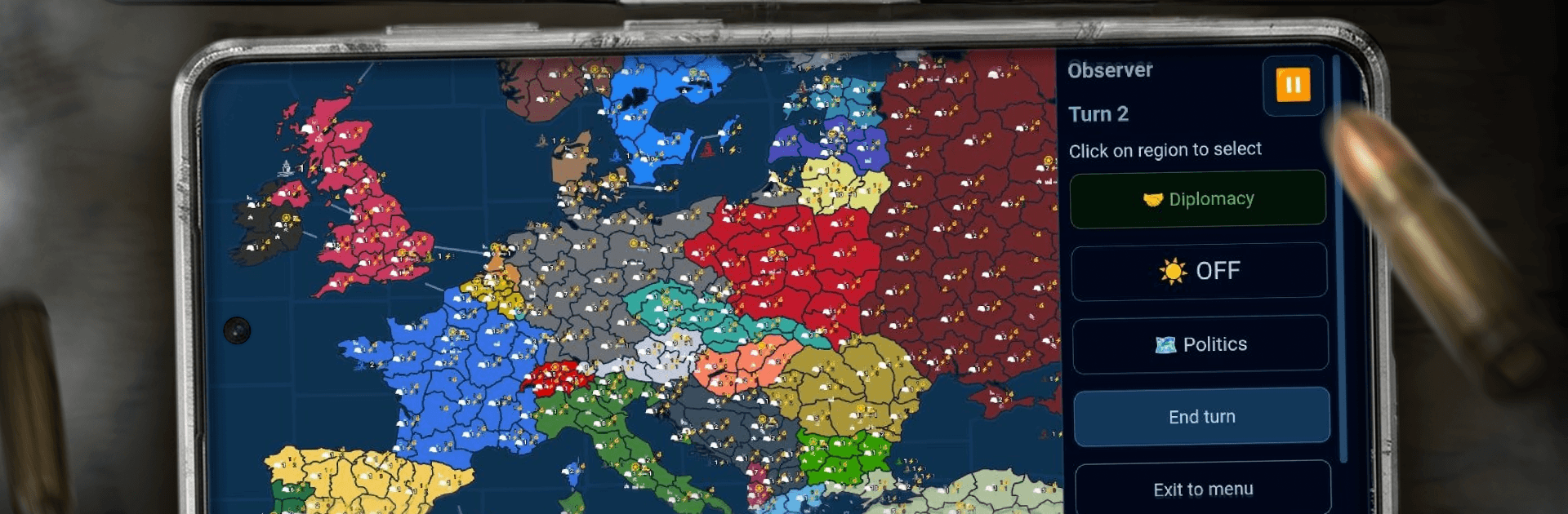
Europe at War: WW2 Strategy drops you into 1936 with a continent bracing for conflict and a map full of possibilities. It’s a thoughtful, detail-rich Strategy experience where planning, logistics, and diplomacy shape every campaign, not just raw firepower. Prefer playing with a keyboard and mouse? It pairs nicely with BlueStacks for a clean, tactical view.

Game Features

  • Grand European Theater: Command any of 35 nations across a sprawling map with 369+ land and sea regions, complete with fog of war, strategic straits, and borders that rarely stay put.
  • Living World AI & Spectator: Every country pursues its own interests—forming pacts, declaring wars, and shifting power blocs—while Spectator Mode lets you watch history unravel without issuing a single order.
  • Logistics-Driven Warfare: Cut supply lines, isolate ports and capitals, and encircle enemy armies to win battles before bullets even fly.
  • Combined Arms Combat: Coordinate infantry on the ground, contest the skies, and send fleets to control the seas for true battlefield synergy.
  • Industry and Resources: Balance Metal, Oil, and Cement as you build out Factories, Shipyards, Airfields, Barracks, and Fortifications to fuel your war machine.
  • Research Edge: Invest in technology to modernize your forces and outpace rivals in an ever-evolving arms race.
  • National Focus & Win Paths: Guide your nation’s priorities and choose your route to victory—Military Conquest, Global Alliance, or Economic Supremacy.
  • Achievements & Leaderboards: Chase 74 achievements, climb three global leaderboards, and personalize your profile with a wide selection of frames, titles, and ranks.
  • Cross-Platform Cloud Saves: Pick up your campaign anywhere with saves that sync across platforms.
  • Skill Over Spending: Wins are earned through planning and execution, not pay-to-win mechanics or forced microtransactions.

Ready to top the leaderboard? We bet you do. Let precise controls and sharp visuals optimized on BlueStacks lead you to victory.


Game Features

Enhancements

  • Macros
  • Multi Instance
  • Multi Instance Sync
  • Eco Mode
  • Enhancements
Macros

Macros

Skip the boring parts of a game. Play Europe at War: WW2 Strategy with Macros and get the edge. Simply record a sequence of commands and execute them at any moment.
Multi Instance

Multi Instance

Why limit to one game on your phone when you can play many on your PC? Open multiple instances of Europe at War: WW2 Strategy at once with Multi-Instance. Leverage the power of different accounts by doing more.
Multi Instance Sync

Multi Instance Sync

Get the best out of Europe at War: WW2 Strategy with Multi-Instance Sync. Play the game from different accounts and build your own empire. Use Multi-instance sync to repeat the action in the main BlueStacks instance on all other instances.
Eco Mode

Eco Mode

Find the rarest heroes by making multiple summons in Europe at War: WW2 Strategy. And while you are at it, reduce your PC’s resource consumption with the Eco Mode. Farm efficiently. Get the best results.
Read More

How to Download and Play Europe at War: WW2 Strategy on PC or Mac

  • Download and install BlueStacks on your PC or Mac

  • Complete Google sign-in to access the Play Store, or do it later

  • Look for Europe at War: WW2 Strategy in the search bar at the top right corner

  • Click to install Europe at War: WW2 Strategy from the search results

  • Complete Google sign-in (if you skipped step 2) to install Europe at War: WW2 Strategy

  • Click the Europe at War: WW2 Strategy icon on the home screen to start playing

video
Watch Video

Minimum System Requirements

With BlueStacks 5, you can get started on a PC that fulfills the following requirements.

  • Operating System

    Microsoft Windows 7 or above, macOS 11 (Big Sur) or above

  • Processor

    Intel, AMD or Apple Silicon Processor

  • RAM

    at least 4GB

  • HDD

    10GB Free Disk Space

Note:

* You must be an Administrator on your PC. Up to date graphics drivers from Microsoft or the chipset vendor.

Europe at War: WW2 Strategy - FAQs

  • How to play Europe at War: WW2 Strategy on Windows PC & Mac?

    Play Europe at War: WW2 Strategy on your PC or Mac by following these simple steps.

    • Click on 'Play Europe at War: WW2 Strategy on PC’ to download BlueStacks
    • Install it and log-in to Google Play Store
    • Launch and play the game.
  • Why is BlueStacks the fastest and safest platform to play games on PC?

    BlueStacks respects your privacy and is always safe and secure to use. It does not carry any malware, spyware, or any sort of additional software that could harm your PC.

    It is engineered to optimize speed and performance for a seamless gaming experience.

  • What are Europe at War: WW2 Strategy PC requirements?

    Minimum requirement to run Europe at War: WW2 Strategy on your PC

    • OS: Microsoft Windows 7 or above MacOS 11 (Big Sur) or above
    • Processor: Intel, AMD or Apple Silicon Processor
    • RAM: Your PC must have at least 4GB of RAM. (Note that having 4GB or more disk space is not a substitute for RAM)
    • HDD: 10GB Free Disk Space.
    • You must be an Administrator on your PC.