Flying Dragon Sim: Be A Dragon

Flying Dragon Sim: Be A Dragon

Strategy

| 2dfunzone

Play on PC with BlueStacks or from our cloud

  • Overview
  • Game Features
  • How to Play

Page Modified On: April 21, 2026

Play Flying Dragon Sim: Be A Dragon on PC or Mac

Step into the World of Flying Dragon Sim: Be A Dragon, a thrilling Strategy game from the house of 2dfunzone. Play this Android game on BlueStacks App Player and experience immersive gaming on PC or Mac.

About the Game

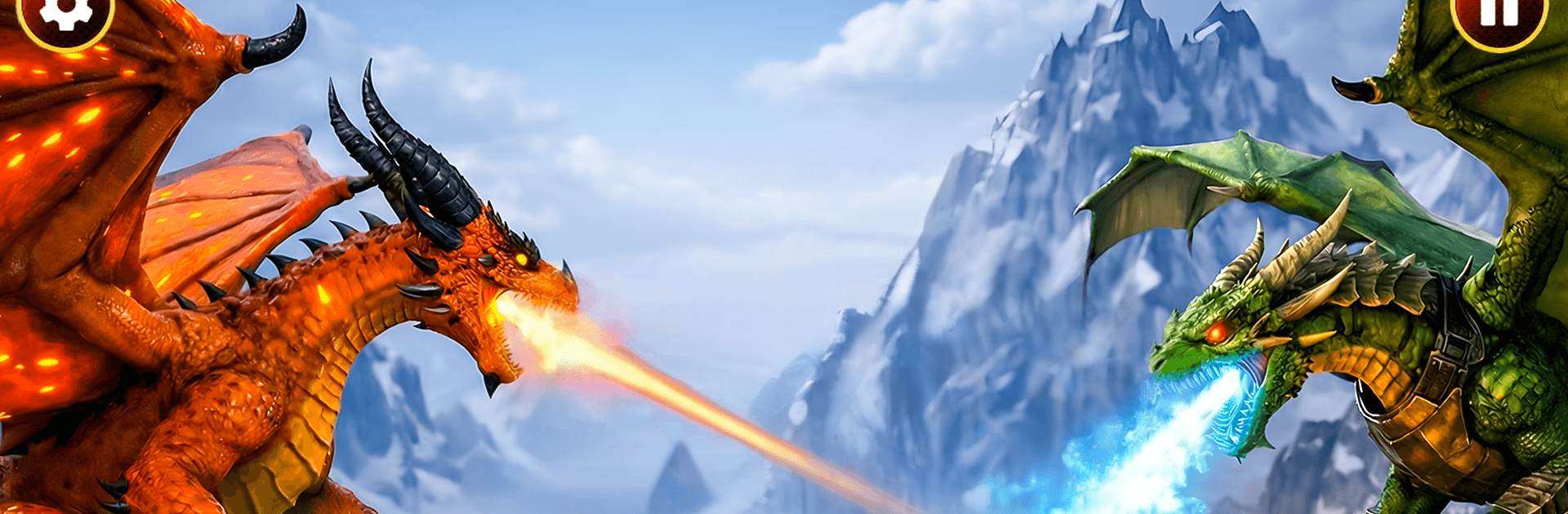
Flying Dragon Sim: Be A Dragon puts you in the scales of a growing dragon and lets you own the skies. It blends high-speed flight, creature growth, and tactical fights in a sprawling fantasy world packed with secrets and serious threats. Expect a hands-on Strategy twist from 2dfunzone: you’ll make smart choices about upgrades, elements, and battles while carving your legend from hatchling to apex flier. You can also play it on BlueStacks if you prefer a bigger screen and crisp controls on PC.

Game Features

  • Be the Dragon: Start as a tiny hatchling and grow into a towering force. Feel the weight of each wingbeat, breathe elemental fury, and rule the air with style.
  • Smooth, Fast Flight: Responsive controls make soaring, diving, and threading through cliffs and islands feel clean and satisfying—perfect for long hauls or quick raids.
  • Elemental Combat: Unleash fire, freeze foes with ice, or swap to specialized powers. Time your strikes, chain abilities, and evolve into new forms that reshape your playstyle.
  • Modes with Teeth: Jump into large-scale battles, survive brutal gauntlets, tackle steep climbs, or wander wide-open islands to uncover hidden spots and rare rewards.
  • Train and Evolve: Improve strength, speed, and stamina through interactive training. Unlock skill paths, tune your loadout, and shape a dragon build that fits how you like to fight.
  • Unique Companions: Raise magical sidekicks—from pony-like sprites to rugged reptilian brutes—that add utility, charm, and a few surprises along the way.
  • A World That Pushes Back: Cinematic landscapes, reactive physics, and punchy sound sell every wing flap and impact. Caves, ruins, and tough enemies keep exploration risky and worth it.
  • Strategy at the Core: Pick targets wisely, manage energy, and select elements that counter enemy types. Smart routing and timely evolutions turn tough missions into statement wins.
  • PC-Friendly Option: Prefer mouse-and-keyboard precision? Run the game on BlueStacks and keep your dragon cruising comfortably on desktop.

Slay your opponents with your epic moves. Play it your way on BlueStacks and dominate the battlefield.


Game Features

Enhancements

  • Macros
  • Multi Instance
  • Multi Instance Sync
  • Eco Mode
  • Enhancements
Macros

Macros

Skip the boring parts of a game. Play Flying Dragon Sim: Be A Dragon with Macros and get the edge. Simply record a sequence of commands and execute them at any moment.
Multi Instance

Multi Instance

Why limit to one game on your phone when you can play many on your PC? Open multiple instances of Flying Dragon Sim: Be A Dragon at once with Multi-Instance. Leverage the power of different accounts by doing more.
Multi Instance Sync

Multi Instance Sync

Get the best out of Flying Dragon Sim: Be A Dragon with Multi-Instance Sync. Play the game from different accounts and build your own empire. Use Multi-instance sync to repeat the action in the main BlueStacks instance on all other instances.
Eco Mode

Eco Mode

Find the rarest heroes by making multiple summons in Flying Dragon Sim: Be A Dragon. And while you are at it, reduce your PC’s resource consumption with the Eco Mode. Farm efficiently. Get the best results.
Read More

How to Download and Play Flying Dragon Sim: Be A Dragon on PC or Mac

  • Download and install BlueStacks on your PC or Mac

  • Complete Google sign-in to access the Play Store, or do it later

  • Look for Flying Dragon Sim: Be A Dragon in the search bar at the top right corner

  • Click to install Flying Dragon Sim: Be A Dragon from the search results

  • Complete Google sign-in (if you skipped step 2) to install Flying Dragon Sim: Be A Dragon

  • Click the Flying Dragon Sim: Be A Dragon icon on the home screen to start playing

video
Watch Video

Minimum System Requirements

With BlueStacks 5, you can get started on a PC that fulfills the following requirements.

  • Operating System

    Microsoft Windows 7 or above, macOS 11 (Big Sur) or above

  • Processor

    Intel, AMD or Apple Silicon Processor

  • RAM

    at least 4GB

  • HDD

    10GB Free Disk Space

Note:

* You must be an Administrator on your PC. Up to date graphics drivers from Microsoft or the chipset vendor.

Flying Dragon Sim: Be A Dragon - FAQs

  • How to play Flying Dragon Sim: Be A Dragon on Windows PC & Mac?

    Play Flying Dragon Sim: Be A Dragon on your PC or Mac by following these simple steps.

    • Click on 'Play Flying Dragon Sim: Be A Dragon on PC’ to download BlueStacks
    • Install it and log-in to Google Play Store
    • Launch and play the game.
  • Why is BlueStacks the fastest and safest platform to play games on PC?

    BlueStacks respects your privacy and is always safe and secure to use. It does not carry any malware, spyware, or any sort of additional software that could harm your PC.

    It is engineered to optimize speed and performance for a seamless gaming experience.

  • What are Flying Dragon Sim: Be A Dragon PC requirements?

    Minimum requirement to run Flying Dragon Sim: Be A Dragon on your PC

    • OS: Microsoft Windows 7 or above MacOS 11 (Big Sur) or above
    • Processor: Intel, AMD or Apple Silicon Processor
    • RAM: Your PC must have at least 4GB of RAM. (Note that having 4GB or more disk space is not a substitute for RAM)
    • HDD: 10GB Free Disk Space.
    • You must be an Administrator on your PC.