Shiba Wars: Goddess Link TD

Shiba Wars: Goddess Link TD

Strategy

| Shibamaru

Play on PC with BlueStacks or from our cloud

  • Overview
  • Game Features
  • How to Play

Page Modified On: December 15, 2025

Play Shiba Wars: Goddess Link TD on PC or Mac

Step into the World of Shiba Wars: Goddess Link TD, a thrilling Strategy game from the house of Shibamaru. Play this Android game on BlueStacks App Player and experience immersive gaming on PC or Mac.

About the Game

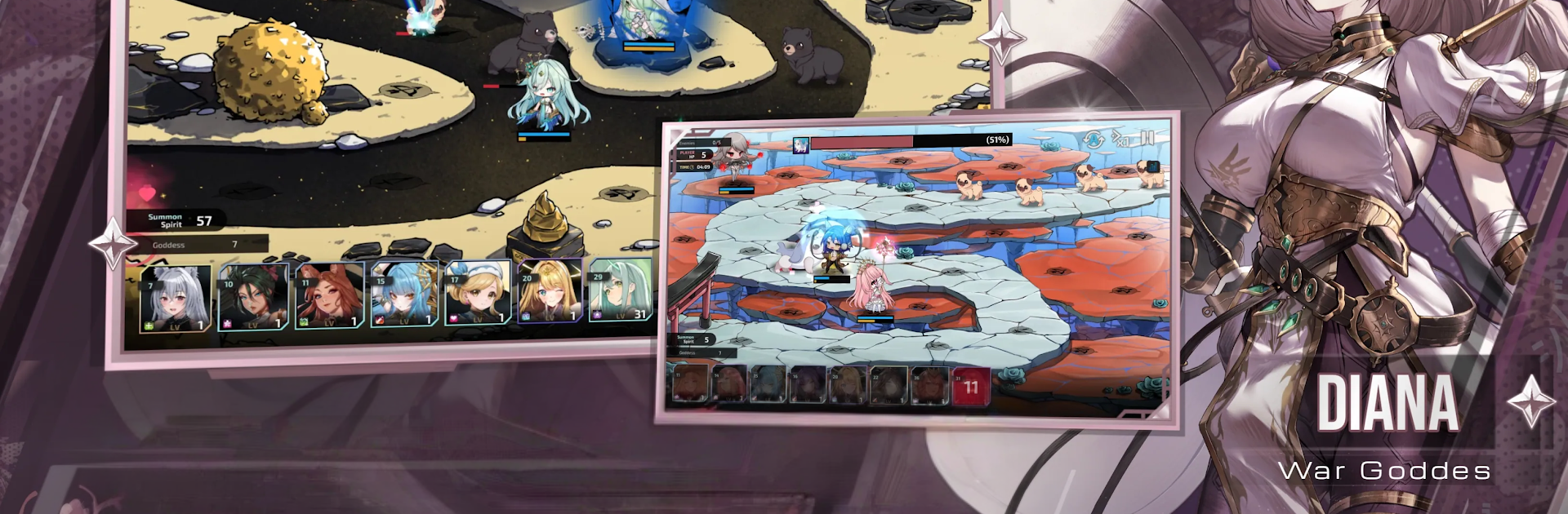
Shiba Wars: Goddess Link TD is a Strategy mash-up of smart tower defense and character-focused RPG from Shibamaru. You’re guiding a squad of goddesses—each with their own quirks—through fast waves and longer sieges, juggling placement, timing, and team synergy. It looks cute with chibi units, sounds like an anime thanks to full Japanese voices, and still asks you to think a few moves ahead. Prefer a bigger screen and mouse precision? It plays great on PC with BlueStacks.

Game Features

  • Tactical Tower Defense
  • Drop units, control skill timing, and mix team roles to hold back relentless enemy waves. Small choices add up, and a clever layout can save a shaky run.

  • Fully Voiced Anime Story (Japanese)

  • Follow Lily, the Bunny Goddess, as an ominous threat spreads across the land. Live2D animations and full Japanese voice acting give every scene that “watch-an-episode” feel.

  • Layered Character Growth

  • Strengthen your favorite goddesses through multiple systems: raise levels, push past limits, unlock skills, and sync souls for meaningful stat boosts and new tricks.

  • Adorable Look, Serious Impact

  • Chibi models, snappy effects, and polished UI make battles lively and easy to read without losing the strategic edge.

  • Modes That Test You in Different Ways

  • Boss Rush throws timed, high-pressure fights your way. Conquest stretches resources across long stages where efficiency matters.

  • Earn and Upgrade

  • Grab materials from story stages, events, and special missions to fuel upgrades and fine-tune your squad for tougher content.

  • Team-Building Freedom

  • Experiment with compositions built around synergies and skill chains—great for fans of anime games, tower defense, and strategy RPGs.

Make your gaming sessions memorable with precise controls that give you an edge in close combats and visuals that pop up, bringing every character to life.


Game Features

Enhancements

  • Macros
  • Multi Instance
  • Multi Instance Sync
  • Eco Mode
  • Enhancements
Macros

Macros

Skip the boring parts of a game. Play Shiba Wars: Goddess Link TD with Macros and get the edge. Simply record a sequence of commands and execute them at any moment.
Multi Instance

Multi Instance

Why limit to one game on your phone when you can play many on your PC? Open multiple instances of Shiba Wars: Goddess Link TD at once with Multi-Instance. Leverage the power of different accounts by doing more.
Multi Instance Sync

Multi Instance Sync

Get the best out of Shiba Wars: Goddess Link TD with Multi-Instance Sync. Play the game from different accounts and build your own empire. Use Multi-instance sync to repeat the action in the main BlueStacks instance on all other instances.
Eco Mode

Eco Mode

Find the rarest heroes by making multiple summons in Shiba Wars: Goddess Link TD. And while you are at it, reduce your PC’s resource consumption with the Eco Mode. Farm efficiently. Get the best results.
Read More

How to Download and Play Shiba Wars: Goddess Link TD on PC or Mac

  • Download and install BlueStacks on your PC or Mac

  • Complete Google sign-in to access the Play Store, or do it later

  • Look for Shiba Wars: Goddess Link TD in the search bar at the top right corner

  • Click to install Shiba Wars: Goddess Link TD from the search results

  • Complete Google sign-in (if you skipped step 2) to install Shiba Wars: Goddess Link TD

  • Click the Shiba Wars: Goddess Link TD icon on the home screen to start playing

video
Watch Video

Minimum System Requirements

With BlueStacks 5, you can get started on a PC that fulfills the following requirements.

  • Operating System

    Microsoft Windows 7 or above, macOS 11 (Big Sur) or above

  • Processor

    Intel, AMD or Apple Silicon Processor

  • RAM

    at least 4GB

  • HDD

    10GB Free Disk Space

Note:

* You must be an Administrator on your PC. Up to date graphics drivers from Microsoft or the chipset vendor.

Shiba Wars: Goddess Link TD - FAQs

  • How to play Shiba Wars: Goddess Link TD on Windows PC & Mac?

    Play Shiba Wars: Goddess Link TD on your PC or Mac by following these simple steps.

    • Click on 'Play Shiba Wars: Goddess Link TD on PC’ to download BlueStacks
    • Install it and log-in to Google Play Store
    • Launch and play the game.
  • Why is BlueStacks the fastest and safest platform to play games on PC?

    BlueStacks respects your privacy and is always safe and secure to use. It does not carry any malware, spyware, or any sort of additional software that could harm your PC.

    It is engineered to optimize speed and performance for a seamless gaming experience.

  • What are Shiba Wars: Goddess Link TD PC requirements?

    Minimum requirement to run Shiba Wars: Goddess Link TD on your PC

    • OS: Microsoft Windows 7 or above MacOS 11 (Big Sur) or above
    • Processor: Intel, AMD or Apple Silicon Processor
    • RAM: Your PC must have at least 4GB of RAM. (Note that having 4GB or more disk space is not a substitute for RAM)
    • HDD: 10GB Free Disk Space.
    • You must be an Administrator on your PC.