Tank Battle: Normandy

Tank Battle: Normandy

Strategy

| Hunted Cow Studios Ltd

Play on PC with BlueStacks or from our cloud

  • Overview
  • Game Features
  • How to Play

Page Modified On: August 14, 2026

Play Tank Battle: Normandy on PC or Mac

Bring your A-game to Tank Battle: Normandy, the Strategy game sensation from Hunted Cow Studios Ltd. Give your gameplay the much-needed boost with precise game controls, high FPS graphics, and top-tier features on your PC or Mac with BlueStacks.

About the Game
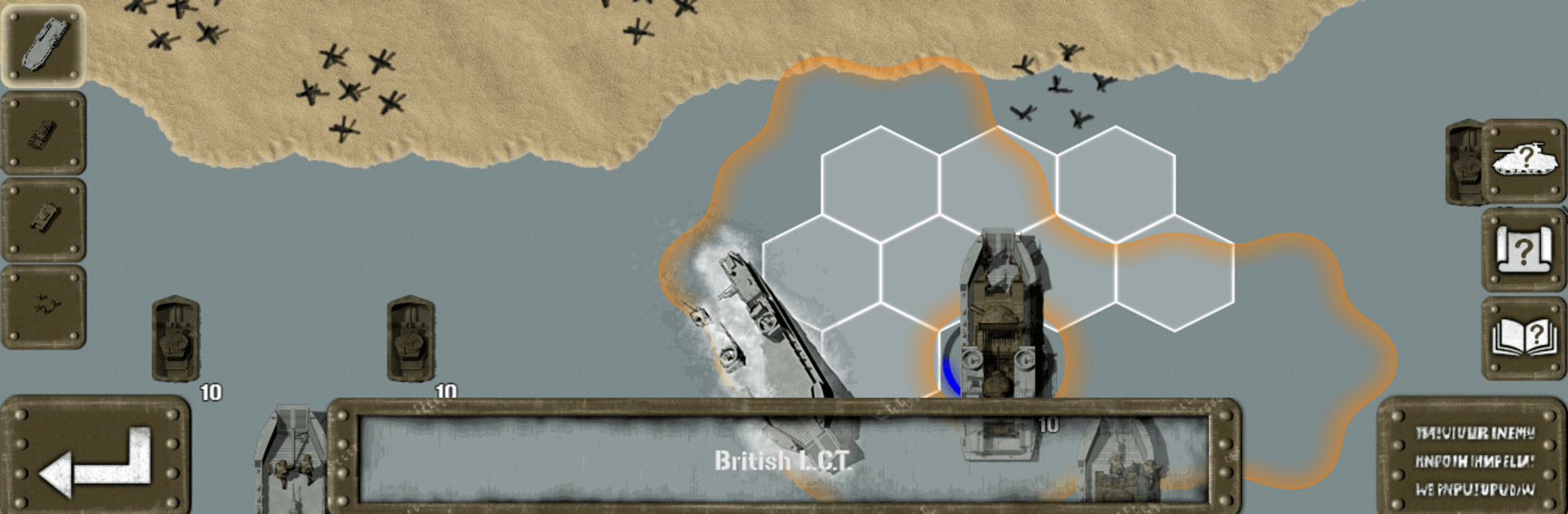
Tank Battle: Normandy drops you into the tense, boots-on-sand chaos of D‑Day and the hard push that followed. It’s a Strategy experience where careful planning, combined arms, and a little nerve decide who owns the beachhead and who falls back. Command Allied landings or dig in with German defenses, manage engineers and armor, and fight across hedgerows and towns that can turn on you in a heartbeat.

Game Features
– Play Either Side: Lead British or American forces ashore, or take command of German armor, bunkers, and artillery to blunt the attack.
– D‑Day, Recreated: Tackle large amphibious operations inspired by Omaha, Utah, Gold, and Sword, complete with landings, obstacles, and brutal first waves.
– Specialized Tools of War: Roll out Churchill bridgelayers, Sherman Crab minesweepers, Sherman DD amphibious tanks, AVREs for bunker busting, Fireflies, Kangaroos, and authentic LCT/LCVP landing craft.
– 23 Hand‑Crafted Missions: Push through four massive beach assaults and a mix of historical and themed scenarios that steadily raise the stakes.
– Guided Onboarding: A British tutorial campaign eases you in with off‑map bombardments and landing craft before the fights get heavier; an American mini‑campaign follows.
– Over 100 Unique Units: From infantry squads to heavy armor and support assets, each piece has a job—use the right tool for the terrain.
– Battlefields with Personality: Fortified beaches, tight towns, and bocage country force different tactics—tanks dominate in the open, infantry rules the streets.
– Real Tactics, Real Payoff: Flank for better results, call indirect fire, clear mines, lay bridges, mount and dismount troops, and work the high ground to your advantage.
– Clear Combat Info: Detailed breakdowns and a handy map zoom help you read the field and make smarter calls under pressure.
– Troop Experience Matters: Raw, Average, Veteran, and Elite tiers change how units perform and survive a tough exchange.
– More to Conquer: Optional add‑on campaigns expand the war from multiple perspectives if you want even more scenarios to chew on.
– Nice on a Bigger Screen: Prefer commanding from your desk? It plays smoothly on BlueStacks without getting in the way of the action.

Start playing Tank Battle: Normandy on BlueStacks and get a smoother, more comfortable PC or Mac setup.


Game Features

Enhancements

  • Macros
  • Multi Instance
  • Multi Instance Sync
  • Eco Mode
  • Enhancements
Macros

Macros

Skip the boring parts of a game. Play Tank Battle: Normandy with Macros and get the edge. Simply record a sequence of commands and execute them at any moment.
Multi Instance

Multi Instance

Why limit to one game on your phone when you can play many on your PC? Open multiple instances of Tank Battle: Normandy at once with Multi-Instance. Leverage the power of different accounts by doing more.
Multi Instance Sync

Multi Instance Sync

Get the best out of Tank Battle: Normandy with Multi-Instance Sync. Play the game from different accounts and build your own empire. Use Multi-instance sync to repeat the action in the main BlueStacks instance on all other instances.
Eco Mode

Eco Mode

Find the rarest heroes by making multiple summons in Tank Battle: Normandy. And while you are at it, reduce your PC’s resource consumption with the Eco Mode. Farm efficiently. Get the best results.
Read More

How to Download and Play Tank Battle: Normandy on PC or Mac

  • Download and install BlueStacks on your PC or Mac

  • Complete Google sign-in to access the Play Store, or do it later

  • Look for Tank Battle: Normandy in the search bar at the top right corner

  • Click to install Tank Battle: Normandy from the search results

  • Complete Google sign-in (if you skipped step 2) to install Tank Battle: Normandy

  • Click the Tank Battle: Normandy icon on the home screen to start playing

video
Watch Video

Minimum System Requirements

With BlueStacks 5, you can get started on a PC that fulfills the following requirements.

  • Operating System

    Microsoft Windows 7 or above, macOS 11 (Big Sur) or above

  • Processor

    Intel, AMD or Apple Silicon Processor

  • RAM

    at least 4GB

  • HDD

    10GB Free Disk Space

Note:

* You must be an Administrator on your PC. Up to date graphics drivers from Microsoft or the chipset vendor.

Tank Battle: Normandy - FAQs

  • How to play Tank Battle: Normandy on Windows PC & Mac?

    Play Tank Battle: Normandy on your PC or Mac by following these simple steps.

    • Click on 'Play Tank Battle: Normandy on PC’ to download BlueStacks
    • Install it and log-in to Google Play Store
    • Launch and play the game.
  • Why is BlueStacks the fastest and safest platform to play games on PC?

    BlueStacks respects your privacy and is always safe and secure to use. It does not carry any malware, spyware, or any sort of additional software that could harm your PC.

    It is engineered to optimize speed and performance for a seamless gaming experience.

  • What are Tank Battle: Normandy PC requirements?

    Minimum requirement to run Tank Battle: Normandy on your PC

    • OS: Microsoft Windows 7 or above MacOS 11 (Big Sur) or above
    • Processor: Intel, AMD or Apple Silicon Processor
    • RAM: Your PC must have at least 4GB of RAM. (Note that having 4GB or more disk space is not a substitute for RAM)
    • HDD: 10GB Free Disk Space.
    • You must be an Administrator on your PC.