The Last Interstellar Traveler

The Last Interstellar Traveler

Strategy

| SevenPirates

Play on PC with BlueStacks or from our cloud

  • Overview
  • Game Features
  • How to Play

Page Modified On: August 10, 2026

Play The Last Interstellar Traveler on PC or Mac

The Last Interstellar Traveler brings the Strategy genre to life, and throws up exciting challenges for gamers. Developed by SevenPirates, this Android game is best experienced on BlueStacks, the World’s #1 app player for PC and Mac users.

About the Game

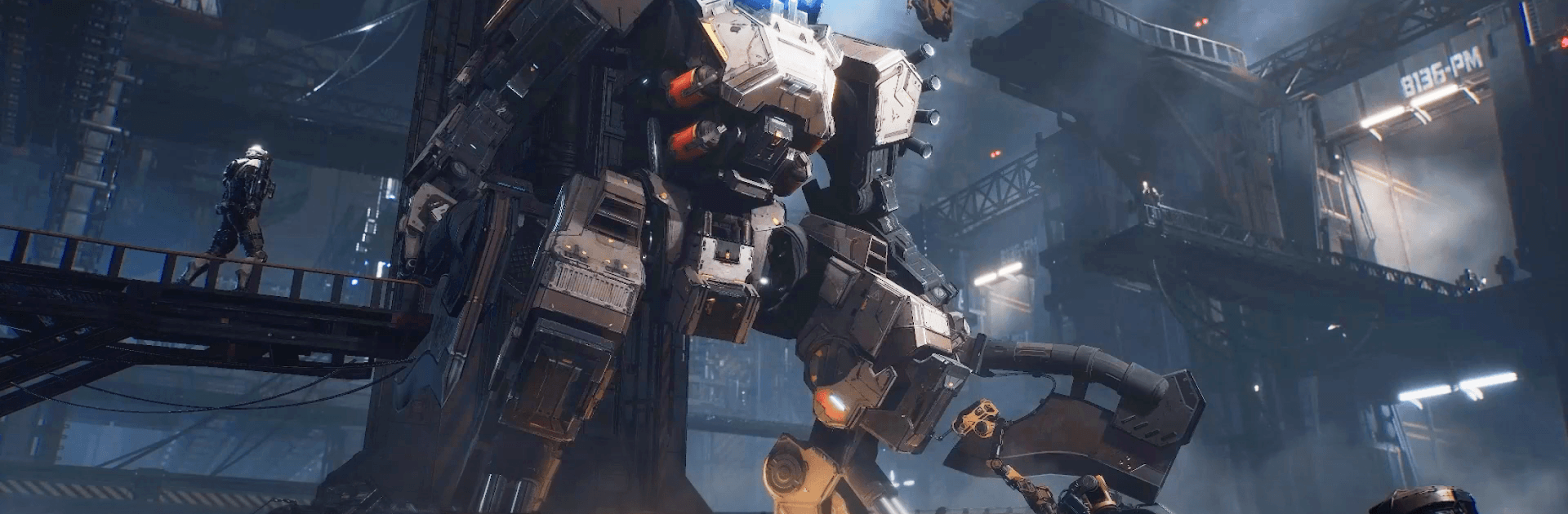
The Last Interstellar Traveler is a Strategy game about staking humanity’s claim on the hostile Charon planet. You’ll pilot powerful mechs, build a forward base, and make tough calls as alien swarms and towering beasts close in from every direction. Prefer a monitor? It runs smoothly on PC with BlueStacks, too.

Game Features

  • Real-time squad control: Drop units, react on the fly, and outmaneuver sudden ambushes. Timing your skills and repositioning under pressure makes every fight feel tense and hands-on.

  • 3D mech roster with personality: Command a lineup of detailed, futuristic machines—snipers that pick targets clean, heavy frames that soak damage, and artillery that clears lanes. Each chassis brings different skills to the field.

  • Charon’s wild biomes: March across frozen poles, parched deserts, dense jungles, and volatile volcanic zones. Changing terrain keeps battles fresh and nudges you to tweak tactics.

  • Choices that matter: Meet survivors, opportunists, and would‑be allies. Your decisions shape who stands with you, who turns against you, and how the larger campaign plays out.

  • Colossal foes and hungry swarms: Face massive sand-burrowers and mysterious heavy-water beasts that guard valuable resources. Win, and you’ll secure the materials your outpost needs to grow.

  • Build the foothold: Expand facilities, bolster defenses, and keep your production lines humming so frontline units stay supplied and mission-ready.

  • Alliance city sieges: Team up with players worldwide for large-scale assaults and defenses. Coordinate roles, set rally timings, and grind down fortified targets together.

BlueStacks gives you more room to focus on the game and less time adjusting around mobile limitations.


Game Features

Enhancements

  • Macros
  • Multi Instance
  • Multi Instance Sync
  • Eco Mode
  • Enhancements
Macros

Macros

Skip the boring parts of a game. Play The Last Interstellar Traveler with Macros and get the edge. Simply record a sequence of commands and execute them at any moment.
Multi Instance

Multi Instance

Why limit to one game on your phone when you can play many on your PC? Open multiple instances of The Last Interstellar Traveler at once with Multi-Instance. Leverage the power of different accounts by doing more.
Multi Instance Sync

Multi Instance Sync

Get the best out of The Last Interstellar Traveler with Multi-Instance Sync. Play the game from different accounts and build your own empire. Use Multi-instance sync to repeat the action in the main BlueStacks instance on all other instances.
Eco Mode

Eco Mode

Find the rarest heroes by making multiple summons in The Last Interstellar Traveler. And while you are at it, reduce your PC’s resource consumption with the Eco Mode. Farm efficiently. Get the best results.
Read More

How to Download and Play The Last Interstellar Traveler on PC or Mac

  • Download and install BlueStacks on your PC or Mac

  • Complete Google sign-in to access the Play Store, or do it later

  • Look for The Last Interstellar Traveler in the search bar at the top right corner

  • Click to install The Last Interstellar Traveler from the search results

  • Complete Google sign-in (if you skipped step 2) to install The Last Interstellar Traveler

  • Click the The Last Interstellar Traveler icon on the home screen to start playing

video
Watch Video

Minimum System Requirements

With BlueStacks 5, you can get started on a PC that fulfills the following requirements.

  • Operating System

    Microsoft Windows 7 or above, macOS 11 (Big Sur) or above

  • Processor

    Intel, AMD or Apple Silicon Processor

  • RAM

    at least 4GB

  • HDD

    10GB Free Disk Space

Note:

* You must be an Administrator on your PC. Up to date graphics drivers from Microsoft or the chipset vendor.

The Last Interstellar Traveler - FAQs

  • How to play The Last Interstellar Traveler on Windows PC & Mac?

    Play The Last Interstellar Traveler on your PC or Mac by following these simple steps.

    • Click on 'Play The Last Interstellar Traveler on PC’ to download BlueStacks
    • Install it and log-in to Google Play Store
    • Launch and play the game.
  • Why is BlueStacks the fastest and safest platform to play games on PC?

    BlueStacks respects your privacy and is always safe and secure to use. It does not carry any malware, spyware, or any sort of additional software that could harm your PC.

    It is engineered to optimize speed and performance for a seamless gaming experience.

  • What are The Last Interstellar Traveler PC requirements?

    Minimum requirement to run The Last Interstellar Traveler on your PC

    • OS: Microsoft Windows 7 or above MacOS 11 (Big Sur) or above
    • Processor: Intel, AMD or Apple Silicon Processor
    • RAM: Your PC must have at least 4GB of RAM. (Note that having 4GB or more disk space is not a substitute for RAM)
    • HDD: 10GB Free Disk Space.
    • You must be an Administrator on your PC.