Transport Tycoon Manager

Transport Tycoon Manager

Strategy

| Alda Games

Play on PC with BlueStacks or from our cloud

  • Overview
  • Game Features
  • How to Play

Page Modified On: August 14, 2026

Play Transport Tycoon Manager on PC or Mac

Play Transport Tycoon Manager by Alda Games on PC or Mac with BlueStacks. Use a bigger screen, mouse and keyboard controls, and smoother performance while you play.

About the Game

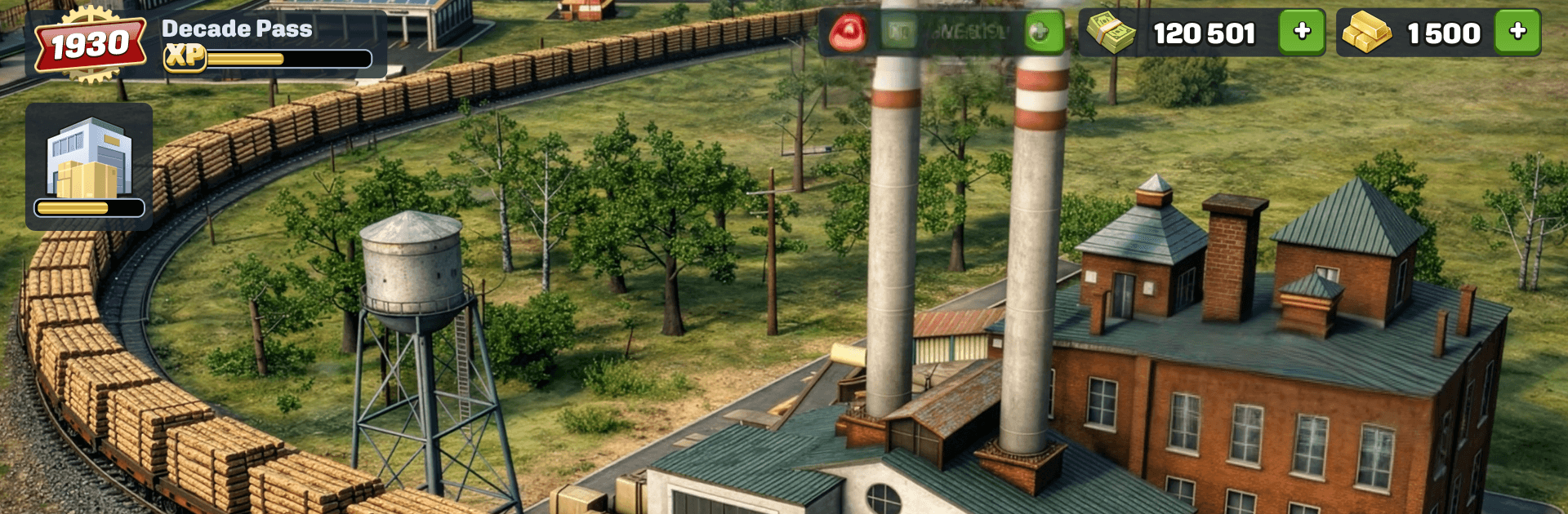
Transport Tycoon Manager is a Strategy game about building a thriving transportation empire from scratch. You start in 1930s America with a modest operation and grow into a powerhouse that moves people and cargo by rail, road, sea, and air. Every route you plan, vehicle you upgrade, and contract you accept nudges the economy of entire regions. Prefer a bigger screen and precision controls? It runs smoothly on PC with BlueStacks.

Game Features

  • From 1930s Roots to Modern Tech: Begin in an era of steam engines and propeller planes, then push through decades of innovation, changing markets, and new mechanics as your network expands.
  • Four Ways to Move: Operate trains, trucks, ships, and planes—each with distinct strengths, costs, and upgrade paths—so you can match the right vehicle to the right job.
  • Smart Supply Chains: Link mines, farms, and factories to ports and cities. Balance production and demand to keep freight flowing without bottlenecks or empty runs.
  • Era Events and Challenges: Navigate fuel shortages, wartime disruptions, and environmental pressures that force you to rethink routes and fleets on the fly.
  • Your City, Your Hub: Upgrade your main city to unlock fresh routes, attract more passengers, and boost industrial output across your entire map.
  • Upgrades Everywhere: Improve vehicles, stations, depots, and production buildings. Tune capacity, speed, and reliability to squeeze more value from each mile traveled.
  • Contracts that Matter: Complete contracts to earn XP and unlock new regions, each with distinct biomes, terrain quirks, and economic puzzles to crack.
  • Profit Through Optimization: Tweak distances, cargo mixes, and turnaround times to maximize margins while keeping service dependable and fast.

Start your journey now. Download the game on BlueStacks, invite your friends, and march on a new adventure.


Game Features

Enhancements

  • Macros
  • Multi Instance
  • Multi Instance Sync
  • Eco Mode
  • Enhancements
Macros

Macros

Skip the boring parts of a game. Play Transport Tycoon Manager with Macros and get the edge. Simply record a sequence of commands and execute them at any moment.
Multi Instance

Multi Instance

Why limit to one game on your phone when you can play many on your PC? Open multiple instances of Transport Tycoon Manager at once with Multi-Instance. Leverage the power of different accounts by doing more.
Multi Instance Sync

Multi Instance Sync

Get the best out of Transport Tycoon Manager with Multi-Instance Sync. Play the game from different accounts and build your own empire. Use Multi-instance sync to repeat the action in the main BlueStacks instance on all other instances.
Eco Mode

Eco Mode

Find the rarest heroes by making multiple summons in Transport Tycoon Manager. And while you are at it, reduce your PC’s resource consumption with the Eco Mode. Farm efficiently. Get the best results.
Read More

How to Download and Play Transport Tycoon Manager on PC or Mac

  • Download and install BlueStacks on your PC or Mac

  • Complete Google sign-in to access the Play Store, or do it later

  • Look for Transport Tycoon Manager in the search bar at the top right corner

  • Click to install Transport Tycoon Manager from the search results

  • Complete Google sign-in (if you skipped step 2) to install Transport Tycoon Manager

  • Click the Transport Tycoon Manager icon on the home screen to start playing

video
Watch Video

Minimum System Requirements

With BlueStacks 5, you can get started on a PC that fulfills the following requirements.

  • Operating System

    Microsoft Windows 7 or above, macOS 11 (Big Sur) or above

  • Processor

    Intel, AMD or Apple Silicon Processor

  • RAM

    at least 4GB

  • HDD

    10GB Free Disk Space

Note:

* You must be an Administrator on your PC. Up to date graphics drivers from Microsoft or the chipset vendor.

Transport Tycoon Manager - FAQs

  • How to play Transport Tycoon Manager on Windows PC & Mac?

    Play Transport Tycoon Manager on your PC or Mac by following these simple steps.

    • Click on 'Play Transport Tycoon Manager on PC’ to download BlueStacks
    • Install it and log-in to Google Play Store
    • Launch and play the game.
  • Why is BlueStacks the fastest and safest platform to play games on PC?

    BlueStacks respects your privacy and is always safe and secure to use. It does not carry any malware, spyware, or any sort of additional software that could harm your PC.

    It is engineered to optimize speed and performance for a seamless gaming experience.

  • What are Transport Tycoon Manager PC requirements?

    Minimum requirement to run Transport Tycoon Manager on your PC

    • OS: Microsoft Windows 7 or above MacOS 11 (Big Sur) or above
    • Processor: Intel, AMD or Apple Silicon Processor
    • RAM: Your PC must have at least 4GB of RAM. (Note that having 4GB or more disk space is not a substitute for RAM)
    • HDD: 10GB Free Disk Space.
    • You must be an Administrator on your PC.