How to Install and Play Angry Birds Friends on PC with BlueStacks

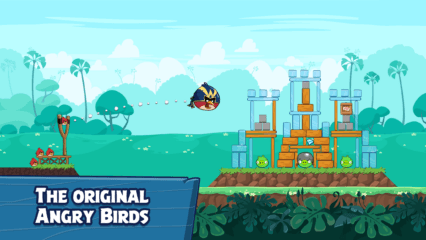
Angry Birds Friends is a fun puzzle game where players launch birds with a slingshot to defeat the famous green piggies. Each level acts like a small challenge where you must think about angles, power, and timing to knock down structures and clear the stage. The goal is to destroy the piggies and earn the highest score possible.
The game stands out because it adds a competitive twist to the classic Angry Birds formula. Instead of only playing alone, you can compete with players around the world in weekly tournaments. Every week introduces dozens of fresh puzzle levels, which gives players new ways to test their slingshot skills.
Players can also take part in special events and one-on-one battles where quick thinking and good aim make the difference between winning and losing. As you progress, you collect feathers to level up your birds and increase their scoring power. Higher scores help you climb leaderboards and show how good your aim really is.
How to Install Angry Birds Friends on PC
- Visit the game’s page and press the “Play Angry Birds Friends on PC” button.
- Download the installer and open the file from your browser’s downloads area.
- Install BlueStacks and start the program on your PC or Mac.
- Log in to the Google Play Store, download the game, and begin playing.
How to Install Angry Birds Friends on Mac with BlueStacks Air
- Download BlueStacks Air: Visit the game’s page and click the “Play Angry Birds Friends on Mac” button to download the installer.
- Install BlueStacks Air: Double-click the BlueStacksInstaller.pkg file and follow the setup steps on your screen.
- Launch and Sign In: Open BlueStacks Air from the Applications folder or Launchpad and sign in with your Google account.
- Install Angry Birds Friends: Search for the game in the Play Store and install it.
- Start Playing: Open Angry Birds Friends and begin your puzzle adventure.
Already Using BlueStacks? Start Angry Birds Friends Quickly
- Open the game’s page and click the “Play Angry Birds Friends on PC” button.
- Launch BlueStacks on your computer.
- Download the game through the BlueStacks Store or Google Play Store.
- Open Angry Birds Friends and begin your first challenge.
Minimum System Requirements
Running Angry Birds Friends on a computer does not require powerful hardware. Most modern PCs and laptops can run the game smoothly with the following setup:
- Operating System: Microsoft Windows 7 or newer, macOS 11 (Big Sur) or newer
- Processor: Intel or AMD CPU, or Apple Silicon processors (M1–M4)
- Memory: At least 4GB RAM
- Storage: Minimum 10GB of free disk space
- Permissions: Administrator rights on your computer
- Graphics Drivers: Updated graphics drivers from Microsoft or the chipset manufacturer
Angry Birds Friends is great for players who enjoy puzzle games mixed with friendly competition. The simple slingshot gameplay makes it easy to pick up, while tournaments and events give players new goals each week. You can play quick rounds during a break or spend time improving your score and climbing the global rankings.
Playing Angry Birds Friends on a PC or Mac with BlueStacks makes the experience even better. The bigger screen helps you see each structure clearly, and using a keyboard and mouse makes aiming the slingshot feel more precise. This setup also allows longer play sessions while enjoying smooth gameplay on your computer.