Drunkn Bar Fight Mobile

Drunkn Bar Fight Mobile

Action

| Ant Hill Games

Play on PC with BlueStacks or from our cloud

  • Overview
  • Game Features
  • How to Play

Page Modified On: October 22, 2026

Play Drunkn Bar Fight Mobile on PC or Mac

Drunkn Bar Fight Mobile brings the Action genre to life, and throws up exciting challenges for gamers. Developed by Ant Hill Games, this Android game is best experienced on BlueStacks, the World’s #1 app player for PC and Mac users.

About the Game

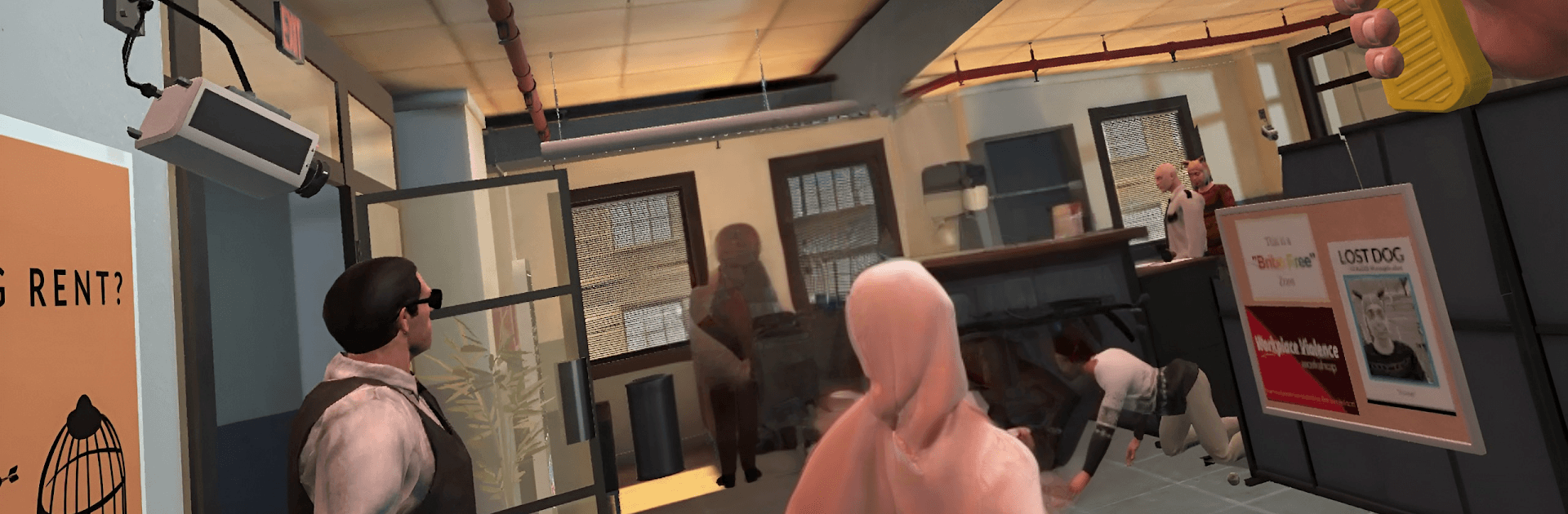
Drunkn Bar Fight Mobile is a slapstick brawler where chaos is the whole point—and the punchline. It’s fast, loud, and proudly ridiculous: walk into a crowded spot, grab whatever’s handy, and start a whirlwind of flying stools, spilled drinks, and shocked onlookers. If you want quick-hit Action with big laughs and wild physics, this is your sandbox. It also plays great on PC with BlueStacks.

Game Features

  • Ragdoll chaos: Every shove, swing, and accidental misfire sends bodies flopping in unpredictable, laugh-out-loud ways, so no two scraps feel the same.
  • Anything becomes a weapon: Bottles, stools, chairs—if you can grab it, you can swing it or launch it (yes, people included).
  • Playgrounds to wreck: Brawl through bars, parties, streets, and supermarkets, each packed with props to test and trouble to make.
  • Quick-hit sessions: Jump in for a few minutes to blow off steam, or stick around and see how far the night spirals.
  • Easy-to-grasp controls: Simple, responsive inputs make grabbing, punching, kicking, and throwing feel instantly natural.
  • Progression and style: Earn rewards as you play and customize your brawler to match your vibe.
  • Bring the crew: Go multiplayer and watch friendships wobble when a flying chair turns a buddy into unexpected décor.
  • Sandbox freedom: Make your own mayhem with open-ended physics that reward curiosity, timing, and a wicked sense of humor.
  • Crowd that reacts: The room gasps, piles on, and escalates every scuffle into a full-blown, hilarious meltdown.

Get ready for a buttery smooth, high-performance gaming action only on BlueStacks.

Game Features

Enhancements

  • Macros
  • Multi Instance
  • Multi Instance Sync
  • Eco Mode
  • Enhancements
Macros

Macros

Skip the boring parts of a game. Play Drunkn Bar Fight Mobile with Macros and get the edge. Simply record a sequence of commands and execute them at any moment.
Multi Instance

Multi Instance

Why limit to one game on your phone when you can play many on your PC? Open multiple instances of Drunkn Bar Fight Mobile at once with Multi-Instance. Leverage the power of different accounts by doing more.
Multi Instance Sync

Multi Instance Sync

Get the best out of Drunkn Bar Fight Mobile with Multi-Instance Sync. Play the game from different accounts and build your own empire. Use Multi-instance sync to repeat the action in the main BlueStacks instance on all other instances.
Eco Mode

Eco Mode

Find the rarest heroes by making multiple summons in Drunkn Bar Fight Mobile. And while you are at it, reduce your PC’s resource consumption with the Eco Mode. Farm efficiently. Get the best results.
Read More

How to Download and Play Drunkn Bar Fight Mobile on PC or Mac

  • Download and install BlueStacks on your PC or Mac

  • Complete Google sign-in to access the Play Store, or do it later

  • Look for Drunkn Bar Fight Mobile in the search bar at the top right corner

  • Click to install Drunkn Bar Fight Mobile from the search results

  • Complete Google sign-in (if you skipped step 2) to install Drunkn Bar Fight Mobile

  • Click the Drunkn Bar Fight Mobile icon on the home screen to start playing

video
Watch Video

Minimum System Requirements

With BlueStacks 5, you can get started on a PC that fulfills the following requirements.

  • Operating System

    Microsoft Windows 7 or above, macOS 11 (Big Sur) or above

  • Processor

    Intel, AMD or Apple Silicon Processor

  • RAM

    at least 4GB

  • HDD

    10GB Free Disk Space

Note:

* You must be an Administrator on your PC. Up to date graphics drivers from Microsoft or the chipset vendor.

Drunkn Bar Fight Mobile - FAQs

  • How to play Drunkn Bar Fight Mobile on Windows PC & Mac?

    Play Drunkn Bar Fight Mobile on your PC or Mac by following these simple steps.

    • Click on 'Play Drunkn Bar Fight Mobile on PC’ to download BlueStacks
    • Install it and log-in to Google Play Store
    • Launch and play the game.
  • Why is BlueStacks the fastest and safest platform to play games on PC?

    BlueStacks respects your privacy and is always safe and secure to use. It does not carry any malware, spyware, or any sort of additional software that could harm your PC.

    It is engineered to optimize speed and performance for a seamless gaming experience.

  • What are Drunkn Bar Fight Mobile PC requirements?

    Minimum requirement to run Drunkn Bar Fight Mobile on your PC

    • OS: Microsoft Windows 7 or above MacOS 11 (Big Sur) or above
    • Processor: Intel, AMD or Apple Silicon Processor
    • RAM: Your PC must have at least 4GB of RAM. (Note that having 4GB or more disk space is not a substitute for RAM)
    • HDD: 10GB Free Disk Space.
    • You must be an Administrator on your PC.