Dark City: Amsterdam (F2P)

Dark City: Amsterdam (F2P)

Adventure

| Friendly Fox Games

Play on PC with BlueStacks or from our cloud

  • Overview
  • Game Features
  • How to Play

Page Modified On: April 13, 2026

Play Dark City: Amsterdam (F2P) on PC or Mac

Bring your A-game to Dark City: Amsterdam (F2P), the Adventure game sensation from Friendly Fox Games. Give your gameplay the much-needed boost with precise game controls, high FPS graphics, and top-tier features on your PC or Mac with BlueStacks.

About the Game

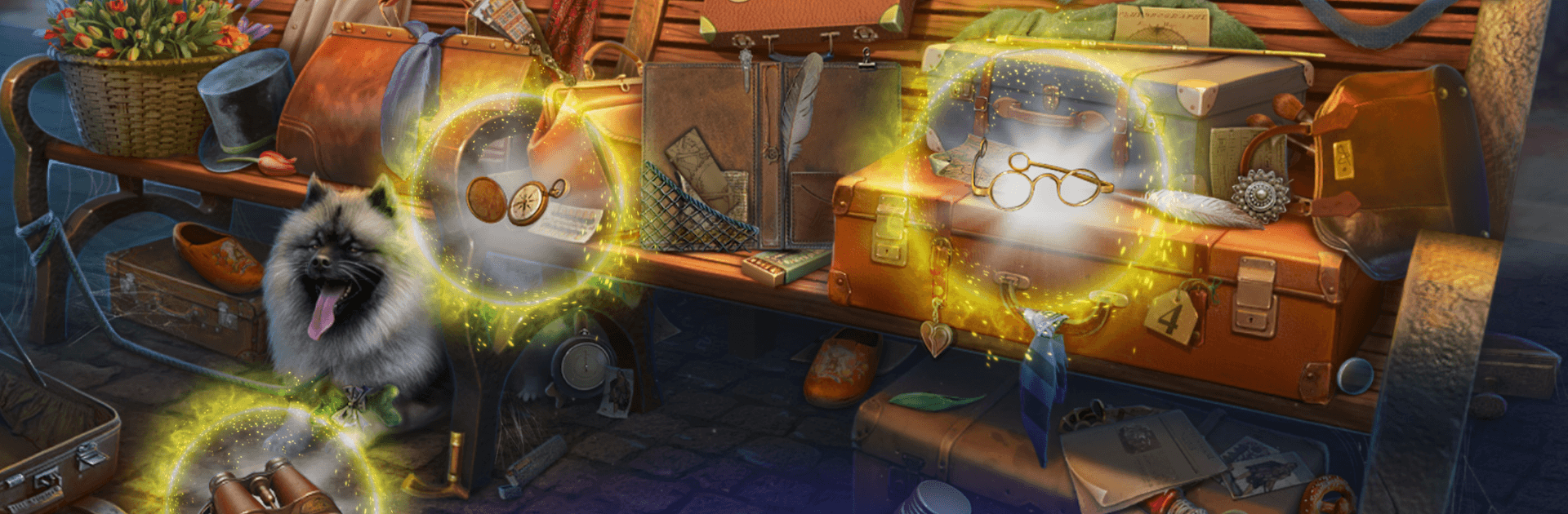
Dark City: Amsterdam (F2P) is an Adventure from Friendly Fox Games that drops you into a moody mystery on the city’s canal-lined streets. A ghost ship—the infamous Flying Dutchman—has drifted back into port, and its crew of spectral sailors might be more than scary stories. As Agatha, a sharp-eyed detective, you’ll pick through hidden-object scenes, crack smart logic puzzles, and follow leads that test whether the legend holds water or it’s all an elaborate setup.

Game Features

  • Legendary Case: Investigate reports of the Flying Dutchman haunting Amsterdam and separate superstition from the facts as Agatha.
  • Hidden-Object Hunts: Search richly detailed scenes for clues, tools, and secrets that push the case forward.
  • Smart Puzzles & Mini-Games: Tackle brainteasers and escape-room style challenges that reward observation and reasoning.
  • A City to Explore: Wander through more than 40 distinct locations—foggy docks, grand halls, shadowy alleys—each hiding its own surprises.
  • Choices That Matter: Make decisions that influence the investigation and can lead to different outcomes.
  • Eerie Atmosphere: A dark, suspenseful tone with subtle twists, mysterious characters, and plenty of red herrings.
  • Free Case, Optional Help: Play the main investigation for free; if a puzzle stumps you, optional hints are available.
  • Built for the Way You Play: Smooth on mobile and comfortable on PC with BlueStacks if you prefer a bigger screen and mouse controls.

Ready to top the leaderboard? We bet you do. Let precise controls and sharp visuals optimized on BlueStacks lead you to victory.


Game Features

Enhancements

  • Macros
  • Multi Instance
  • Multi Instance Sync
  • Script
  • Enhancements
Macros

Macros

Automate the predictable in Dark City: Amsterdam (F2P) and transform your gameplay with Macros. Get access to inventive Macros in the BlueStacks Macro Community
Multi Instance

Multi Instance

Play Dark City: Amsterdam (F2P) on one window. And chat with your friend on the other. Press CTRL + Shift + 8 to open the Multi-Instance Manager. And start creating fresh instances or clone an existing one.
Multi Instance Sync

Multi Instance Sync

Play Dark City: Amsterdam (F2P) with the power of Multi-Instance Sync. Replicate what you are doing on the main instance on all other instances. Level up faster, play more.
Script

Script

Script your way to gaming glory in Dark City: Amsterdam (F2P) with BlueStacks Script. Write and run a set of commands to automate repeated tasks. Trigger the command by assigning it to any key.
Read More

How to Download and Play Dark City: Amsterdam (F2P) on PC or Mac

  • Download and install BlueStacks on your PC or Mac

  • Complete Google sign-in to access the Play Store, or do it later

  • Look for Dark City: Amsterdam (F2P) in the search bar at the top right corner

  • Click to install Dark City: Amsterdam (F2P) from the search results

  • Complete Google sign-in (if you skipped step 2) to install Dark City: Amsterdam (F2P)

  • Click the Dark City: Amsterdam (F2P) icon on the home screen to start playing

video
Watch Video

Minimum System Requirements

With BlueStacks 5, you can get started on a PC that fulfills the following requirements.

  • Operating System

    Microsoft Windows 7 or above, macOS 11 (Big Sur) or above

  • Processor

    Intel, AMD or Apple Silicon Processor

  • RAM

    at least 4GB

  • HDD

    10GB Free Disk Space

Note:

* You must be an Administrator on your PC. Up to date graphics drivers from Microsoft or the chipset vendor.

Dark City: Amsterdam (F2P) - FAQs

  • How to play Dark City: Amsterdam (F2P) on Windows PC & Mac?

    Play Dark City: Amsterdam (F2P) on your PC or Mac by following these simple steps.

    • Click on 'Play Dark City: Amsterdam (F2P) on PC’ to download BlueStacks
    • Install it and log-in to Google Play Store
    • Launch and play the game.
  • Why is BlueStacks the fastest and safest platform to play games on PC?

    BlueStacks respects your privacy and is always safe and secure to use. It does not carry any malware, spyware, or any sort of additional software that could harm your PC.

    It is engineered to optimize speed and performance for a seamless gaming experience.

  • What are Dark City: Amsterdam (F2P) PC requirements?

    Minimum requirement to run Dark City: Amsterdam (F2P) on your PC

    • OS: Microsoft Windows 7 or above MacOS 11 (Big Sur) or above
    • Processor: Intel, AMD or Apple Silicon Processor
    • RAM: Your PC must have at least 4GB of RAM. (Note that having 4GB or more disk space is not a substitute for RAM)
    • HDD: 10GB Free Disk Space.
    • You must be an Administrator on your PC.