Kids Truck: City Builder Games

Kids Truck: City Builder Games

Educational

| GoKids! publishing

Play on PC with BlueStacks or from our cloud

  • Overview
  • Game Features
  • How to Play

Page Modified On: September 12, 2025

Play Kids Truck: City Builder Games on PC or Mac

From the innovators and creators at GoKids! publishing, Kids Truck: City Builder Games is another fun addition to the World of Educational games. Go beyond your mobile screen and play it bigger and better on your PC or Mac. An immersive experience awaits you.

About the Game

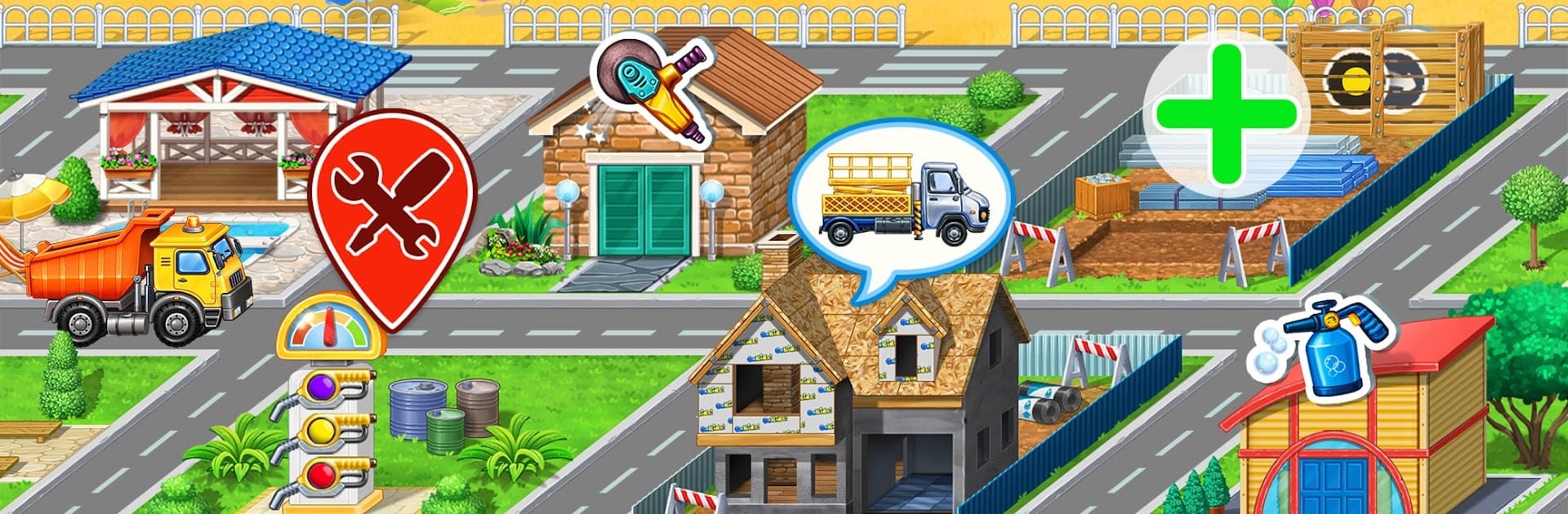
Kids Truck: City Builder Games is an Educational sandbox where kids get hands-on with building a bustling city. They’ll drive real construction trucks, fix up roads, and put together homes step by step. It’s playful, easy to grasp, and packed with small tasks that feel like big achievements.

Game Features

  • Build a growing town: Start with unfinished lots and turn them into a lively city. Choose buildings, add details, and watch neighborhoods come to life.
  • Real construction trucks: Operate kid-favorite machines like a bulldozer, excavator, dump truck, crane, concrete mixer, loader, tractor, and more. Each truck has a job to do.
  • Step-by-step construction: Dig the ground, pour concrete, lift beams, haul materials—kids learn how a building gets made from the first scoop to the final touch.
  • Vehicle care mini-games: Solve simple puzzles, wash muddy wheels, refuel, make quick fixes, and even assemble parts to build a truck.
  • Interactive home design: Swap roofs, windows, and colors. Tap on objects to see how they react and change the look of your growing city.
  • Traffic helper tasks: Patch potholes, clear obstacles, and manage intersections so the streets keep moving. Earn rewards and keep townspeople happy.
  • Roles to try on: Builder, mechanic, city planner—kids switch roles naturally, building creativity, problem-solving, and coordination along the way.
  • Made for young players: Clear prompts, simple controls, and calm pacing make it friendly for ages 2–10. Works even without Wi‑Fi.
  • Big-screen option: Want a roomier view of your city? You can also play on PC with BlueStacks.

Created by GoKids! publishing. Genre: Educational.

Slay your opponents with your epic moves. Play it your way on BlueStacks and dominate the battlefield.


Game Features

Enhancements

  • Macros
  • Multi Instance
  • Multi Instance Sync
  • Script
  • Enhancements
Macros

Macros

Automate the predictable in Kids Truck: City Builder Games and transform your gameplay with Macros. Get access to inventive Macros in the BlueStacks Macro Community
Multi Instance

Multi Instance

Play Kids Truck: City Builder Games on one window. And chat with your friend on the other. Press CTRL + Shift + 8 to open the Multi-Instance Manager. And start creating fresh instances or clone an existing one.
Multi Instance Sync

Multi Instance Sync

Play Kids Truck: City Builder Games with the power of Multi-Instance Sync. Replicate what you are doing on the main instance on all other instances. Level up faster, play more.
Script

Script

Script your way to gaming glory in Kids Truck: City Builder Games with BlueStacks Script. Write and run a set of commands to automate repeated tasks. Trigger the command by assigning it to any key.
Read More

How to Download and Play Kids Truck: City Builder Games on PC or Mac

  • Download and install BlueStacks on your PC or Mac

  • Complete Google sign-in to access the Play Store, or do it later

  • Look for Kids Truck: City Builder Games in the search bar at the top right corner

  • Click to install Kids Truck: City Builder Games from the search results

  • Complete Google sign-in (if you skipped step 2) to install Kids Truck: City Builder Games

  • Click the Kids Truck: City Builder Games icon on the home screen to start playing

video
Watch Video

Minimum System Requirements

With BlueStacks 5, you can get started on a PC that fulfills the following requirements.

  • Operating System

    Microsoft Windows 7 or above, macOS 11 (Big Sur) or above

  • Processor

    Intel, AMD or Apple Silicon Processor

  • RAM

    at least 4GB

  • HDD

    10GB Free Disk Space

Note:

* You must be an Administrator on your PC. Up to date graphics drivers from Microsoft or the chipset vendor.

Kids Truck: City Builder Games - FAQs

  • How to play Kids Truck: City Builder Games on Windows PC & Mac?

    Play Kids Truck: City Builder Games on your PC or Mac by following these simple steps.

    • Click on 'Play Kids Truck: City Builder Games on PC’ to download BlueStacks
    • Install it and log-in to Google Play Store
    • Launch and play the game.
  • Why is BlueStacks the fastest and safest platform to play games on PC?

    BlueStacks respects your privacy and is always safe and secure to use. It does not carry any malware, spyware, or any sort of additional software that could harm your PC.

    It is engineered to optimize speed and performance for a seamless gaming experience.

  • What are Kids Truck: City Builder Games PC requirements?

    Minimum requirement to run Kids Truck: City Builder Games on your PC

    • OS: Microsoft Windows 7 or above MacOS 11 (Big Sur) or above
    • Processor: Intel, AMD or Apple Silicon Processor
    • RAM: Your PC must have at least 4GB of RAM. (Note that having 4GB or more disk space is not a substitute for RAM)
    • HDD: 10GB Free Disk Space.
    • You must be an Administrator on your PC.