I Am Bird
I Am Bird

I Am Bird

Role Playing

| Estoty

Play on PC with BlueStacks or from our cloud

  • Overview
  • Game Features
  • How to Play

Page Modified On: December 26, 2025

Play I Am Bird on PC or Mac

From the innovators and creators at Estoty, I Am Bird is another fun addition to the World of Role Playing games. Go beyond your mobile screen and play it bigger and better on your PC or Mac. An immersive experience awaits you.

About the Game

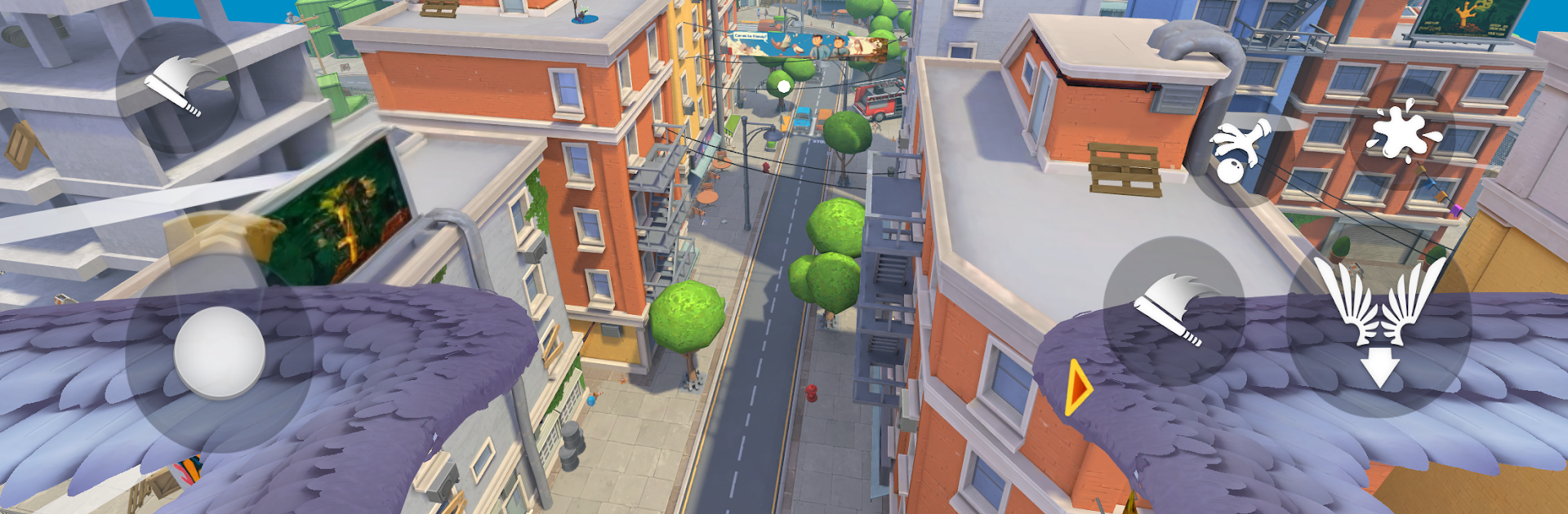
I Am Bird from Estoty lets you be the city’s cheekiest resident: a pigeon with places to be and trouble to make. You’ll slip through traffic, skim rooftops, and stir up street-level drama just by flapping where you shouldn’t. It’s a Role Playing take on urban chaos where you decide whether you’re a charming crumb collector or a full-on feathery menace.

Game Features

  • Open-Sky Playground: Cruise over rooftops, café patios, markets, and power lines. Nudge cups, snatch fries, pocket shiny odds and ends—almost everything invites a little mischief.
  • People Who React: Some folks share snacks, others squeal, and a few get mad fast. Your antics change how the crowd behaves, so the city feels alive (and occasionally furious).
  • Flight That Feels Good: Glide, dive, brake, and thread tight gaps with responsive physics that make every turn and swoop feel intentional.
  • Choose Your Kind of Chaos: Beg nicely, pickpocket pockets and tables, distract with low passes, or drop… messy surprises from above. Your style writes the story.
  • Tiny Bird, Big Stories: One quick fly-by can spark chases, laughs, and accidental slapstick. No two runs play out the same.
  • Role-Play Your Pigeon: Be polite, petty, or gloriously annoying—the way you act shapes how pedestrians treat you and how the city opens up.
  • Plays Great on PC: Prefer a bigger view and precise controls? Fire it up on BlueStacks and enjoy smooth flying with your setup.

Ready to top the leaderboard? We bet you do. Let precise controls and sharp visuals optimized on BlueStacks lead you to victory.


Game Features

Enhancements

  • Macros
  • Rerolling
  • Eco Mode
  • Multi Instance Sync
  • Enhancements
Macros

Macros

Focus more on the fun part of the game, skip the tedious aspects. Master I Am Bird with Macros. Record yourself completing the monotonous tasks you wish to automate and replay them later with just one keypress.
Rerolling

Rerolling

Speed up the rerolling process in I Am Bird. Perform multiple summons and keep looking for the best Heroes. Use Multi-Instance sync to replicate the rerolling mechanism in all instances.
Eco Mode

Eco Mode

Farm in-game resources with ease in I Am Bird. Enable the Eco Mode when running the game in multiple instances. And lower your PC's resource consumption.
Multi Instance Sync

Multi Instance Sync

With the Multi-instance Sync, you can do even more in I Am Bird. Sync the action of the main instance and repeat them in real time for all other instances. Sync and sit back, let the game progress unfold.
Read More

How to Download and Play I Am Bird on PC or Mac

  • Download and install BlueStacks on your PC or Mac

  • Complete Google sign-in to access the Play Store, or do it later

  • Look for I Am Bird in the search bar at the top right corner

  • Click to install I Am Bird from the search results

  • Complete Google sign-in (if you skipped step 2) to install I Am Bird

  • Click the I Am Bird icon on the home screen to start playing

video
Watch Video

Minimum System Requirements

With BlueStacks 5, you can get started on a PC that fulfills the following requirements.

  • Operating System

    Microsoft Windows 7 or above, macOS 11 (Big Sur) or above

  • Processor

    Intel, AMD or Apple Silicon Processor

  • RAM

    at least 4GB

  • HDD

    10GB Free Disk Space

Note:

* You must be an Administrator on your PC. Up to date graphics drivers from Microsoft or the chipset vendor.

I Am Bird - FAQs

  • How to play I Am Bird on Windows PC & Mac?

    Play I Am Bird on your PC or Mac by following these simple steps.

    • Click on 'Play I Am Bird on PC’ to download BlueStacks
    • Install it and log-in to Google Play Store
    • Launch and play the game.
  • Why is BlueStacks the fastest and safest platform to play games on PC?

    BlueStacks respects your privacy and is always safe and secure to use. It does not carry any malware, spyware, or any sort of additional software that could harm your PC.

    It is engineered to optimize speed and performance for a seamless gaming experience.

  • What are I Am Bird PC requirements?

    Minimum requirement to run I Am Bird on your PC

    • OS: Microsoft Windows 7 or above MacOS 11 (Big Sur) or above
    • Processor: Intel, AMD or Apple Silicon Processor
    • RAM: Your PC must have at least 4GB of RAM. (Note that having 4GB or more disk space is not a substitute for RAM)
    • HDD: 10GB Free Disk Space.
    • You must be an Administrator on your PC.