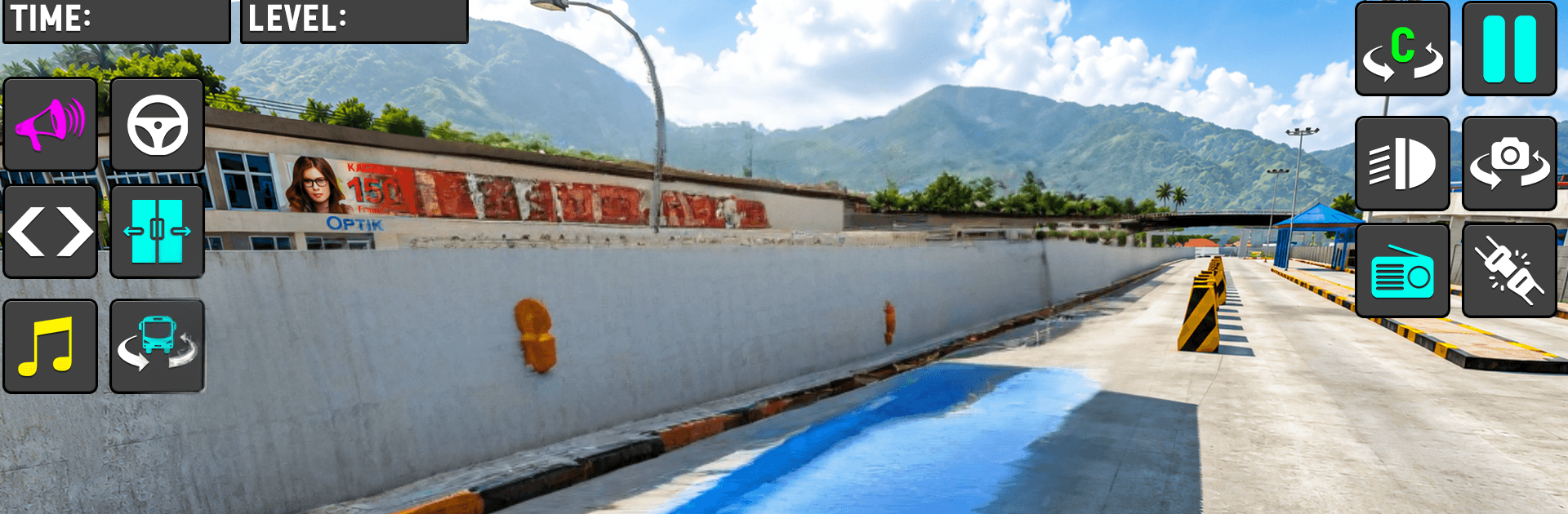
Bus Simulator Bus Driving Game

Bus Simulator Bus Driving Game

Simulation

| XuXu Games

Play on PC with BlueStacks or from our cloud

  • Overview
  • Game Features
  • How to Play

Page Modified On: July 14, 2026

Play Bus Simulator Bus Driving Game on PC or Mac

Bus Simulator Bus Driving Game by XuXu Games has plenty to keep you busy. BlueStacks lets you play it on PC or Mac with more screen space, better control, and fewer mobile limits.

About the Game

Bus Simulator Bus Driving Game puts you behind the wheel of a big coach and sends you off across rugged trails, cliffside bends, and muddy paths. Your job? Pick up riders from remote stops and bring them to safety—no scraping guardrails or missing the schedule. It’s a grounded, skill-first Simulation that rewards careful driving, good timing, and nerves of steel.

Game Features

  • Offroad Challenges: Tackle winding mountain passes, bumpy hills, and slippery dirt tracks that test your focus and patience.
  • Passenger Runs: Collect passengers at scattered stops and deliver them on time, all while keeping the ride smooth and safe.
  • Realistic Handling: Responsive steering and smooth acceleration make tight turns and narrow bridges feel tense but fair.
  • HD Visuals & Animations: Crisp graphics and lively animations bring forests, valleys, and dusty roads to life without clutter.
  • Smart Obstacles: Watch for falling rocks, sharp switchbacks, and sudden dips that can throw you off your line if you’re not ready.
  • Time & Safety Goals: Balance speed with caution—arrive promptly, avoid collisions, and earn your reputation as a reliable driver.
  • Bus Collection: Try different buses and fresh, colorful paint jobs to match your mood or the route ahead.
  • Comfortable Controls: Simple, intuitive inputs that feel natural on mobile—and they pair nicely with BlueStacks on PC if you prefer a bigger view and steadier steering.

Start your journey now. Download the game on BlueStacks, invite your friends, and march on a new adventure.


Game Features

Enhancements

  • Macros
  • Multi Instance
  • Multi Instance Sync
  • Script
  • Enhancements
Macros

Macros

Automate the predictable in Bus Simulator Bus Driving Game and transform your gameplay with Macros. Get access to inventive Macros in the BlueStacks Macro Community
Multi Instance

Multi Instance

Play Bus Simulator Bus Driving Game on one window. And chat with your friend on the other. Press CTRL + Shift + 8 to open the Multi-Instance Manager. And start creating fresh instances or clone an existing one.
Multi Instance Sync

Multi Instance Sync

Play Bus Simulator Bus Driving Game with the power of Multi-Instance Sync. Replicate what you are doing on the main instance on all other instances. Level up faster, play more.
Script

Script

Script your way to gaming glory in Bus Simulator Bus Driving Game with BlueStacks Script. Write and run a set of commands to automate repeated tasks. Trigger the command by assigning it to any key.
Read More

How to Download and Play Bus Simulator Bus Driving Game on PC or Mac

  • Download and install BlueStacks on your PC or Mac

  • Complete Google sign-in to access the Play Store, or do it later

  • Look for Bus Simulator Bus Driving Game in the search bar at the top right corner

  • Click to install Bus Simulator Bus Driving Game from the search results

  • Complete Google sign-in (if you skipped step 2) to install Bus Simulator Bus Driving Game

  • Click the Bus Simulator Bus Driving Game icon on the home screen to start playing

video
Watch Video

Minimum System Requirements

With BlueStacks 5, you can get started on a PC that fulfills the following requirements.

  • Operating System

    Microsoft Windows 7 or above, macOS 11 (Big Sur) or above

  • Processor

    Intel, AMD or Apple Silicon Processor

  • RAM

    at least 4GB

  • HDD

    10GB Free Disk Space

Note:

* You must be an Administrator on your PC. Up to date graphics drivers from Microsoft or the chipset vendor.

Bus Simulator Bus Driving Game - FAQs

  • How to play Bus Simulator Bus Driving Game on Windows PC & Mac?

    Play Bus Simulator Bus Driving Game on your PC or Mac by following these simple steps.

    • Click on 'Play Bus Simulator Bus Driving Game on PC’ to download BlueStacks
    • Install it and log-in to Google Play Store
    • Launch and play the game.
  • Why is BlueStacks the fastest and safest platform to play games on PC?

    BlueStacks respects your privacy and is always safe and secure to use. It does not carry any malware, spyware, or any sort of additional software that could harm your PC.

    It is engineered to optimize speed and performance for a seamless gaming experience.

  • What are Bus Simulator Bus Driving Game PC requirements?

    Minimum requirement to run Bus Simulator Bus Driving Game on your PC

    • OS: Microsoft Windows 7 or above MacOS 11 (Big Sur) or above
    • Processor: Intel, AMD or Apple Silicon Processor
    • RAM: Your PC must have at least 4GB of RAM. (Note that having 4GB or more disk space is not a substitute for RAM)
    • HDD: 10GB Free Disk Space.
    • You must be an Administrator on your PC.