Helicopter Army Simulator

Helicopter Army Simulator

Simulation

| Game Pickle

Play on PC with BlueStacks or from our cloud

  • Overview
  • Game Features
  • How to Play

Page Modified On: August 14, 2026

Play Helicopter Army Simulator on PC or Mac

Helicopter Army Simulator brings the Simulation genre to life, and throws up exciting challenges for gamers. Developed by Game Pickle, this Android game is best experienced on BlueStacks, the World’s #1 app player for PC and Mac users.

About the Game

Helicopter Army Simulator puts you in the pilot’s seat of military choppers across a sprawling desert playground. It’s a Simulation experience that blends free-flight exploring with hands-on missions—sometimes high-risk, sometimes just plain satisfying. Want to skim the dunes, scout hidden points of interest, or jump right into operations? Your call. Prefer playing on PC? BlueStacks handles it smoothly with crisp visuals and precise controls.

Game Features

  • Massive Open Desert
    Explore a huge sandy expanse with villages, outposts, and rugged terrain to skim, circle, and navigate at your own pace.

  • 20 Distinct Operations
    Tackle search-and-rescue runs, convoy protection, timed checkpoint races, landing on moving ships, and nighttime sorties with night vision.

  • Real Military Birds
    Hop into iconic aircraft—attack, transport, and rescue models—including favorites like the Apache, Chinook, and Mi‑8.

  • Firefighting From the Sky
    Scoop up water and douse village fires, balancing weight and altitude while keeping the burn under control.

  • Heavy Lift With Electromagnets
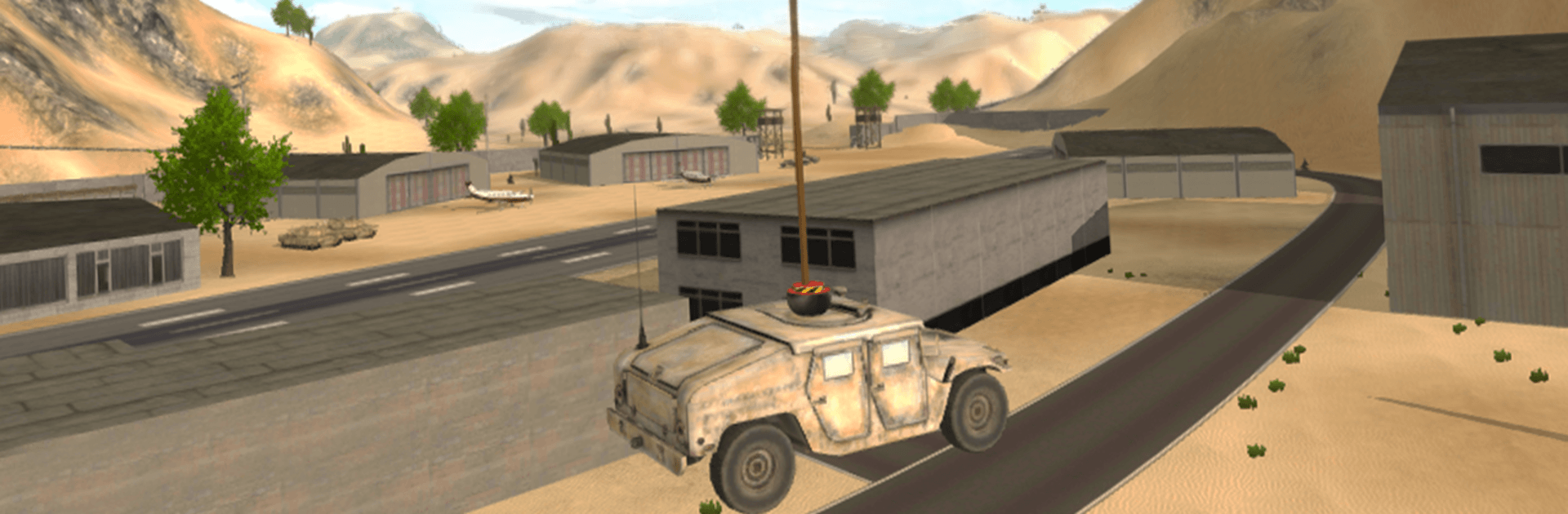
    Hoist tanks and Humvees, relocate cargo, and place heavy equipment exactly where the mission needs it.

  • Combat Support When It Counts
    Clear roadblocks with rockets, provide air cover, and keep ground units safe as you escort them back to base.

  • Free-Flight or Mission Hunt
    Roam the map for points of interest or use the mini-map to expand and pinpoint operation sites fast.

  • Authentic Flight Feel
    Enjoy believable rotor physics tuned to feel weighty and responsive without being punishing.

  • Flexible Views and Controls
    Swap between cockpit and third-person cameras, use smooth control options, and line up those tricky landings with confidence.

  • Performance Options
    Adjust graphics settings to keep everything running smoothly, whether you’re skimming low or soaring high.

Start your journey now. Download the game on BlueStacks, invite your friends, and march on a new adventure.


Game Features

Enhancements

  • Macros
  • Multi Instance
  • Multi Instance Sync
  • Script
  • Enhancements
Macros

Macros

Automate the predictable in Helicopter Army Simulator and transform your gameplay with Macros. Get access to inventive Macros in the BlueStacks Macro Community
Multi Instance

Multi Instance

Play Helicopter Army Simulator on one window. And chat with your friend on the other. Press CTRL + Shift + 8 to open the Multi-Instance Manager. And start creating fresh instances or clone an existing one.
Multi Instance Sync

Multi Instance Sync

Play Helicopter Army Simulator with the power of Multi-Instance Sync. Replicate what you are doing on the main instance on all other instances. Level up faster, play more.
Script

Script

Script your way to gaming glory in Helicopter Army Simulator with BlueStacks Script. Write and run a set of commands to automate repeated tasks. Trigger the command by assigning it to any key.
Read More

How to Download and Play Helicopter Army Simulator on PC or Mac

  • Download and install BlueStacks on your PC or Mac

  • Complete Google sign-in to access the Play Store, or do it later

  • Look for Helicopter Army Simulator in the search bar at the top right corner

  • Click to install Helicopter Army Simulator from the search results

  • Complete Google sign-in (if you skipped step 2) to install Helicopter Army Simulator

  • Click the Helicopter Army Simulator icon on the home screen to start playing

video
Watch Video

Minimum System Requirements

With BlueStacks 5, you can get started on a PC that fulfills the following requirements.

  • Operating System

    Microsoft Windows 7 or above, macOS 11 (Big Sur) or above

  • Processor

    Intel, AMD or Apple Silicon Processor

  • RAM

    at least 4GB

  • HDD

    10GB Free Disk Space

Note:

* You must be an Administrator on your PC. Up to date graphics drivers from Microsoft or the chipset vendor.

Helicopter Army Simulator - FAQs

  • How to play Helicopter Army Simulator on Windows PC & Mac?

    Play Helicopter Army Simulator on your PC or Mac by following these simple steps.

    • Click on 'Play Helicopter Army Simulator on PC’ to download BlueStacks
    • Install it and log-in to Google Play Store
    • Launch and play the game.
  • Why is BlueStacks the fastest and safest platform to play games on PC?

    BlueStacks respects your privacy and is always safe and secure to use. It does not carry any malware, spyware, or any sort of additional software that could harm your PC.

    It is engineered to optimize speed and performance for a seamless gaming experience.

  • What are Helicopter Army Simulator PC requirements?

    Minimum requirement to run Helicopter Army Simulator on your PC

    • OS: Microsoft Windows 7 or above MacOS 11 (Big Sur) or above
    • Processor: Intel, AMD or Apple Silicon Processor
    • RAM: Your PC must have at least 4GB of RAM. (Note that having 4GB or more disk space is not a substitute for RAM)
    • HDD: 10GB Free Disk Space.
    • You must be an Administrator on your PC.