Ragdoll Simulator: Break Body

Ragdoll Simulator: Break Body

Simulation

| Black Box Digital

Play on PC with BlueStacks or from our cloud

  • Overview
  • Game Features
  • How to Play

Page Modified On: June 29, 2026

Play Ragdoll Simulator: Break Body on PC or Mac

Ragdoll Simulator: Break Body brings the Simulation genre to life, and throws up exciting challenges for gamers. Developed by Black Box Digital, this Android game is best experienced on BlueStacks, the World’s #1 app player for PC and Mac users.

About the Game

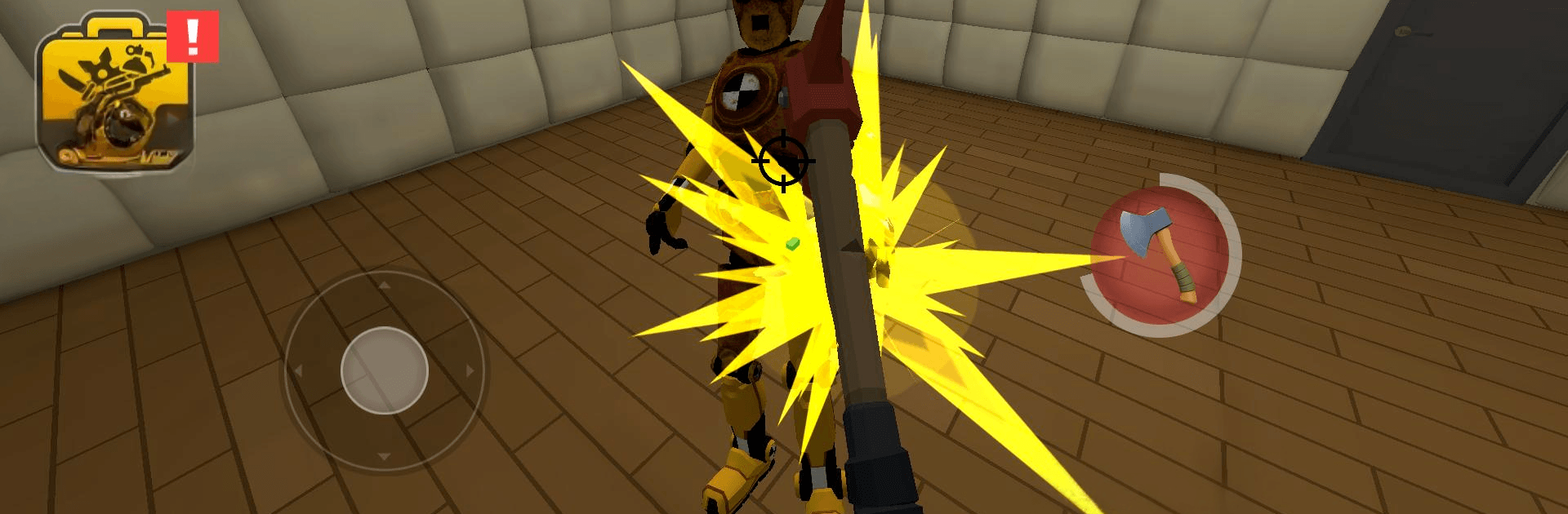
Ragdoll Simulator: Break Body turns stress relief into a first-person playground. You’re standing right in front of a crash-test dummy with a ridiculous toolkit and zero pressure—just curiosity, chaos, and a lot of clattering bones. It’s a loose, physical Simulation sandbox where the fun is watching what happens when physics decides the outcome.

Game Features

  • First-person smackdowns: Get up close and deliver hits that actually feel like they connect, thanks to punchy feedback and a clear view of every wobble and collapse.
  • A pile of tools: Start with the basics, then unlock a growing stash—bats, blades, pistols, shotguns, and heavier hardware when you’re in a bigger-boom mood.
  • Fire, ice, and volts: Ignite it, freeze it solid, or light up the room with electricity. Mix effects to see how the dummy reacts when everything hits at once.
  • Big, goofy explosions: Toss grenades and plant bombs for maximum mayhem, then watch pieces fly and settle in believable, messy fashion.
  • Ragdoll physics that sell it: Limbs fold, bodies crumple, and rebounds feel right—half the fun is just seeing the weird poses it lands in.
  • Damage that pays off: Every hit fills a progress bar. Fill it, pop a chest, grab soft currency, and add a fresh instrument of destruction to your lineup.
  • Quick and simple controls: Designed for one-hand play, so a 30-second break is enough time to land a few satisfying hits.
  • Pure sandbox freedom: No timers, no mission list—experiment, tinker, and discover your favorite combos at your own pace.
  • Plays nicely on PC: If you prefer a bigger screen and steady performance, it runs smoothly with BlueStacks.

Start your journey now. Download the game on BlueStacks, invite your friends, and march on a new adventure.


Game Features

Enhancements

  • Macros
  • Multi Instance
  • Multi Instance Sync
  • Script
  • Enhancements
Macros

Macros

Automate the predictable in Ragdoll Simulator: Break Body and transform your gameplay with Macros. Get access to inventive Macros in the BlueStacks Macro Community
Multi Instance

Multi Instance

Play Ragdoll Simulator: Break Body on one window. And chat with your friend on the other. Press CTRL + Shift + 8 to open the Multi-Instance Manager. And start creating fresh instances or clone an existing one.
Multi Instance Sync

Multi Instance Sync

Play Ragdoll Simulator: Break Body with the power of Multi-Instance Sync. Replicate what you are doing on the main instance on all other instances. Level up faster, play more.
Script

Script

Script your way to gaming glory in Ragdoll Simulator: Break Body with BlueStacks Script. Write and run a set of commands to automate repeated tasks. Trigger the command by assigning it to any key.
Read More

How to Download and Play Ragdoll Simulator: Break Body on PC or Mac

  • Download and install BlueStacks on your PC or Mac

  • Complete Google sign-in to access the Play Store, or do it later

  • Look for Ragdoll Simulator: Break Body in the search bar at the top right corner

  • Click to install Ragdoll Simulator: Break Body from the search results

  • Complete Google sign-in (if you skipped step 2) to install Ragdoll Simulator: Break Body

  • Click the Ragdoll Simulator: Break Body icon on the home screen to start playing

video
Watch Video

Minimum System Requirements

With BlueStacks 5, you can get started on a PC that fulfills the following requirements.

  • Operating System

    Microsoft Windows 7 or above, macOS 11 (Big Sur) or above

  • Processor

    Intel, AMD or Apple Silicon Processor

  • RAM

    at least 4GB

  • HDD

    10GB Free Disk Space

Note:

* You must be an Administrator on your PC. Up to date graphics drivers from Microsoft or the chipset vendor.

Ragdoll Simulator: Break Body - FAQs

  • How to play Ragdoll Simulator: Break Body on Windows PC & Mac?

    Play Ragdoll Simulator: Break Body on your PC or Mac by following these simple steps.

    • Click on 'Play Ragdoll Simulator: Break Body on PC’ to download BlueStacks
    • Install it and log-in to Google Play Store
    • Launch and play the game.
  • Why is BlueStacks the fastest and safest platform to play games on PC?

    BlueStacks respects your privacy and is always safe and secure to use. It does not carry any malware, spyware, or any sort of additional software that could harm your PC.

    It is engineered to optimize speed and performance for a seamless gaming experience.

  • What are Ragdoll Simulator: Break Body PC requirements?

    Minimum requirement to run Ragdoll Simulator: Break Body on your PC

    • OS: Microsoft Windows 7 or above MacOS 11 (Big Sur) or above
    • Processor: Intel, AMD or Apple Silicon Processor
    • RAM: Your PC must have at least 4GB of RAM. (Note that having 4GB or more disk space is not a substitute for RAM)
    • HDD: 10GB Free Disk Space.
    • You must be an Administrator on your PC.