Soccer Tactic Board
Soccer Tactic Board

Soccer Tactic Board

Sports

| Jan Soukup

Play on PC with BlueStacks or from our cloud

  • Overview
  • Game Features
  • How to Play

Page Modified On: September 02, 2025

Play Soccer Tactic Board on PC or Mac

Explore a whole new adventure with Soccer Tactic Board, a Sports game created by Jan Soukup. Experience great gameplay with BlueStacks, the most popular gaming platform to play Android games on your PC or Mac.

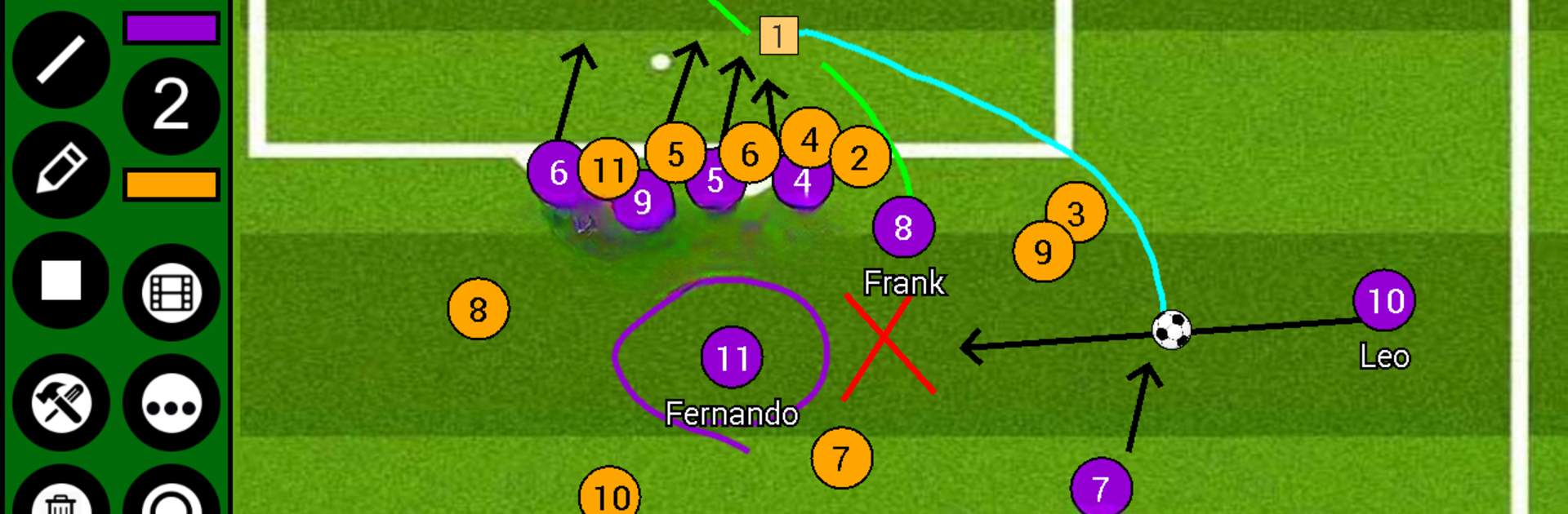
Soccer Tactic Board is not a match sim, it is a digital whiteboard for planning plays. It feels like laying magnets on a locker room board, then sketching lines to show runs, passes, or pressing traps. The app switches fields fast, so a user can work on a full pitch, a half field, or jump straight into set pieces like free kicks, corners, and penalties. The tools are simple but exactly what is needed: solid or dotted arrows, straight lines, a rectangle with numbers for players, a pen for quick scribbles, text labels, and shaded areas to mark zones. Everything snaps into place without much fuss, and if a plan goes sideways there is a quick delete or a full reset.

The neat part is the frame by frame animation. They drop a player here, add an arrow, create the next frame, tweak the next movement, then play it back with adjustable speed to show timing. It saves as a single tactic image or a shareable animation file, so a teammate can import it on their device and see the same thing. There is team management too, so names, numbers, and player size can be set, plus the option to pull in photos or videos for basic analysis. No account nagging, no paywall popping up. On PC with BlueStacks, the mouse makes drawing clean lines way easier and the big screen helps when juggling many runs at once, especially for set piece routines that need tiny adjustments and clear labeling.

Ready to top the leaderboard? We bet you do. Let precise controls and sharp visuals optimized on BlueStacks lead you to victory.


Game Features

Enhancements

  • Macros
  • Multi Instance
  • Multi Instance Sync
  • Script
  • Enhancements
Macros

Macros

Automate the predictable in Soccer Tactic Board and transform your gameplay with Macros. Get access to inventive Macros in the BlueStacks Macro Community
Multi Instance

Multi Instance

Play Soccer Tactic Board on one window. And chat with your friend on the other. Press CTRL + Shift + 8 to open the Multi-Instance Manager. And start creating fresh instances or clone an existing one.
Multi Instance Sync

Multi Instance Sync

Play Soccer Tactic Board with the power of Multi-Instance Sync. Replicate what you are doing on the main instance on all other instances. Level up faster, play more.
Script

Script

Script your way to gaming glory in Soccer Tactic Board with BlueStacks Script. Write and run a set of commands to automate repeated tasks. Trigger the command by assigning it to any key.
Read More

How to Download and Play Soccer Tactic Board on PC or Mac

  • Download and install BlueStacks on your PC or Mac

  • Complete Google sign-in to access the Play Store, or do it later

  • Look for Soccer Tactic Board in the search bar at the top right corner

  • Click to install Soccer Tactic Board from the search results

  • Complete Google sign-in (if you skipped step 2) to install Soccer Tactic Board

  • Click the Soccer Tactic Board icon on the home screen to start playing

video
Watch Video

Minimum System Requirements

With BlueStacks 5, you can get started on a PC that fulfills the following requirements.

  • Operating System

    Microsoft Windows 7 or above, macOS 11 (Big Sur) or above

  • Processor

    Intel, AMD or Apple Silicon Processor

  • RAM

    at least 4GB

  • HDD

    10GB Free Disk Space

Note:

* You must be an Administrator on your PC. Up to date graphics drivers from Microsoft or the chipset vendor.

Soccer Tactic Board - FAQs

  • How to play Soccer Tactic Board on Windows PC & Mac?

    Play Soccer Tactic Board on your PC or Mac by following these simple steps.

    • Click on 'Play Soccer Tactic Board on PC’ to download BlueStacks
    • Install it and log-in to Google Play Store
    • Launch and play the game.
  • Why is BlueStacks the fastest and safest platform to play games on PC?

    BlueStacks respects your privacy and is always safe and secure to use. It does not carry any malware, spyware, or any sort of additional software that could harm your PC.

    It is engineered to optimize speed and performance for a seamless gaming experience.

  • What are Soccer Tactic Board PC requirements?

    Minimum requirement to run Soccer Tactic Board on your PC

    • OS: Microsoft Windows 7 or above MacOS 11 (Big Sur) or above
    • Processor: Intel, AMD or Apple Silicon Processor
    • RAM: Your PC must have at least 4GB of RAM. (Note that having 4GB or more disk space is not a substitute for RAM)
    • HDD: 10GB Free Disk Space.
    • You must be an Administrator on your PC.