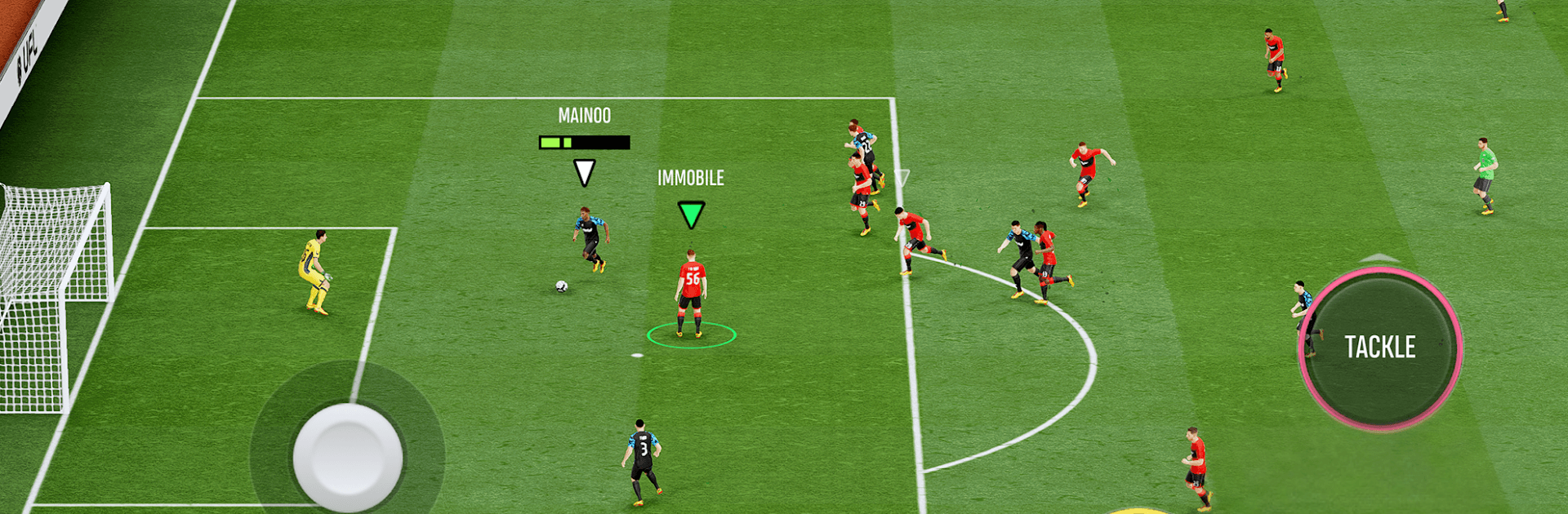
UFL - Soccer Game 2026

UFL - Soccer Game 2026

Sports

| XTEN LIMITED

Play on PC with BlueStacks or from our cloud

  • Overview
  • Game Features
  • How to Play

Page Modified On: May 26, 2026

Play UFL - Soccer Game 2026 on PC or Mac

Play UFL – Soccer Game 2026 by XTEN LIMITED on PC or Mac with BlueStacks. Use a bigger screen, mouse and keyboard controls, and smoother performance while you play.

About the Game

UFL – Soccer Game 2026 is a sharp, competitive soccer sim where your decisions on and off the pitch actually matter. Build a club from scratch, fine-tune tactics, and go head-to-head with real players in a fair, skill-driven environment. Prefer a bigger screen and flexible controls? You can also play it on PC with BlueStacks.

Game Features

  • Skill-First Matches: Wins come from your tactics, timing, and reads—not your wallet. Outthink and outplay opponents to climb the ranks.
  • Build Your Club: Scout and recruit from a deep player pool, shape your best eleven, and set a vision that fits how you want to play.
  • Training That Changes Games: Create focused training plans to grow attributes, sharpen strengths, and address weak spots.
  • Real Team Chemistry: Every transfer, lineup tweak, and role choice affects how your squad gels and performs together.
  • Flexible Formations: Craft complex systems, adjust on the fly, and tailor setups to counter different styles and threats.
  • Authentic Match Feel: Crisp passing, clean tackles, and satisfying finishes give each game real weight and momentum.
  • Global Competition: Test yourself against players worldwide and see how your club stacks up in a truly competitive scene.
  • Constantly Evolving: Expect regular updates shaped by community feedback and the latest happenings in the sport.
  • Play Anywhere: Quick matches fit into a commute or a break, so you can keep your season moving whenever you’ve got a minute.
  • Manager and Player in One: Set the strategy, jump onto the pitch, and make the key moments count.

BlueStacks gives you more room to focus on the game and less time adjusting around mobile limitations.

Game Features

Enhancements

  • Macros
  • Multi Instance
  • Multi Instance Sync
  • Script
  • Enhancements
Macros

Macros

Automate the predictable in UFL - Soccer Game 2026 and transform your gameplay with Macros. Get access to inventive Macros in the BlueStacks Macro Community
Multi Instance

Multi Instance

Play UFL - Soccer Game 2026 on one window. And chat with your friend on the other. Press CTRL + Shift + 8 to open the Multi-Instance Manager. And start creating fresh instances or clone an existing one.
Multi Instance Sync

Multi Instance Sync

Play UFL - Soccer Game 2026 with the power of Multi-Instance Sync. Replicate what you are doing on the main instance on all other instances. Level up faster, play more.
Script

Script

Script your way to gaming glory in UFL - Soccer Game 2026 with BlueStacks Script. Write and run a set of commands to automate repeated tasks. Trigger the command by assigning it to any key.
Read More

How to Download and Play UFL - Soccer Game 2026 on PC or Mac

  • Download and install BlueStacks on your PC or Mac

  • Complete Google sign-in to access the Play Store, or do it later

  • Look for UFL - Soccer Game 2026 in the search bar at the top right corner

  • Click to install UFL - Soccer Game 2026 from the search results

  • Complete Google sign-in (if you skipped step 2) to install UFL - Soccer Game 2026

  • Click the UFL - Soccer Game 2026 icon on the home screen to start playing

video
Watch Video

Minimum System Requirements

With BlueStacks 5, you can get started on a PC that fulfills the following requirements.

  • Operating System

    Microsoft Windows 7 or above, macOS 11 (Big Sur) or above

  • Processor

    Intel, AMD or Apple Silicon Processor

  • RAM

    at least 4GB

  • HDD

    10GB Free Disk Space

Note:

* You must be an Administrator on your PC. Up to date graphics drivers from Microsoft or the chipset vendor.

UFL - Soccer Game 2026 - FAQs

  • How to play UFL - Soccer Game 2026 on Windows PC & Mac?

    Play UFL - Soccer Game 2026 on your PC or Mac by following these simple steps.

    • Click on 'Play UFL - Soccer Game 2026 on PC’ to download BlueStacks
    • Install it and log-in to Google Play Store
    • Launch and play the game.
  • Why is BlueStacks the fastest and safest platform to play games on PC?

    BlueStacks respects your privacy and is always safe and secure to use. It does not carry any malware, spyware, or any sort of additional software that could harm your PC.

    It is engineered to optimize speed and performance for a seamless gaming experience.

  • What are UFL - Soccer Game 2026 PC requirements?

    Minimum requirement to run UFL - Soccer Game 2026 on your PC

    • OS: Microsoft Windows 7 or above MacOS 11 (Big Sur) or above
    • Processor: Intel, AMD or Apple Silicon Processor
    • RAM: Your PC must have at least 4GB of RAM. (Note that having 4GB or more disk space is not a substitute for RAM)
    • HDD: 10GB Free Disk Space.
    • You must be an Administrator on your PC.