Operation Barbarossa

Operation Barbarossa

Strategy

| Joni Nuutinen

Play on PC with BlueStacks or from our cloud

  • Overview
  • Game Features
  • How to Play

Page Modified On: July 20, 2026

Play Operation Barbarossa on PC or Mac

Explore a whole new adventure with Operation Barbarossa, a Strategy game created by Joni Nuutinen. Experience great gameplay with BlueStacks, the most popular gaming platform to play Android games on your PC or Mac.

About the Game

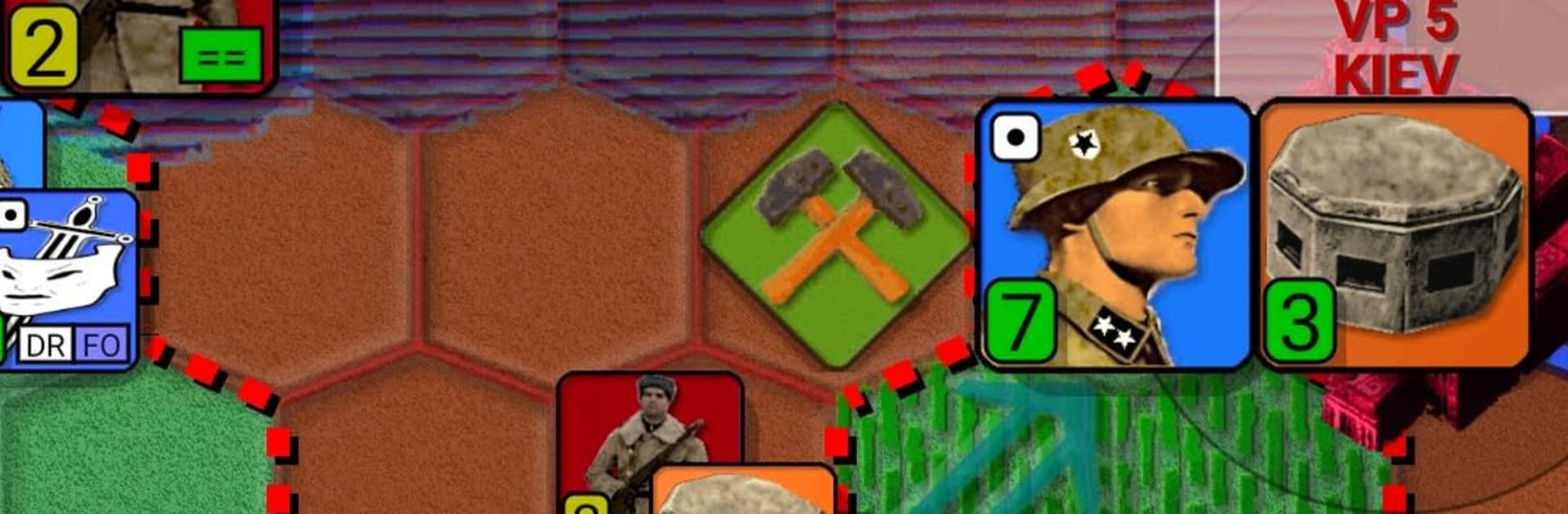
Operation Barbarossa puts you in charge of the 1941 push across the Eastern Front with a lean, turn-based Strategy approach. It’s all about tempo: punch through, encircle, and keep your spearheads moving while mud and snow try to wreck your timetable. Expect tight hex battles where one slip can spiral—and the seasons won’t cut you any slack.

Game Features

  • Tight Map, Quick Turns: The compact campaign keeps things tense and snappy, so you’re always making meaningful moves instead of shuffling pieces forever.
  • Historical Flow: The operation follows a grounded setup, capturing the momentum, setbacks, and shifting balance of the real campaign.
  • Smart Opponent, Fresh Runs: An adaptive AI and built-in variation make each attempt play out a little differently, encouraging experimentation.
  • Reinforcements Over Time: Call in replacements and new unit types as the war drags on—yes, that includes heavy hitters like Tiger I tanks.
  • Veteran Perks: Units gain experience and unlock handy upgrades: stronger attack or defense, extra movement, damage resistance, even crossing rivers without losing time.
  • Full Order of Battle: Field panzers, infantry, motorized formations, Axis allies, air support, and espionage units. The Red Army starts modestly, then rolls in tougher Siberian troops and T‑34s.
  • Weather With Teeth: Spring and autumn mud slow your advance; winter cuts vision and punishes mechanized forces. Plan around the forecast—or pay for it.
  • Flexible Options: Tune difficulty, hex size, and animation speed. Swap unit icons (NATO or REAL) and city styles (Round, Shield, Square, block of houses), and choose what’s shown on the map.
  • Encirclement Pays: Surround enemy formations to reap the big rewards and climb the Hall of Fame leaderboard.
  • Play Your Way: Prefer a larger screen and keyboard controls? You can run it on PC with BlueStacks for a smooth, comfy setup.

Start your journey now. Download the game on BlueStacks, invite your friends, and march on a new adventure.


Game Features

Enhancements

  • Macros
  • Multi Instance
  • Multi Instance Sync
  • Eco Mode
  • Enhancements
Macros

Macros

Skip the boring parts of a game. Play Operation Barbarossa with Macros and get the edge. Simply record a sequence of commands and execute them at any moment.
Multi Instance

Multi Instance

Why limit to one game on your phone when you can play many on your PC? Open multiple instances of Operation Barbarossa at once with Multi-Instance. Leverage the power of different accounts by doing more.
Multi Instance Sync

Multi Instance Sync

Get the best out of Operation Barbarossa with Multi-Instance Sync. Play the game from different accounts and build your own empire. Use Multi-instance sync to repeat the action in the main BlueStacks instance on all other instances.
Eco Mode

Eco Mode

Find the rarest heroes by making multiple summons in Operation Barbarossa. And while you are at it, reduce your PC’s resource consumption with the Eco Mode. Farm efficiently. Get the best results.
Read More

How to Download and Play Operation Barbarossa on PC or Mac

  • Download and install BlueStacks on your PC or Mac

  • Complete Google sign-in to access the Play Store, or do it later

  • Look for Operation Barbarossa in the search bar at the top right corner

  • Click to install Operation Barbarossa from the search results

  • Complete Google sign-in (if you skipped step 2) to install Operation Barbarossa

  • Click the Operation Barbarossa icon on the home screen to start playing

video
Watch Video

Minimum System Requirements

With BlueStacks 5, you can get started on a PC that fulfills the following requirements.

  • Operating System

    Microsoft Windows 7 or above, macOS 11 (Big Sur) or above

  • Processor

    Intel, AMD or Apple Silicon Processor

  • RAM

    at least 4GB

  • HDD

    10GB Free Disk Space

Note:

* You must be an Administrator on your PC. Up to date graphics drivers from Microsoft or the chipset vendor.

Operation Barbarossa - FAQs

  • How to play Operation Barbarossa on Windows PC & Mac?

    Play Operation Barbarossa on your PC or Mac by following these simple steps.

    • Click on 'Play Operation Barbarossa on PC’ to download BlueStacks
    • Install it and log-in to Google Play Store
    • Launch and play the game.
  • Why is BlueStacks the fastest and safest platform to play games on PC?

    BlueStacks respects your privacy and is always safe and secure to use. It does not carry any malware, spyware, or any sort of additional software that could harm your PC.

    It is engineered to optimize speed and performance for a seamless gaming experience.

  • What are Operation Barbarossa PC requirements?

    Minimum requirement to run Operation Barbarossa on your PC

    • OS: Microsoft Windows 7 or above MacOS 11 (Big Sur) or above
    • Processor: Intel, AMD or Apple Silicon Processor
    • RAM: Your PC must have at least 4GB of RAM. (Note that having 4GB or more disk space is not a substitute for RAM)
    • HDD: 10GB Free Disk Space.
    • You must be an Administrator on your PC.