Grand Tractor Farming Games

Grand Tractor Farming Games

Strategy

| Play Street

Play on PC with BlueStacks or from our cloud

  • Overview
  • Game Features
  • How to Play

Page Modified On: September 05, 2025

Play Grand Tractor Farming Games on PC or Mac

Join millions to experience Grand Tractor Farming Games, an exciting Strategy game from Play Street. With BlueStacks App Player, you are always a step ahead of your opponent, ready to outplay them with faster gameplay and better control with the mouse and keyboard on your PC or Mac.

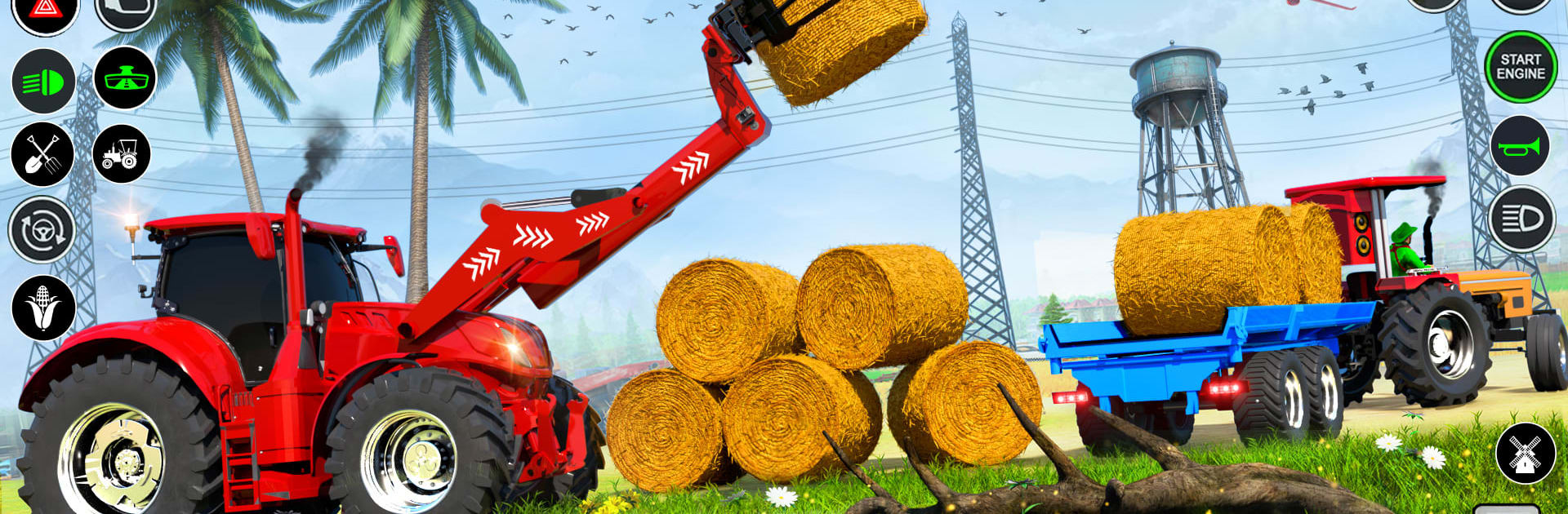
Grand Tractor Farming Games feels like a straightforward farming sim where players hop into a heavy tractor and work through the whole routine, step by step. It starts in the yard, grab the trolley, and head to the fields. Missions guide players through plowing, sowing seeds, watering on schedule, spraying when pests show up, then harvesting and loading grain into the trolley for a run to the market before the timer runs down. The loop is simple but satisfying, more about doing each job cleanly than juggling spreadsheets. The tractors feels weighty without being clumsy, and the camera makes lining up straight rows less annoying than it could be. There are a few tractor options and tools to swap, plus on-screen hints so beginners do not get stuck staring at a field wondering what to do next.

It looks decent for a mobile sim, with bright fields, chunky 3D models, and little dust and soil effects that sell the work. Nothing flashy, but it gets the job done. On PC with BlueStacks, keyboard controls make the long hauls and tight turns easier, and the frame rate holds steady even with big trailers attached. What stands out is how it sticks to the practical chores. Plant on time, water on time, protect the crop, then haul it without tipping the load. It is chill enough for short sessions, family friendly, and does not bury players in menus. A few menus and lines read a bit odd, and some objectives repeat, but if someone likes tractor driving and checking off farm tasks, this scratches that itch without becoming complicated.

Start your journey now. Download the game on BlueStacks, invite your friends, and march on a new adventure.


Game Features

Enhancements

  • Macros
  • Multi Instance
  • Multi Instance Sync
  • Eco Mode
  • Enhancements
Macros

Macros

Skip the boring parts of a game. Play Grand Tractor Farming Games with Macros and get the edge. Simply record a sequence of commands and execute them at any moment.
Multi Instance

Multi Instance

Why limit to one game on your phone when you can play many on your PC? Open multiple instances of Grand Tractor Farming Games at once with Multi-Instance. Leverage the power of different accounts by doing more.
Multi Instance Sync

Multi Instance Sync

Get the best out of Grand Tractor Farming Games with Multi-Instance Sync. Play the game from different accounts and build your own empire. Use Multi-instance sync to repeat the action in the main BlueStacks instance on all other instances.
Eco Mode

Eco Mode

Find the rarest heroes by making multiple summons in Grand Tractor Farming Games. And while you are at it, reduce your PC’s resource consumption with the Eco Mode. Farm efficiently. Get the best results.
Read More

How to Download and Play Grand Tractor Farming Games on PC or Mac

  • Download and install BlueStacks on your PC or Mac

  • Complete Google sign-in to access the Play Store, or do it later

  • Look for Grand Tractor Farming Games in the search bar at the top right corner

  • Click to install Grand Tractor Farming Games from the search results

  • Complete Google sign-in (if you skipped step 2) to install Grand Tractor Farming Games

  • Click the Grand Tractor Farming Games icon on the home screen to start playing

video
Watch Video

Minimum System Requirements

With BlueStacks 5, you can get started on a PC that fulfills the following requirements.

  • Operating System

    Microsoft Windows 7 or above, macOS 11 (Big Sur) or above

  • Processor

    Intel, AMD or Apple Silicon Processor

  • RAM

    at least 4GB

  • HDD

    10GB Free Disk Space

Note:

* You must be an Administrator on your PC. Up to date graphics drivers from Microsoft or the chipset vendor.

Grand Tractor Farming Games - FAQs

  • How to play Grand Tractor Farming Games on Windows PC & Mac?

    Play Grand Tractor Farming Games on your PC or Mac by following these simple steps.

    • Click on 'Play Grand Tractor Farming Games on PC’ to download BlueStacks
    • Install it and log-in to Google Play Store
    • Launch and play the game.
  • Why is BlueStacks the fastest and safest platform to play games on PC?

    BlueStacks respects your privacy and is always safe and secure to use. It does not carry any malware, spyware, or any sort of additional software that could harm your PC.

    It is engineered to optimize speed and performance for a seamless gaming experience.

  • What are Grand Tractor Farming Games PC requirements?

    Minimum requirement to run Grand Tractor Farming Games on your PC

    • OS: Microsoft Windows 7 or above MacOS 11 (Big Sur) or above
    • Processor: Intel, AMD or Apple Silicon Processor
    • RAM: Your PC must have at least 4GB of RAM. (Note that having 4GB or more disk space is not a substitute for RAM)
    • HDD: 10GB Free Disk Space.
    • You must be an Administrator on your PC.