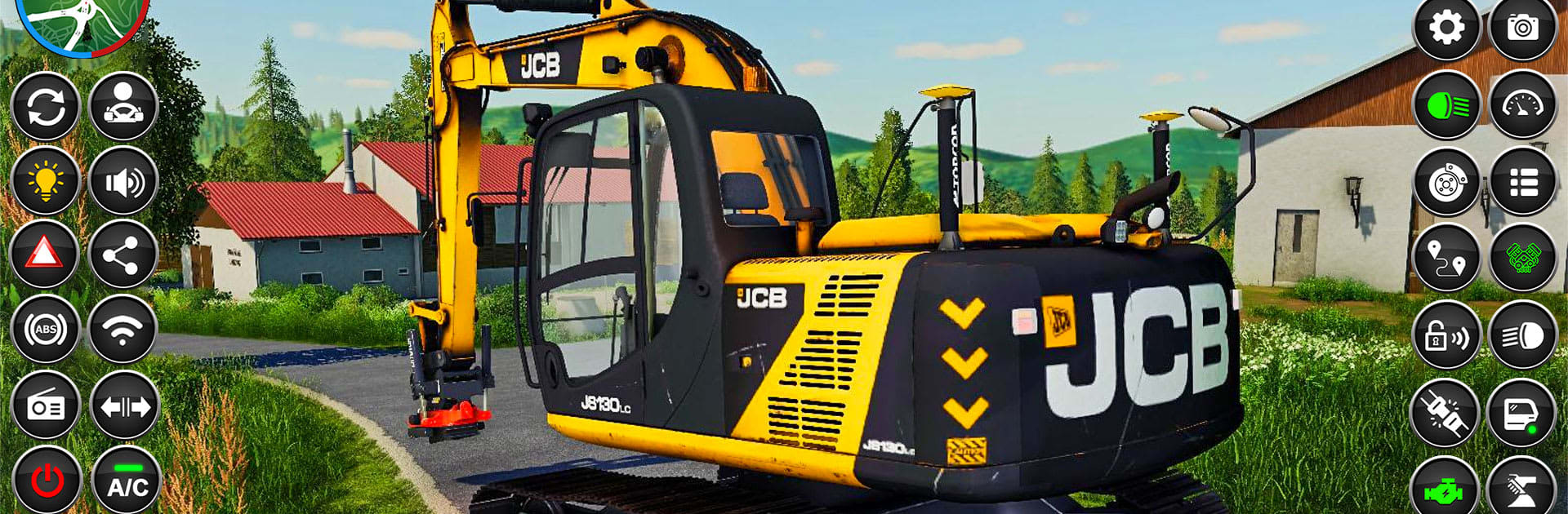
JCB Game: Snow Construction 3D

JCB Game: Snow Construction 3D

Strategy

| Right Solution Inc

Play on PC with BlueStacks or from our cloud

  • Overview
  • Game Features
  • How to Play

Page Modified On: November 28, 2025

Play JCB Game: Snow Construction 3D on PC or Mac

Bring your A-game to JCB Game: Snow Construction 3D, the Strategy game sensation from Right Solution Inc. Give your gameplay the much-needed boost with precise game controls, high FPS graphics, and top-tier features on your PC or Mac with BlueStacks.

JCB Game: Snow Construction 3D feels like a big winter sandbox full of heavy machines. Players swap between excavators, snow bulldozers, loaders, dump trucks, forklifts, and cranes, then grind through bite sized jobs around snowy roads, city streets, and hill stations. One task might be clearing a blocked tunnel or pushing thick snow off a highway, the next is hauling beams on a trailer, laying rail tracks, or rolling a fresh road surface. Each vehicle has its own quirks, so getting the excavator arm lined up, rotating a crane without swinging the load, or backing a long truck on ice needs a bit of patience. It leans more chill and methodical than fast and flashy, which is kind of the point with this style of sim.

Controls are straightforward with a bunch of camera angles to help see bucket edges and wheel placement, and there are short cutscenes that explain what to do before a job starts. Missions pay out to unlock tougher gear, so progress feels steady. Snow and weather make the ground feel slippery, and the audio is surprisingly punchy for engines and hydraulics. Visually it is clean and readable, not blockbuster, but the scenery shifts enough between city, mountain passes, and construction yards to keep things fresh. There is even a railway build thread where players set stations and push track through mountain tunnels, which scratches that builder itch in a different way. It runs offline, which is handy for a quick session.

On PC with BlueStacks, steering and bucket control feel tighter using a keyboard and mouse and the higher frame rate helps with those slow precision moments, like nudging a load into a dump bed without spilling it. The only heads up is that the camera can get fussy in tight spots and physics can feel a little floaty on steep slopes, but once players settle into the rhythm, clearing snow and piecing together roads turns into a strangely relaxing loop.

Get ready for a buttery smooth, high-performance gaming action only on BlueStacks.

Game Features

Enhancements

  • Macros
  • Multi Instance
  • Multi Instance Sync
  • Eco Mode
  • Enhancements
Macros

Macros

Skip the boring parts of a game. Play JCB Game: Snow Construction 3D with Macros and get the edge. Simply record a sequence of commands and execute them at any moment.
Multi Instance

Multi Instance

Why limit to one game on your phone when you can play many on your PC? Open multiple instances of JCB Game: Snow Construction 3D at once with Multi-Instance. Leverage the power of different accounts by doing more.
Multi Instance Sync

Multi Instance Sync

Get the best out of JCB Game: Snow Construction 3D with Multi-Instance Sync. Play the game from different accounts and build your own empire. Use Multi-instance sync to repeat the action in the main BlueStacks instance on all other instances.
Eco Mode

Eco Mode

Find the rarest heroes by making multiple summons in JCB Game: Snow Construction 3D. And while you are at it, reduce your PC’s resource consumption with the Eco Mode. Farm efficiently. Get the best results.
Read More

How to Download and Play JCB Game: Snow Construction 3D on PC or Mac

  • Download and install BlueStacks on your PC or Mac

  • Complete Google sign-in to access the Play Store, or do it later

  • Look for JCB Game: Snow Construction 3D in the search bar at the top right corner

  • Click to install JCB Game: Snow Construction 3D from the search results

  • Complete Google sign-in (if you skipped step 2) to install JCB Game: Snow Construction 3D

  • Click the JCB Game: Snow Construction 3D icon on the home screen to start playing

video
Watch Video

Minimum System Requirements

With BlueStacks 5, you can get started on a PC that fulfills the following requirements.

  • Operating System

    Microsoft Windows 7 or above, macOS 11 (Big Sur) or above

  • Processor

    Intel, AMD or Apple Silicon Processor

  • RAM

    at least 4GB

  • HDD

    10GB Free Disk Space

Note:

* You must be an Administrator on your PC. Up to date graphics drivers from Microsoft or the chipset vendor.

JCB Game: Snow Construction 3D - FAQs

  • How to play JCB Game: Snow Construction 3D on Windows PC & Mac?

    Play JCB Game: Snow Construction 3D on your PC or Mac by following these simple steps.

    • Click on 'Play JCB Game: Snow Construction 3D on PC’ to download BlueStacks
    • Install it and log-in to Google Play Store
    • Launch and play the game.
  • Why is BlueStacks the fastest and safest platform to play games on PC?

    BlueStacks respects your privacy and is always safe and secure to use. It does not carry any malware, spyware, or any sort of additional software that could harm your PC.

    It is engineered to optimize speed and performance for a seamless gaming experience.

  • What are JCB Game: Snow Construction 3D PC requirements?

    Minimum requirement to run JCB Game: Snow Construction 3D on your PC

    • OS: Microsoft Windows 7 or above MacOS 11 (Big Sur) or above
    • Processor: Intel, AMD or Apple Silicon Processor
    • RAM: Your PC must have at least 4GB of RAM. (Note that having 4GB or more disk space is not a substitute for RAM)
    • HDD: 10GB Free Disk Space.
    • You must be an Administrator on your PC.