Pantenite Space Colony Sim

Pantenite Space Colony Sim

Strategy

| Kodsay

Play on PC with BlueStacks or from our cloud

  • Overview
  • Game Features
  • How to Play

Page Modified On: November 10, 2025

Play Pantenite Space Colony Sim on PC or Mac

From the innovators and creators at Kodsay, Pantenite Space Colony Sim is another fun addition to the World of Strategy games. Go beyond your mobile screen and play it bigger and better on your PC or Mac. An immersive experience awaits you.

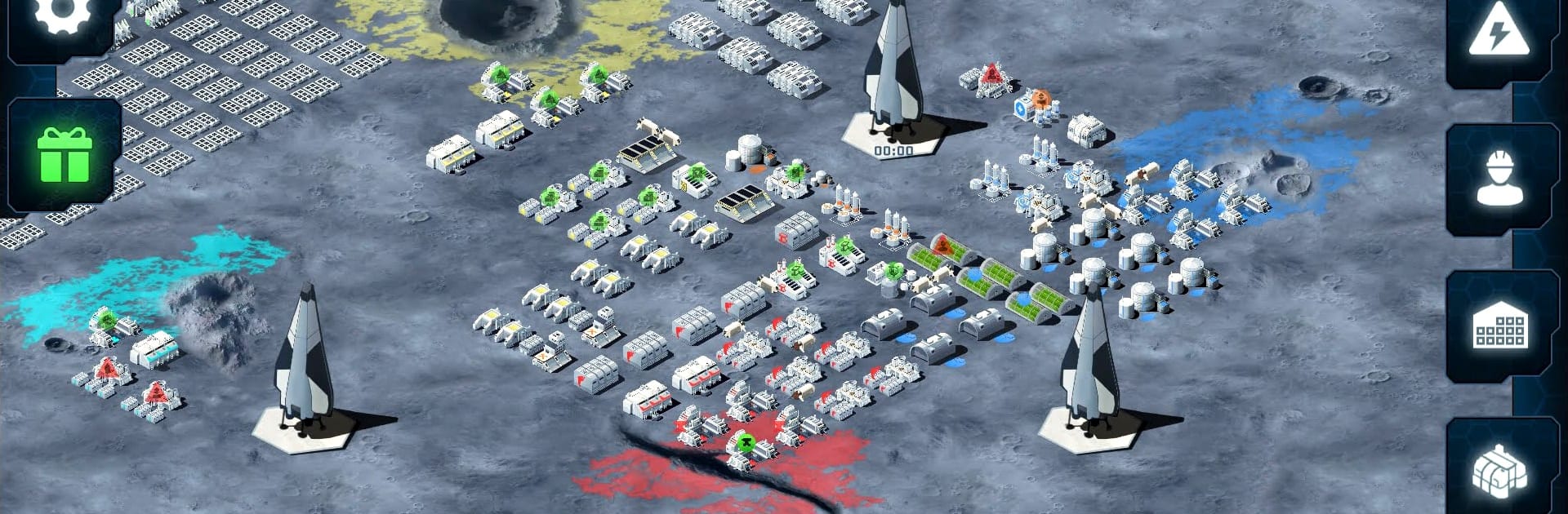
Pantenite Space Colony Sim plays like a chill but thoughtful city builder set in space, where every building and pipe feels connected to a bigger machine. The player lays out solar arrays and power plants, sets up batteries so the lights do not die at night, then chains mines into refineries into factories so resources keep flowing. Water, food, and oxygen are not background stats, they are lifelines that spike and dip if production is out of sync, so it becomes a gentle juggling act of storage capacity, power draw, and worker needs. One minute it is placing a greenhouse in just the right spot, the next it is realizing the oxygen generators are starving because the hydrogen storage is full, and suddenly a new pipeline or extra scrubber becomes the plan for the day. It has that satisfying loop of planning a small fix, locking in a new building, and watching the graphs settle.

There is a light business layer too, since the whole operation is built around mining and selling pantenite, which pushes the player to balance expansion with survival. Technology buildings unlock better infrastructure, clinics keep people alive, and arc reactors change how the grid behaves, so the colony grows from tents to a proper space city without feeling rushed. Running it on PC through BlueStacks makes dragging layouts and tweaking production lines feel clean with a mouse, which suits the more methodical pacing. No flashy battles, just solid systems, tidy menus, and that steady hum of a colony that finally runs on its own, until it doesn not and the power graph nosedives again.

Slay your opponents with your epic moves. Play it your way on BlueStacks and dominate the battlefield.


Game Features

Enhancements

  • Macros
  • Multi Instance
  • Multi Instance Sync
  • Eco Mode
  • Enhancements
Macros

Macros

Skip the boring parts of a game. Play Pantenite Space Colony Sim with Macros and get the edge. Simply record a sequence of commands and execute them at any moment.
Multi Instance

Multi Instance

Why limit to one game on your phone when you can play many on your PC? Open multiple instances of Pantenite Space Colony Sim at once with Multi-Instance. Leverage the power of different accounts by doing more.
Multi Instance Sync

Multi Instance Sync

Get the best out of Pantenite Space Colony Sim with Multi-Instance Sync. Play the game from different accounts and build your own empire. Use Multi-instance sync to repeat the action in the main BlueStacks instance on all other instances.
Eco Mode

Eco Mode

Find the rarest heroes by making multiple summons in Pantenite Space Colony Sim. And while you are at it, reduce your PC’s resource consumption with the Eco Mode. Farm efficiently. Get the best results.
Read More

How to Download and Play Pantenite Space Colony Sim on PC or Mac

  • Download and install BlueStacks on your PC or Mac

  • Complete Google sign-in to access the Play Store, or do it later

  • Look for Pantenite Space Colony Sim in the search bar at the top right corner

  • Click to install Pantenite Space Colony Sim from the search results

  • Complete Google sign-in (if you skipped step 2) to install Pantenite Space Colony Sim

  • Click the Pantenite Space Colony Sim icon on the home screen to start playing

video
Watch Video

Minimum System Requirements

With BlueStacks 5, you can get started on a PC that fulfills the following requirements.

  • Operating System

    Microsoft Windows 7 or above, macOS 11 (Big Sur) or above

  • Processor

    Intel, AMD or Apple Silicon Processor

  • RAM

    at least 4GB

  • HDD

    10GB Free Disk Space

Note:

* You must be an Administrator on your PC. Up to date graphics drivers from Microsoft or the chipset vendor.

Pantenite Space Colony Sim - FAQs

  • How to play Pantenite Space Colony Sim on Windows PC & Mac?

    Play Pantenite Space Colony Sim on your PC or Mac by following these simple steps.

    • Click on 'Play Pantenite Space Colony Sim on PC’ to download BlueStacks
    • Install it and log-in to Google Play Store
    • Launch and play the game.
  • Why is BlueStacks the fastest and safest platform to play games on PC?

    BlueStacks respects your privacy and is always safe and secure to use. It does not carry any malware, spyware, or any sort of additional software that could harm your PC.

    It is engineered to optimize speed and performance for a seamless gaming experience.

  • What are Pantenite Space Colony Sim PC requirements?

    Minimum requirement to run Pantenite Space Colony Sim on your PC

    • OS: Microsoft Windows 7 or above MacOS 11 (Big Sur) or above
    • Processor: Intel, AMD or Apple Silicon Processor
    • RAM: Your PC must have at least 4GB of RAM. (Note that having 4GB or more disk space is not a substitute for RAM)
    • HDD: 10GB Free Disk Space.
    • You must be an Administrator on your PC.