Pocket Hockey Stars
Pocket Hockey Stars

Pocket Hockey Stars

Sports

| Gold Town Games AB

Play on PC with BlueStacks or from our cloud

  • Overview
  • Game Features
  • How to Play

Page Modified On: July 06, 2026

Play Pocket Hockey Stars on PC or Mac

Play Pocket Hockey Stars by Gold Town Games AB on PC or Mac with BlueStacks. Use a bigger screen, mouse and keyboard controls, and smoother performance while you play.

About the Game

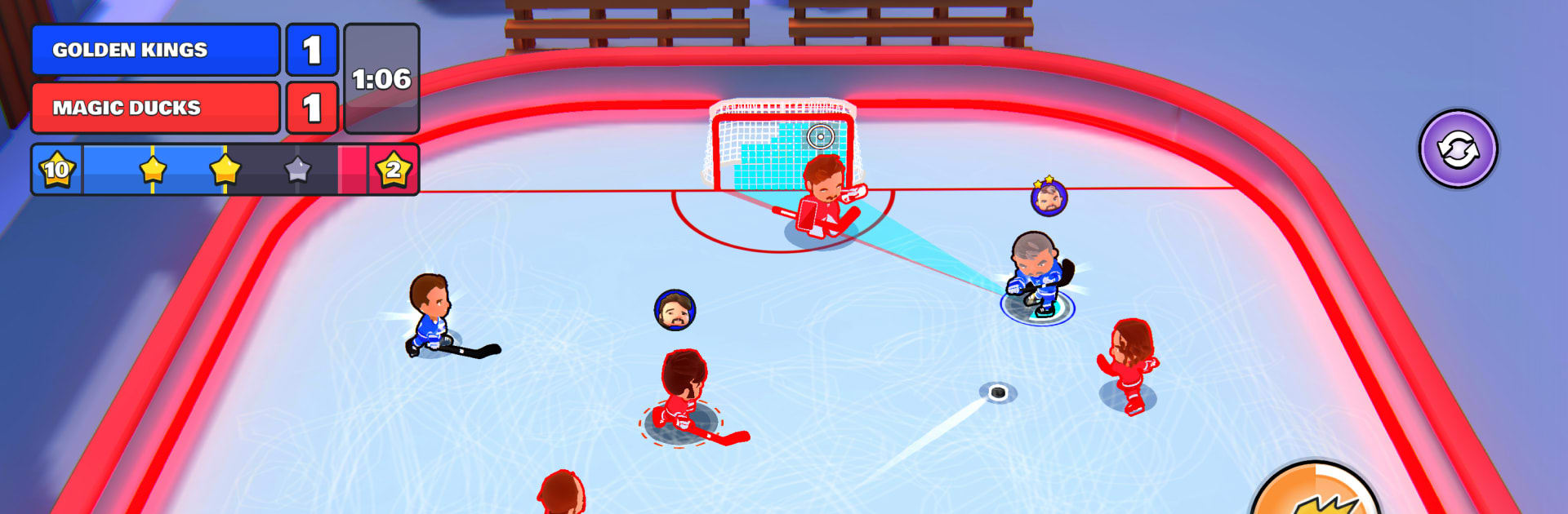
Pocket Hockey Stars puts quick, chaotic hockey right in your pocket. It’s 3-on-3, real-time action where slick passes, clutch saves, and perfectly timed checks can flip a match in seconds. Want a bigger view of the rink? It runs smoothly on BlueStacks if you’d rather play on your PC.

Game Features

  • Fast 3v3 Showdowns: Jump into brisk, live matches against real opponents. Every touch of the puck matters—thread the needle with a pass, hammer a slapshot, or shut it down with a clean stop.
  • Build Your Squad: Collect distinct skaters and goalies with unique traits, then piece together a lineup that fits how you like to play—speed, finesse, brute force, or a little of everything.
  • Upgrades That Count: Strengthen your players, sharpen signature abilities, and tune your team so you can handle tougher competition without breaking a sweat.
  • Pick-Up Fun, Real Depth: It’s easy to get moving and score, but smart positioning, timing, and teamwork separate a good run from a highlight reel.
  • New Rinks and Challenges: Unlock fresh arenas with their own vibe and take on varied PvP modes. Push forward and snag rewards as you go.
  • Friends = Instant Rivalry: Host matches with buddies and see who owns the ice. It’s quick to set up and even quicker to talk smack afterward.
  • Made for Short Sessions: Matches are designed to fit a break, yet still deliver big, momentum-swinging moments that keep you coming back.

Start your journey now. Download the game on BlueStacks, invite your friends, and march on a new adventure.


Game Features

Enhancements

  • Macros
  • Multi Instance
  • Multi Instance Sync
  • Script
  • Enhancements
Macros

Macros

Automate the predictable in Pocket Hockey Stars and transform your gameplay with Macros. Get access to inventive Macros in the BlueStacks Macro Community
Multi Instance

Multi Instance

Play Pocket Hockey Stars on one window. And chat with your friend on the other. Press CTRL + Shift + 8 to open the Multi-Instance Manager. And start creating fresh instances or clone an existing one.
Multi Instance Sync

Multi Instance Sync

Play Pocket Hockey Stars with the power of Multi-Instance Sync. Replicate what you are doing on the main instance on all other instances. Level up faster, play more.
Script

Script

Script your way to gaming glory in Pocket Hockey Stars with BlueStacks Script. Write and run a set of commands to automate repeated tasks. Trigger the command by assigning it to any key.
Read More

How to Download and Play Pocket Hockey Stars on PC or Mac

  • Download and install BlueStacks on your PC or Mac

  • Complete Google sign-in to access the Play Store, or do it later

  • Look for Pocket Hockey Stars in the search bar at the top right corner

  • Click to install Pocket Hockey Stars from the search results

  • Complete Google sign-in (if you skipped step 2) to install Pocket Hockey Stars

  • Click the Pocket Hockey Stars icon on the home screen to start playing

video
Watch Video

Minimum System Requirements

With BlueStacks 5, you can get started on a PC that fulfills the following requirements.

  • Operating System

    Microsoft Windows 7 or above, macOS 11 (Big Sur) or above

  • Processor

    Intel, AMD or Apple Silicon Processor

  • RAM

    at least 4GB

  • HDD

    10GB Free Disk Space

Note:

* You must be an Administrator on your PC. Up to date graphics drivers from Microsoft or the chipset vendor.

Pocket Hockey Stars - FAQs

  • How to play Pocket Hockey Stars on Windows PC & Mac?

    Play Pocket Hockey Stars on your PC or Mac by following these simple steps.

    • Click on 'Play Pocket Hockey Stars on PC’ to download BlueStacks
    • Install it and log-in to Google Play Store
    • Launch and play the game.
  • Why is BlueStacks the fastest and safest platform to play games on PC?

    BlueStacks respects your privacy and is always safe and secure to use. It does not carry any malware, spyware, or any sort of additional software that could harm your PC.

    It is engineered to optimize speed and performance for a seamless gaming experience.

  • What are Pocket Hockey Stars PC requirements?

    Minimum requirement to run Pocket Hockey Stars on your PC

    • OS: Microsoft Windows 7 or above MacOS 11 (Big Sur) or above
    • Processor: Intel, AMD or Apple Silicon Processor
    • RAM: Your PC must have at least 4GB of RAM. (Note that having 4GB or more disk space is not a substitute for RAM)
    • HDD: 10GB Free Disk Space.
    • You must be an Administrator on your PC.