Age of History 2: Definitive

Age of History 2: Definitive

Strategy

| Łukasz Jakowski

Play on PC with BlueStacks or from our cloud

  • Overview
  • Game Features
  • How to Play

Page Modified On: June 09, 2026

Play Age of History 2: Definitive on PC or Mac

Explore a whole new adventure with Age of History 2: Definitive, a Strategy game created by Łukasz Jakowski. Experience great gameplay with BlueStacks, the most popular gaming platform to play Android games on your PC or Mac.

About the Game

Age of History 2: Definitive is a sweeping Strategy sandbox where you take a nation from the earliest civilizations to far-future frontiers. Plot, bargain, and battle your way across a gigantic map as borders shift, alliances wobble, and empires rise or fall. Prefer playing on a big screen? It feels great on BlueStacks with crisp controls and smooth pacing.

Game Features

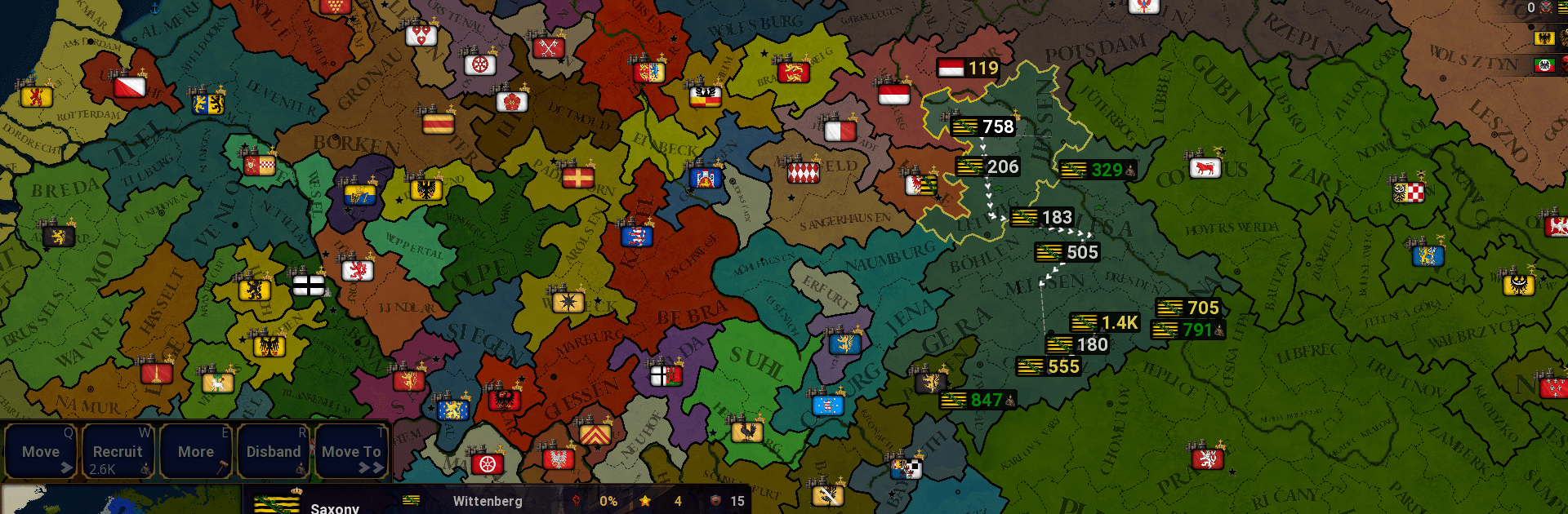
  • Vast World, Fine Detail: Command your people across a massive map packed with 13,892 provinces, clearer borders, and province names shown right on the map for easy reading.
  • From Stone Tools to Space Age: Lead any civilization through centuries, tackling unique terrain, diverse populations, and evolving challenges that change with the era.
  • Deep, Flexible Diplomacy: Enforce peace, intervene or join wars, host summits, spread propaganda, recruit mercenaries, impose sanctions, share technology, and more.
  • Vassals, Unions, and Influence: Ask to become a vassal, transfer vassals, propose unions, relocate populations, request loans, offer debt relief, and even found new cities.
  • Military on Your Terms: Toggle AI army control, regroup all forces with a click, send volunteer troops abroad, provoke rebels strategically, and enjoy faster recruitment and movement.
  • Build at Scale: Invest, construct, or assimilate across many provinces at once using handy mass actions; also invest and build in foreign lands to project soft power.
  • Power Plays and Wonders: Pursue new government types, discover world wonders, and—if you dare—unlock atomic weapons to reshape the balance.
  • Smarter AI, Clearer Feedback: Improved behavior, better notifications, and quality-of-life tweaks help you read the board and react quickly.
  • Hotseat Multiplayer: Pass the device and face off or cooperate locally with as many players as there are civilizations.
  • Creator’s Toolkit: Craft your own history with robust editors—build maps and provinces, set growth rates and terrain, design flags and civilizations, define alliances, continents, and custom diplomacy colors.

Start playing Age of History 2: Definitive on BlueStacks and get a smoother, more comfortable PC or Mac setup.


Game Features

Enhancements

  • Macros
  • Multi Instance
  • Multi Instance Sync
  • Eco Mode
  • Enhancements
Macros

Macros

Skip the boring parts of a game. Play Age of History 2: Definitive with Macros and get the edge. Simply record a sequence of commands and execute them at any moment.
Multi Instance

Multi Instance

Why limit to one game on your phone when you can play many on your PC? Open multiple instances of Age of History 2: Definitive at once with Multi-Instance. Leverage the power of different accounts by doing more.
Multi Instance Sync

Multi Instance Sync

Get the best out of Age of History 2: Definitive with Multi-Instance Sync. Play the game from different accounts and build your own empire. Use Multi-instance sync to repeat the action in the main BlueStacks instance on all other instances.
Eco Mode

Eco Mode

Find the rarest heroes by making multiple summons in Age of History 2: Definitive. And while you are at it, reduce your PC’s resource consumption with the Eco Mode. Farm efficiently. Get the best results.
Read More

How to Download and Play Age of History 2: Definitive on PC or Mac

  • Download and install BlueStacks on your PC or Mac

  • Complete Google sign-in to access the Play Store, or do it later

  • Look for Age of History 2: Definitive in the search bar at the top right corner

  • Click to install Age of History 2: Definitive from the search results

  • Complete Google sign-in (if you skipped step 2) to install Age of History 2: Definitive

  • Click the Age of History 2: Definitive icon on the home screen to start playing

video
Watch Video

Minimum System Requirements

With BlueStacks 5, you can get started on a PC that fulfills the following requirements.

  • Operating System

    Microsoft Windows 7 or above, macOS 11 (Big Sur) or above

  • Processor

    Intel, AMD or Apple Silicon Processor

  • RAM

    at least 4GB

  • HDD

    10GB Free Disk Space

Note:

* You must be an Administrator on your PC. Up to date graphics drivers from Microsoft or the chipset vendor.

Age of History 2: Definitive - FAQs

  • How to play Age of History 2: Definitive on Windows PC & Mac?

    Play Age of History 2: Definitive on your PC or Mac by following these simple steps.

    • Click on 'Play Age of History 2: Definitive on PC’ to download BlueStacks
    • Install it and log-in to Google Play Store
    • Launch and play the game.
  • Why is BlueStacks the fastest and safest platform to play games on PC?

    BlueStacks respects your privacy and is always safe and secure to use. It does not carry any malware, spyware, or any sort of additional software that could harm your PC.

    It is engineered to optimize speed and performance for a seamless gaming experience.

  • What are Age of History 2: Definitive PC requirements?

    Minimum requirement to run Age of History 2: Definitive on your PC

    • OS: Microsoft Windows 7 or above MacOS 11 (Big Sur) or above
    • Processor: Intel, AMD or Apple Silicon Processor
    • RAM: Your PC must have at least 4GB of RAM. (Note that having 4GB or more disk space is not a substitute for RAM)
    • HDD: 10GB Free Disk Space.
    • You must be an Administrator on your PC.