Age of History 3
Age of History 3

Age of History 3

Strategy

| Łukasz Jakowski

Play on PC with BlueStacks or from our cloud

  • Overview
  • Game Features
  • How to Play

Page Modified On: April 07, 2026

Play Age of History 3 on PC or Mac

Age of History 3 brings the Strategy genre to life, and throws up exciting challenges for gamers. Developed by Łukasz Jakowski, this Android game is best experienced on BlueStacks, the World’s #1 app player for PC and Mac users.

About the Game

Age of History 3 is a sweeping Strategy sandbox about guiding a civilization from stone tools to tomorrow’s tech. You pick the nation—towering empire or humble tribe—and steer it through growth, conflict, and tough trade-offs. From Łukasz Jakowski, it leans hard into planning, research, and smart battlefield decisions.

Game Features

  • Spans the ages: Lead your Civilization from early human history to speculative futures, watching your choices ripple across centuries.
  • Research that actually matters: Climb a tech tree to unlock stronger buildings and units, opening fresh strategies as your society advances.
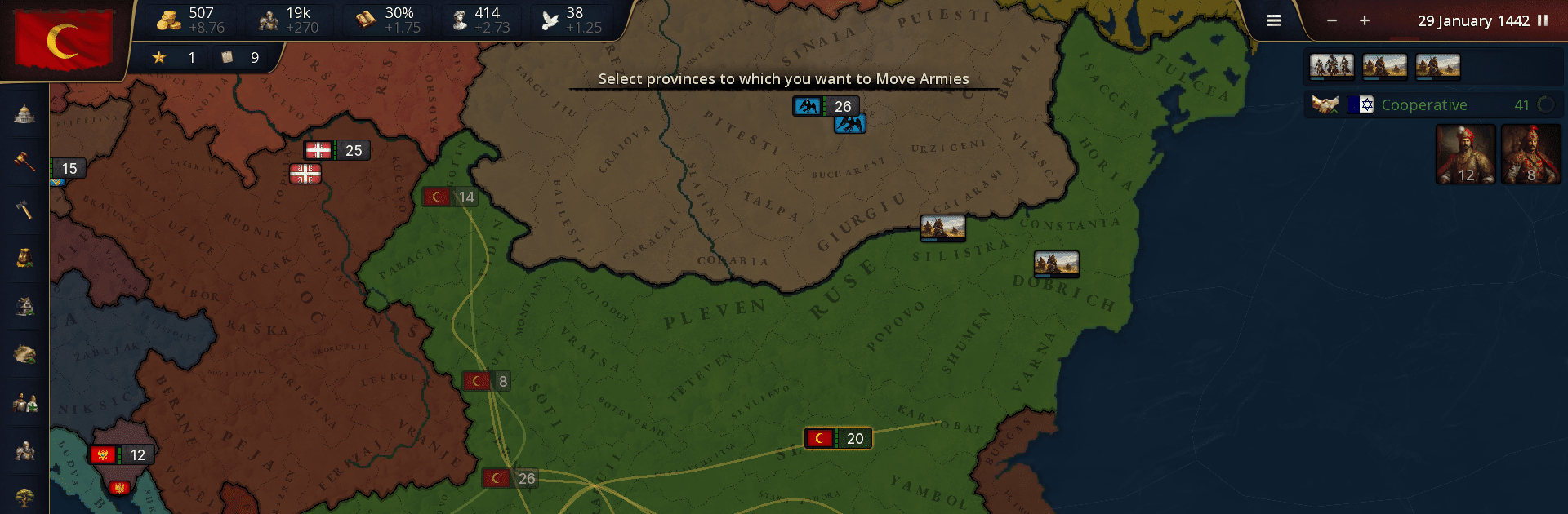
  • Build your battle lines: Assign hardy units to the front for brutal clashes, and keep support, ranged, or specialist troops in the second line to shape the fight.
  • 63+ distinct unit types: Mix and match an extensive roster to craft custom army compositions tailored to your goals and playstyle.
  • Day-by-day combat flow: Battles progress in daily ticks—front lines trade blows, support units fire if they’re in range, and results can trigger casualties, retreats, and morale swings.
  • Manpower as a war engine: Your pool of eligible recruits fuels new armies and reinforcements. It replenishes over time, so planning campaigns around current and future reserves is essential.
  • Tactics over brute force: Positioning, timing, and who you put up front versus who you keep in reserve can turn a close call into a decisive win.
  • Play comfortably: Prefer a bigger screen and precise controls? Running it on BlueStacks feels right at home without changing how the game plays.

Ready to top the leaderboard? We bet you do. Let precise controls and sharp visuals optimized on BlueStacks lead you to victory.


Game Features

Enhancements

  • Macros
  • Multi Instance
  • Multi Instance Sync
  • Eco Mode
  • Enhancements
Macros

Macros

Skip the boring parts of a game. Play Age of History 3 with Macros and get the edge. Simply record a sequence of commands and execute them at any moment.
Multi Instance

Multi Instance

Why limit to one game on your phone when you can play many on your PC? Open multiple instances of Age of History 3 at once with Multi-Instance. Leverage the power of different accounts by doing more.
Multi Instance Sync

Multi Instance Sync

Get the best out of Age of History 3 with Multi-Instance Sync. Play the game from different accounts and build your own empire. Use Multi-instance sync to repeat the action in the main BlueStacks instance on all other instances.
Eco Mode

Eco Mode

Find the rarest heroes by making multiple summons in Age of History 3. And while you are at it, reduce your PC’s resource consumption with the Eco Mode. Farm efficiently. Get the best results.
Read More

How to Download and Play Age of History 3 on PC or Mac

  • Download and install BlueStacks on your PC or Mac

  • Complete Google sign-in to access the Play Store, or do it later

  • Look for Age of History 3 in the search bar at the top right corner

  • Click to install Age of History 3 from the search results

  • Complete Google sign-in (if you skipped step 2) to install Age of History 3

  • Click the Age of History 3 icon on the home screen to start playing

video
Watch Video

Minimum System Requirements

With BlueStacks 5, you can get started on a PC that fulfills the following requirements.

  • Operating System

    Microsoft Windows 7 or above, macOS 11 (Big Sur) or above

  • Processor

    Intel, AMD or Apple Silicon Processor

  • RAM

    at least 4GB

  • HDD

    10GB Free Disk Space

Note:

* You must be an Administrator on your PC. Up to date graphics drivers from Microsoft or the chipset vendor.

Age of History 3 - FAQs

  • How to play Age of History 3 on Windows PC & Mac?

    Play Age of History 3 on your PC or Mac by following these simple steps.

    • Click on 'Play Age of History 3 on PC’ to download BlueStacks
    • Install it and log-in to Google Play Store
    • Launch and play the game.
  • Why is BlueStacks the fastest and safest platform to play games on PC?

    BlueStacks respects your privacy and is always safe and secure to use. It does not carry any malware, spyware, or any sort of additional software that could harm your PC.

    It is engineered to optimize speed and performance for a seamless gaming experience.

  • What are Age of History 3 PC requirements?

    Minimum requirement to run Age of History 3 on your PC

    • OS: Microsoft Windows 7 or above MacOS 11 (Big Sur) or above
    • Processor: Intel, AMD or Apple Silicon Processor
    • RAM: Your PC must have at least 4GB of RAM. (Note that having 4GB or more disk space is not a substitute for RAM)
    • HDD: 10GB Free Disk Space.
    • You must be an Administrator on your PC.