Don't Starve Together

Don't Starve Together

Adventure

| Playdigious

Play on PC with BlueStacks or from our cloud

Click here to Pre-Register for Don't Starve Together
  • Overview
  • Features
  • How to Play

Page Modified On: June 18, 2026

Play Don't Starve Together on PC or Mac

Step into the World of Don’t Starve Together, a thrilling Adventure game from the house of Playdigious. Play this Android game on BlueStacks App Player and experience immersive gaming on PC or Mac.

About the Game

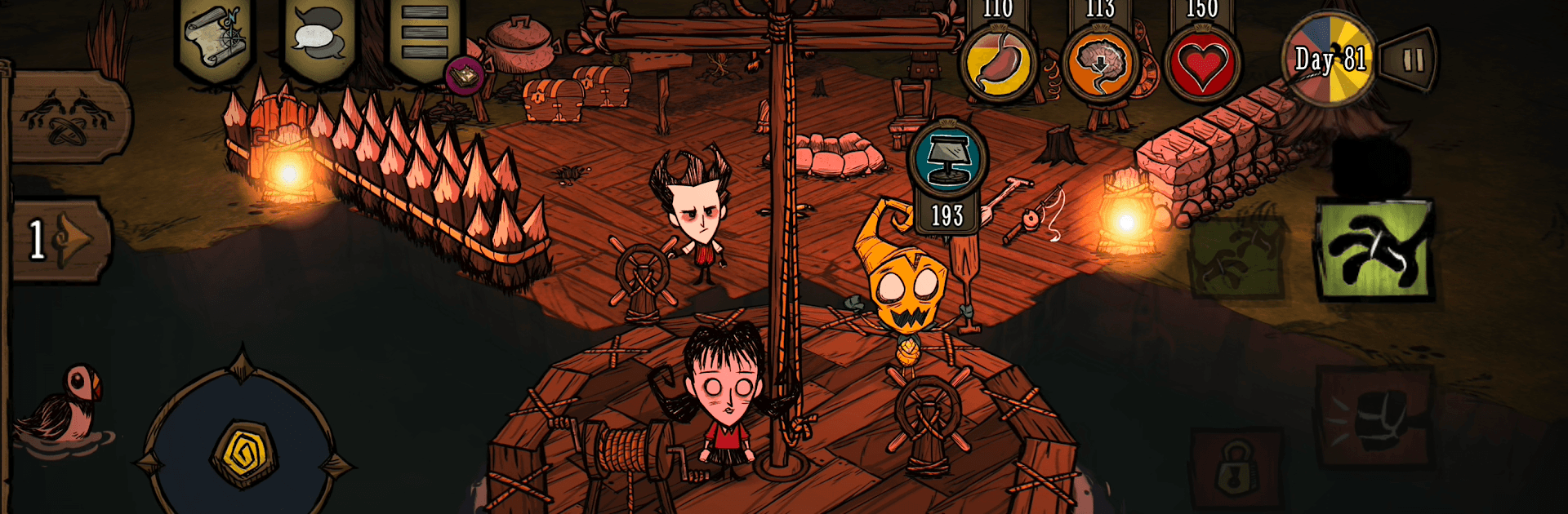
Don’t Starve Together is a cooperative survival Adventure where a cute-but-cruel wilderness keeps you guessing. You’ll gather, craft, and scheme your way through long nights and weirder days while deciding if you’re safer with friends or better off alone. Want a bigger view of the chaos sometimes? It also plays comfortably on BlueStacks.

Game Features

  • Shared survival: Host a private world for your crew or jump into public games and team up with new allies. Going solo is still an option—just expect the world to bite back.
  • Cast with quirks: Pick from a roster of characters, each with their own perks, drawbacks, and personalities that nudge you toward different playstyles.
  • Build, farm, and fight: Put down a camp, grow crops, hunt for dinner, and craft tools, armor, and light sources to push farther into the wilds.
  • Sanity matters: Night, darkness, and stress wear you down. Keep your mind in check with light, comfort, and smart planning—or face things that shouldn’t be real.
  • Seasons and surprises: Shifting weather, roaming creatures, and towering bosses keep every in-game year tense and unpredictable.
  • Tune the rules: Customize world settings to make it gentler, harsher, or just plain odd. Change resource rates, enemy behavior, and more to shape your ideal challenge.
  • The Constant’s secrets: Explore eerie biomes, poke at strange machines, and piece together fragments of a bigger mystery lurking just off-screen.
  • Look good, stay weird: Unlock cosmetic items and dress your favorites to match your vibe. Style doesn’t keep you warm, but it sure feels right. (In-app purchases available)
  • Built for mobile: Clean touch controls and a refreshed interface make crafting and combat feel natural on the go.
  • Progress that travels: Cloud saves keep your worlds synced across Android devices, and Google Play Games achievements mark your milestones.
  • Controller-ready: Prefer buttons and sticks? Plug in a controller and get right to surviving.

BlueStacks gives you more room to focus on the game and less time adjusting around mobile limitations.


Features

  • Macros

    Automate the predictable in Don't Starve Together and transform your gameplay with Macros. Get access to inventive Macros in the BlueStacks Macro Community

  • Multi Instance

    Play Don't Starve Together on one window. And chat with your friend on the other. Press CTRL + Shift + 8 to open the Multi-Instance Manager. And start creating fresh instances or clone an existing one.

  • Multi Instance Sync

    Play Don't Starve Together with the power of Multi-Instance Sync. Replicate what you are doing on the main instance on all other instances. Level up faster, play more.

  • Script

    Script your way to gaming glory in Don't Starve Together with BlueStacks Script. Write and run a set of commands to automate repeated tasks. Trigger the command by assigning it to any key.

How to Download and Play Don't Starve Together on PC or Mac

  • Download and install BlueStacks on your PC or Mac

  • Complete Google sign-in to access the Play Store, or do it later

  • Look for Don't Starve Together in the search bar at the top right corner

  • Click to install Don't Starve Together from the search results

  • Complete Google sign-in (if you skipped step 2) to install Don't Starve Together

  • Click the Don't Starve Together icon on the home screen to start playing

video
Watch Video

Minimum System Requirements

With BlueStacks 5, you can get started on a PC that fulfills the following requirements.

  • Operating System

    Microsoft Windows 7 or above, macOS 11 (Big Sur) or above

  • Processor

    Intel, AMD or Apple Silicon Processor

  • RAM

    at least 4GB

  • HDD

    10GB Free Disk Space

Note:

* You must be an Administrator on your PC. Up to date graphics drivers from Microsoft or the chipset vendor.

Exclusive Gaming Content. And More.

Get the latest updates on the BlueStacks Blog.

See More
Don't Starve Together

Be among the first to play Don't Starve Together on PC

Get notified when the Game launches

Don't Starve Together - FAQs

  • How to play Don't Starve Together on Windows PC & Mac?

    Play Don't Starve Together on your PC or Mac by following these simple steps.

    • Click on 'Play Don't Starve Together on PC’ to download BlueStacks
    • Install it and log-in to Google Play Store
    • Launch and play the game.
  • Why is BlueStacks the fastest and safest platform to play games on PC?

    BlueStacks respects your privacy and is always safe and secure to use. It does not carry any malware, spyware, or any sort of additional software that could harm your PC.

    It is engineered to optimize speed and performance for a seamless gaming experience.

  • What are Don't Starve Together PC requirements?

    Minimum requirement to run Don't Starve Together on your PC

    • OS: Microsoft Windows 7 or above MacOS 11 (Big Sur) or above
    • Processor: Intel, AMD or Apple Silicon Processor
    • RAM: Your PC must have at least 4GB of RAM. (Note that having 4GB or more disk space is not a substitute for RAM)
    • HDD: 10GB Free Disk Space.
    • You must be an Administrator on your PC.