Axis Balkan Campaign

Axis Balkan Campaign

Strategy

| Joni Nuutinen

Play on PC with BlueStacks or from our cloud

  • Overview
  • Game Features
  • How to Play

Page Modified On: August 03, 2026

Play Axis Balkan Campaign on PC or Mac

Axis Balkan Campaign by Joni Nuutinen has plenty to keep you busy. BlueStacks lets you play it on PC or Mac with more screen space, better control, and fewer mobile limits.

About the Game

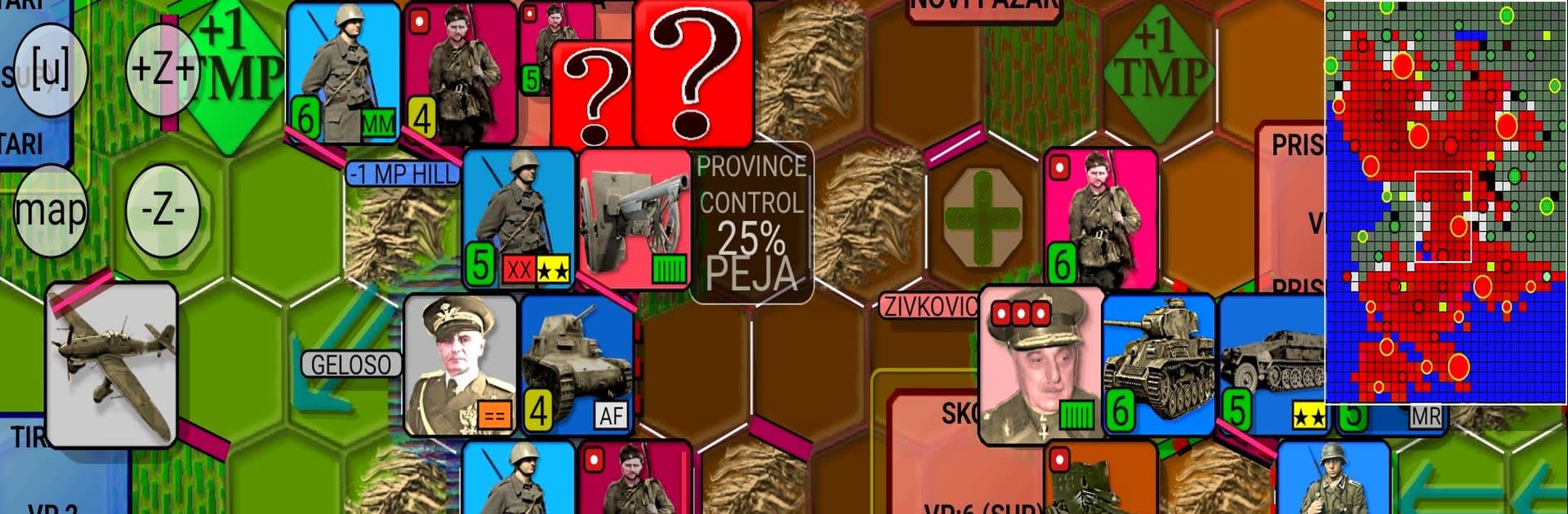
Axis Balkan Campaign is a Strategy wargame that drops you into the tense spring of 1941 across Yugoslavia and Greece. You’re juggling fast-moving German spearheads, Italian pushes from Albania, and Hungarian units stepping in later—while the clock is ticking. It feels like a classic board-game scenario brought to life, where sharp planning and a bit of nerve pay off.

Game Features

  • Multi-front offensive: Launch coordinated attacks from different directions, with German armor breaking through while Italian and Hungarian forces create new pressure points on the map.
  • Historically grounded campaign: Fight through the Yugoslav and Greek operations of 1941, shaped by the rush to stabilize the southern flank before wider plans in the East kick off.
  • Dynamic AI command: Opponents don’t just charge straight ahead; they weigh tactical skirmishes against broader goals, so priorities shift and each run plays out a little differently.
  • Race against time: Push for quick, decisive gains before reinforcements arrive for the defenders or strategic deadlines tighten around your planning.
  • Reinforcements with personality: Blend eager but uneven allied contingents with your main thrusts—timing when to commit fresh formations matters as much as where you send them.
  • Board-game feel, digital flow: If hexes, counters, and dice-era tactics are your thing, you’ll recognize the rhythm—without the table cleanup.
  • Play comfortably on PC: Prefer a bigger view and simple controls? BlueStacks lets you plan, pan, and plot your moves with more room to think.

Start playing Axis Balkan Campaign on BlueStacks and get a smoother, more comfortable PC or Mac setup.


Game Features

Enhancements

  • Macros
  • Multi Instance
  • Multi Instance Sync
  • Eco Mode
  • Enhancements
Macros

Macros

Skip the boring parts of a game. Play Axis Balkan Campaign with Macros and get the edge. Simply record a sequence of commands and execute them at any moment.
Multi Instance

Multi Instance

Why limit to one game on your phone when you can play many on your PC? Open multiple instances of Axis Balkan Campaign at once with Multi-Instance. Leverage the power of different accounts by doing more.
Multi Instance Sync

Multi Instance Sync

Get the best out of Axis Balkan Campaign with Multi-Instance Sync. Play the game from different accounts and build your own empire. Use Multi-instance sync to repeat the action in the main BlueStacks instance on all other instances.
Eco Mode

Eco Mode

Find the rarest heroes by making multiple summons in Axis Balkan Campaign. And while you are at it, reduce your PC’s resource consumption with the Eco Mode. Farm efficiently. Get the best results.
Read More

How to Download and Play Axis Balkan Campaign on PC or Mac

  • Download and install BlueStacks on your PC or Mac

  • Complete Google sign-in to access the Play Store, or do it later

  • Look for Axis Balkan Campaign in the search bar at the top right corner

  • Click to install Axis Balkan Campaign from the search results

  • Complete Google sign-in (if you skipped step 2) to install Axis Balkan Campaign

  • Click the Axis Balkan Campaign icon on the home screen to start playing

video
Watch Video

Minimum System Requirements

With BlueStacks 5, you can get started on a PC that fulfills the following requirements.

  • Operating System

    Microsoft Windows 7 or above, macOS 11 (Big Sur) or above

  • Processor

    Intel, AMD or Apple Silicon Processor

  • RAM

    at least 4GB

  • HDD

    10GB Free Disk Space

Note:

* You must be an Administrator on your PC. Up to date graphics drivers from Microsoft or the chipset vendor.

Axis Balkan Campaign - FAQs

  • How to play Axis Balkan Campaign on Windows PC & Mac?

    Play Axis Balkan Campaign on your PC or Mac by following these simple steps.

    • Click on 'Play Axis Balkan Campaign on PC’ to download BlueStacks
    • Install it and log-in to Google Play Store
    • Launch and play the game.
  • Why is BlueStacks the fastest and safest platform to play games on PC?

    BlueStacks respects your privacy and is always safe and secure to use. It does not carry any malware, spyware, or any sort of additional software that could harm your PC.

    It is engineered to optimize speed and performance for a seamless gaming experience.

  • What are Axis Balkan Campaign PC requirements?

    Minimum requirement to run Axis Balkan Campaign on your PC

    • OS: Microsoft Windows 7 or above MacOS 11 (Big Sur) or above
    • Processor: Intel, AMD or Apple Silicon Processor
    • RAM: Your PC must have at least 4GB of RAM. (Note that having 4GB or more disk space is not a substitute for RAM)
    • HDD: 10GB Free Disk Space.
    • You must be an Administrator on your PC.